I am at the end of week eight of my major project development. This leaves me with just three weeks remaining to finish my environment. I believe I will be able to complete this project on schedule and as such I am going to be sticking very closely to the final weeks of my project plan.
Entering the final four weeks of my project development.
Before I start next week I have been researching games that I feel have particularly strong environment design. Horizon Zero Dawn (2017) is game that features a post-apocalyptic world that is slowly being enveloped by nature. I love the juxtaposition of nature and technology and I think this has given the game incredibly strong visuals.
Horizon Zero Dawn trailer.
I place this game at the forefront of the industry because it offers a fully open world similar to the Legend of Zelda: Breath of the Wild (2017). Unlike Zelda however, this game has a far more realistic graphical style which makes the fact that it can display all those assets on screen at once very impressive.
I have been drawing inspiration from the Game's foliage and vegetation that is growing everywhere in the world and ensnaring old structures. I want my environment to have a similar feel, in that nature is beginning to take its course and overtake the mansion.
Over the next few weeks I am going to be experimenting with creating my own foliage and using it within Unreal Engine. I feel this is perhaps one of the most important elements that will be within my environment, as realistic feeling vegetation will make my project far more believable. I am making references of how Horizon Zero Dawn has used particular types of vegetation that I think will be effective in my scene. So far I am interested in creating ivy because I like how it conforms to the shape of buildings and isn't placed randomly.
GUERRILLA GAMES (2017) Horizon Zero Dawn. [DISC, DOWNLOAD] Playstation 4. San Mateo: Sony Interactive Entertainment.
PLAYSTATION (2015) Horizon Zero Dawn - E3 2015 Trailer | PS4. [Online Video]. June 15th.
Available from: https://www.youtube.com/watch?v=Fkg5UVTsKCE
[Accessed: 13/07/2018].
I've been thinking how I can best utilise every element of my environment so that the mise-en-scene feeds the player as much visual information about the story as possible. I have a large area of empty wall space that I think could be put to better use, so today I will be experimenting with ways in which I can make them more thematically appropriate.
Below you can see an image of how the walls look in the current version of the scene:
This is an image from my scene where the walls have no material applied to them.
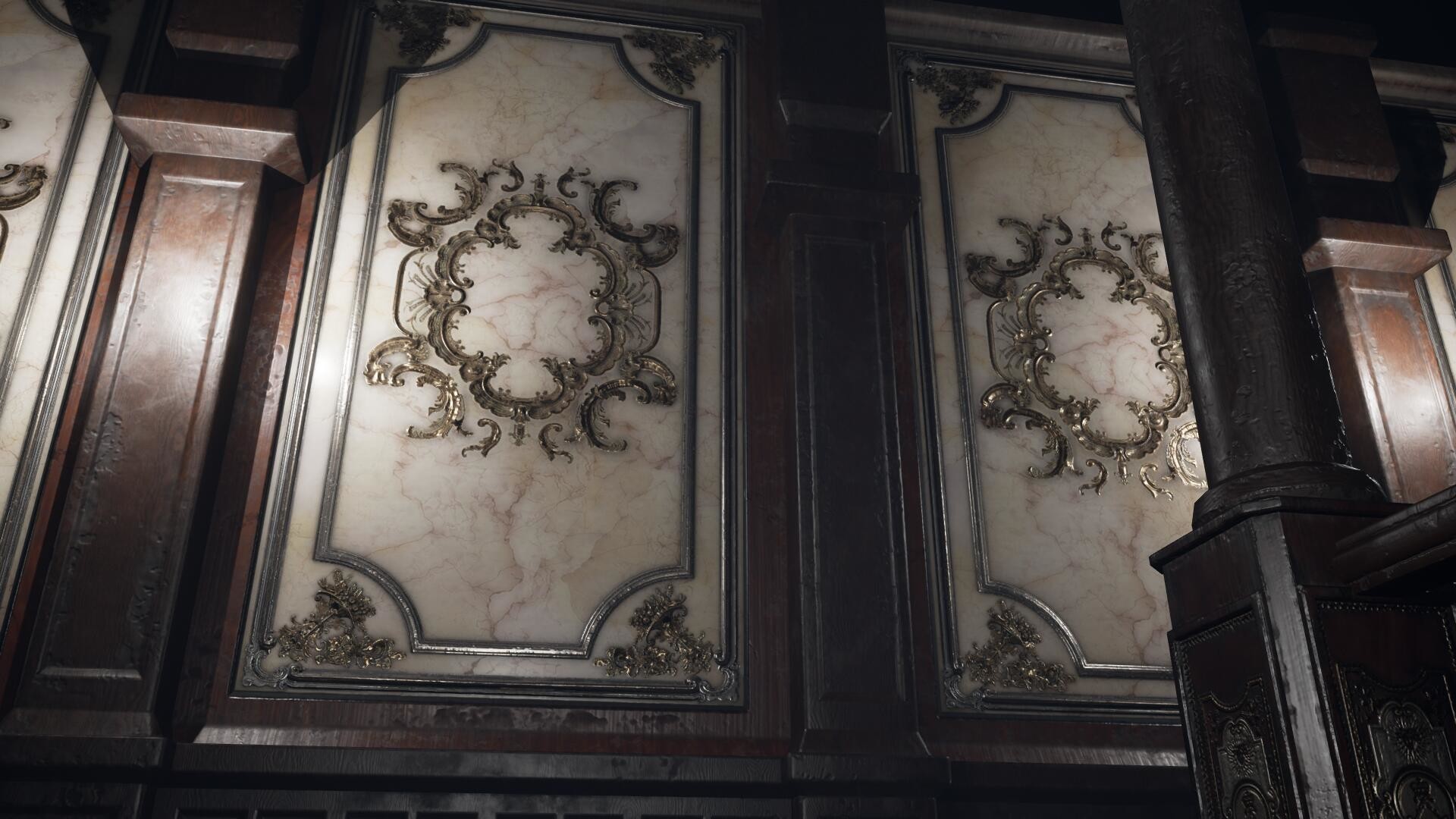
If you loaok at the walls carefully you can see an early pattern that I have modelled onto them. This is because I originally wanted to use a baroque pattern similar to B.O.W. Qin's work:
B.O.W. Qin's ornate wall panels.
Whilst I felt these looked nice, I didn't think using this element within my scene would be furthering my project goals which is to tell a story purely through visuals alone. I wanted to take this opportunity to show the level of decay the mansion has fallen into and didn't think using these patterns were the best way of doing that.
So deleting these, I have gone back into 3DS Max and created some new walls. I want to be able to give each segment of the wall it's own unique level of decay. I'm not sure what the best way to do this will be, but I know that I want to do this all within the material and not rely entirely on using decals in Unreal Engine. I can still choose to add them later on to further the level of decay on the walls, but I would rather be able to paint unique details in Substance Painter first so that I can make them less repetitive.
My new walls in 3DS Max. Each segment has been individually UV mapped with each one having its own material.
It is fortunate that I couldn't decide on the design of my walls sooner because it has led me to learning about Texture Sets within Substance Painter:
A video tutorial explaining texture sets within Substance Painter.
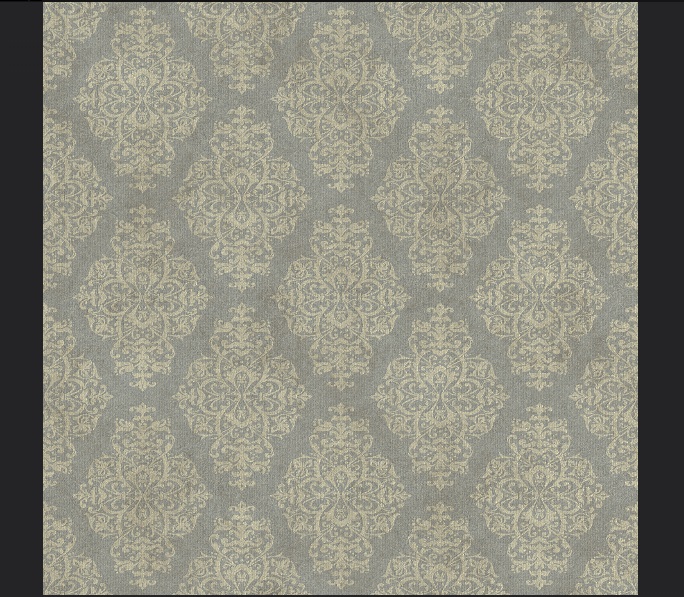
I have decided to use wallpaper to cover my walls. This is because I think wallpaper gives me a lot of room to get creative with the level of dereliction. I can make some strips of wallpaper peel off whilst others can be ripped. I think this will give me a nice mix of visuals and will push the "abandoned" vibe much more than if I had used the baroque pattern.
This is the wallpaper texture that I created in Substance Painter.
After watching the tutorial on how texture sets work, I found that I can load all of my different wall segments and paint them in on go within Substance Painter. I have made a wall paper
pattern and layered it up with varying levels of decay. When I begin
painting in Substance I will be able to create custom levels of
grime and dirt. See an example of this below:
I can paint on varying levels of decay to my wallpaper material. Some I will leave cracked, whilst others will be peeled off.
I have loaded all of my walls into the program. I had to copy my material layers from one set of materials to another in order for this to work. See the image below for what I mean:
Notice the layers tab in the top right of this image. I started by creating one material that I could paint details on to and when I was happy this looked good, I copied all of these layers into the other material slots. I have 8 materials in total.
I've had to copy each layer into a new material slot for this to work. Currently Substance doesn't let you paint them across all the elements within the scene, so I had to cycle between the material slots to paint on certain parts of the walls. Doing this has let me paint each wall segment with its own unique pattern.
So far I am really pleased with the look of these new walls and I feel they are going to be much stronger than what I originally had in mind. After this success I think I will see if there are other areas that I could perhaps make look more decayed.
A close up of the peeled wallpaper I have created in Substance Painter.
ALLEGORITHMIC (2015) Substance Painter Tutorial – Fundamentals 04: Texture Sets [Online Video]. August 13th.
Available from: https://www.youtube.com/watch?v=2NFXuFQYjvo [Accessed: 12/07/2018].
In this week's tutorial session I was shown a simple technique to get the most out of my texture creation process within Substance Painter. Using a 4086 x 4086 texture resolution in Substance instead of the default of 2048 x 2048 allows you to get a much cleaner result and avoid aliasing within texture maps. Once I am finished texturing in Substance, I can then save out the 4K resolution texture downscaled to 2048 to reduce the jagged aliasing on the texture map.
An example of an aliased image against one that has been anti-aliased.
I wish I had known to do this sooner as some or my older assets now have quite bad aliasing on them. I am going to be revisiting my armchair model in particular as you can see below some of the finer details are quite pixelated.
You can see some aliasing occurring on the metallic parts of the chair model.
Over the past few weeks I have been better acclimating myself with the concept of mise-en-scène. Whilst the expression is mainly used to describe the design aspects of a film production, I believe the visual storytelling philosophy covered by mise-en-scène is equally applicable to the realm of video games. I have been reading two books on the subject from different authors which I believe have helped focus the visual design of my major project.
The first book I read from author Jane Barnwell titled “Production Design for Screen: Visual Storytelling in Film and Television”, gave me an effective new methodology for evaluating the set design in films (although I intend to apply this methodology to the visual design of game environments). The author has separated the set designers work into five distinct areas of analysis, each of which is given its own chapter.
Below I have broken down the five categories from the book and extrapolated some questions from them that I can then ask myself to help evaluate the design of my environment. They are as follows:
Space – How have I used this to convey the size, scale and geography of the location to the player?
In and Out. (Or Interior and Exterior) – How does the look of the environment change between the exterior locations to the interiors scenes? Are they all lit in the same way? What are the boundaries of the interior, and do they constrain the player’s actions in any way and can you use this to create an emotion or atmosphere?
Light – What are the light sources and their position within the environment? Are they a certain colour and does this convey any character or story elements to the player? Have you used the light to illicit any emotions?
Colour – Have you chosen a specific colour palette and ask yourself what the intention of this was? What is the emotional colour of the scene? Have you used the colour red anywhere and if so, does it denote anything important?
Set Decoration – Has this been used to explain the character of the person who resides in this location? What period and style have you chosen and is it consistent with the story?
When asking myself these questions I can see some aspects that my environment design has excelled in and others that I have barely considered at all.
I believe so far my “set decoration” has done well in conveying the personality and character of the previous owner. I have populated the environment with ornate objects that speak of an older time when hand crafted objects were far more valued. The classical design of the furniture and main stairway emphasise the wealth of the mansions former occupant. I want to illicit a sense of intimidation as the player explores the mansion and I believe classical architecture does this well.
My use of colour on the other hand has been rather weak. I didn’t give much consideration to this aspect and the interior in particular feels much too washed out. I chose to keep my colour palette in line as much as I could with images of real abandoned homes that I have studied online, however this has resulted in a very plain looking scene. I would like to improve this element as well as my lighting, as it isn’t telling the player anything about the story. Originally I wanted the scene to be set at twilight as a visual metaphor for the sun setting over this once prosperous home, but I think this is an element that will need to be exaggerated. After all video games are a visual medium and they take on an almost “hyper-realism” where everything is a little more extreme than it is in real life.
The second book I read by Jean Whitehead titled “Creating Interior Atmosphere: Mise-en-scène and Interior Design”, highlighted to me the importance of taking advantage of my medium and using each element of mise-en-scène that I have control over to convey the story or message. Whitehead mentions that the use of distinctive visuals themselves can be the primary means in which a director conveys a story. In my case I would like to use the mise-en-scène to literally be the only method of storytelling in my game. Therefore I have decided to exaggerate the visuals of my abandoned mansion and really show off the state of ruin it has fallen into.
To do this I think I will need to add more debris and decay to all of my assets that populate the scene. I intend to study some other environments from games and analyse how they have used mise-en-scène to amplify the storytelling.
BARNWELL, J. (2017) Production Design for Screen: Visual Storytelling in Film and Television. New York: Bloomsbury Visual Arts.
WHITEHEAD, J. (2017) Creating Interior Atmosphere: Mise-en-scène and Interior Design. New York: Bloomsbury Visual Arts.
Level of Detail or LOD, is a method for simplifying the geometry of a mesh so that the game engine requires less resources to display it in-game. A common use of this is to display a large array of assets on screen at once without a severe hit to the games performance. The LOD will progressively raise or lower the detail of the assets relative to the player's proximity to them. If done effectively the reduced visual quality of the models will often go unnoticed. A noteworthy example of this would be the 2017 game The Legend of Zelda: The Breath of the Wild, in which a vast landscape is fully open for the player to explore.
The Legend of Zelda: Breath of the Wild (2017) uses LOD's to display the vast kingdom of Hyrule that loads in detail the closer the player gets.
Whilst I am certainly not creating anything near the scale of Hyrule, I acknowledge the importance of using Levels of Detail to boost a game's performance. I have several high poly assets that I want to reduce in size and decided to practice using LOD's on one of them. I selected my model of a Corinthian capital because it has about 10k triangles, making it a good specimen to experiment with.
My Corinthian capital model at about 10k tri's.
I had two options for creating LOD's for this model. I could either use 3DS Max and manually create lower resolution versions of the model, or I could use the in-built LOD feature within Unreal Engine. I chose to use Unreal Engine as I was able to provide a better representation of the technique in action, which you can see in the animation below:
Here you can see the result of applying different LOD's. Ideally they would be applied the further away from the camera they are, but to better illustrate my results I have manually toggled them on. Notice how drastically the triangle count drops in the top left of the screen per LOD.
I intend to apply LOD's to some of the higher density assets that I have in my scene. I think anything above 5K triangles that will be repeated en masse should have at least one LOD. As I am creating a smaller scale environment I can get away with not using LOD's on a lot of geometry. That being said, I intend to use LOD's to straight up halve the amount of triangles on some assets as the effect is almost unnoticeable from a distance. For the Corinthian capital I will limit the asset to two LOD's as the geometry starts to look very jagged from LOD 2 onwards.
Using LOD's in my environment is important to show that it is fit for purpose as a fully functional game environment within Unreal Engine.
NINTENDO. (2017) The Legend of Zelda: Breath of the Wild. [CARTRIDGE] Nintendo Switch. Kyoto: Nintendo
UNREAL ENGINE. (2018) Creating and Using LODs. [Online] Available from: https://docs.unrealengine.com/en-us/Engine/Content/Types/StaticMeshes/HowTo/LODs [Accessed: 9th July 2018]