Showing posts with label Wednesday. Show all posts

Wednesday, 8 August 2018

Week 12 - Wednesday: Rookies Results

This year I entered the annual Autodesk competition The Rookies. I was eager to see how my work would stack up against the competition from other schools and disciplines from across the creative field. I was surprised to be announced as a finalist for an internship at Cambridge based game studio Ninja Theory. Unfortunately I didn't win the internship which is a shame because I feel that if I had been able to include work from my major project I would have had a much better chance. In either case being a finalist was a great confidence boost to me as an environment artist. My final rank for my competition entry was a B, which means I have a lot of areas I can improve in.

My final rank for the competition.

I entered into the competition with six pieces of work, four of which recieved an award for excellence much to my surprise.

My work recieved four excellence awards.

Overall The Rookies has provided me with the perfect opportunity to compare myself with the talent now entering the industry. Some entrants had very impressive portfolios and I have identified areas where my work has fallen short. Right now my main concern is to create more pieces that demonstrate the skills I have acquired over the course of my Master’s degree. Because the competition ended before my course had finished, I wasn't able to include my most recent work which I feel is the strongest. Next year I would like to enter the competition again and see if I can hit that A rank!

The certificate I recieved via email.

This has been an excellent experience to take part in and I feel that I can use these accolades to bolster my CV as I continue to apply for work within the industry.

AUTODESK (2018) The Rookies - The highest honour for creative media & entertainment students. [Online] Available from: https://www.therookies.co/ [Accessed: 08/08/2018]

Wednesday, 1 August 2018

Week 11 - Wednesday: Tutorial and adding foliage to the interior

In todays tutorial, I received some feedback on my foliage decals. They were considered unrealistic and the details of on the surfaces projected by them were coming through underneath. Thankfully I was shown a much better way of creating realistic vines using planes to simulate leaves and parallax occlusion mapping to add a bit of depth.

I first went back to 3DS Max and created some planes that were mapped with a leaf texture. What you see in the images below are the leaf planes with their alpha masks displayed:

Two types of vines I created to put in my environment. One is a generic vine card that I can repeat throughout my scene and the other is a specific piece that I can use to hang over the balcony in the entrance hall.

For my leaf planes I have added some edge loops so that I can animate the leaves slightly in Unreal Engine. This also gives the leaves some better definition as curving the planes makes it easy to see the leaves from multiple angles in the engine.

A close up of my leaf planes with alpha masks displayed.

I used real geometry from the vine decal that I had created to help me align the leaves. Using the align spacing tool I was able to quickly create a spline path and then make my leaves follow it just as I had done with the pattern on my rug asset.

The leaves following the paths I created. The vine geometry will not be used in the engine only the leaves and the larger plane.

Below you can see the texture maps I created for the individual leaves:

The normal, albedo and alpha maps for the leaf.

When taken into Unreal Engine the vines look like this:

The vine model in Unreal Engine.

I have used my original alpha mask from the vine decal to cut out the plane. Using parallax occlusion mapping I was able to give some further depth to the cut out vine texture. The leaves are using their own material as you can see in the image above.

Below you can see the effect of all the vines clustered together in the scene:

Multiple vines placed together to create the ivy on the house.

I think these are looking much better than what I had before. Bringing some greenery into the interior is also going to help make the environment pop. In terms of my criteria for determining my colour palette, I think the inclusion of the colour green is going to emphasise that nature is slowly taking over the mansion.

Wednesday, 25 July 2018

Week 10 - Wednesday: Tutorial Session

Hofstadter's law is a self-referential time-related adage, coined by Douglas Hofstadter and named after him. Hofstadter's Law: "It always takes longer than you expect, even when you take into account Hofstadter's Law". In relation to my major project this means that even factoring in my additional contingency time on my schedule, certain tasks are going to run beyond my allotted time frames.

The last week of my project plan. Week eleven will be the last week I will spend on project development.

I am aiming to have all the development work of my major project complete by the end of week eleven. However factoring in Hofstadter's law, I have decided to spend the last week polishing what I already have in my environment as opposed to creating any new major assets.

During my tutorial session I was introduced to the concept of "triage" which is a medical term used to assign degrees of urgency towards patients with wounds or illnesses to decide the treatment order of a large number of patients or casualties. Whilst grim, the concept is quite helpful in determining what areas of my project I should spend my remaining time working on. I was demonstrated vividly that if something couldn't be salvaged then it was optimal to let it go and work on something that was achievable. With this in mind I will be aiming to perfect the debris and finish adding foliage to my environment. I have been using elements such as grass and trees from the Unreal Engine "Open World Demo" as these are high quality vegetation assets that have saved me a great deal of time that I haven't had to model myself.

As these foliage elements are not the focus of the environment and I am not gearing my portfolio toward naturalistic objects, I feel it will be acceptable to use them as window dressing to flesh out the mansion environment. Doing this should save me time and enable me to meet the deadline I have set myself for week eleven.

HOFSTADTER, D. (1979) Godel, Escher, Bach: An Eternal Golden Braid, 20th anniversary ed. New York: Basic Books.

Wednesday, 18 July 2018

Week 9 - Wednesday: Tutorial Session

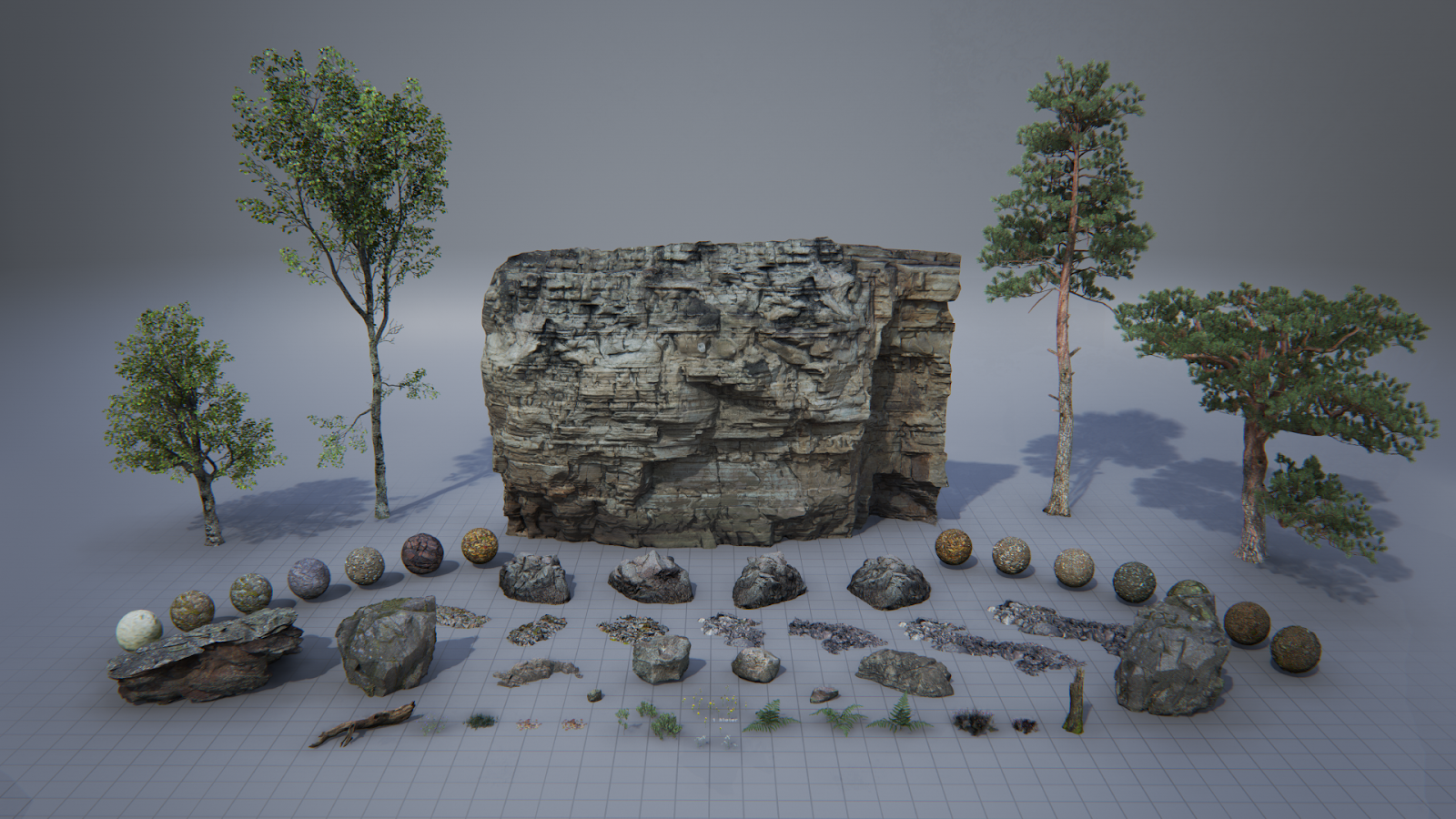
For this week's tutorial session I have been getting some help with adding foliage to my scene in Unreal Engine. Because I don't have the time to invest in creating my own trees, I was recommended to use some of the freely available assets on the Unreal Engine marketplace. I downloaded the Epic Games Open World Demo Collection (2015), which has given me access to a few tree assets as well as some grass. I have also been creating some custom vines that will be growing on the walls of the exterior.

 The vines I have created in 3DS Max.

I was introduced to the foliage brush within Unreal Engine and was shown how to apply lots of assets over a large surface area efficiently. I have begun painting the grass into my environment scene:

The exterior with the grass beginning to be painted in using the foliage brush.

One problem that I have noticed with using the foliage brush is that it treats all the objects that have been painted with it as one asset. Because there is so much grass in the scene the lightmap for this element is ridiculously huge. It was causing my light bake times to get very expensive so as a solution to this I have disabled shadow casting on the grass. This will make the grass look slightly less-realistic, however because there is so much of it in the scene the fact that each blade of grass isn't casting a shadow shouldn't be noticeable.

I am starting to place trees within the scene as well. I am hoping to create some nice long shadows across the environment to indicate the time of day and create some visual interest with the lighting, as currently it feels rather flat.

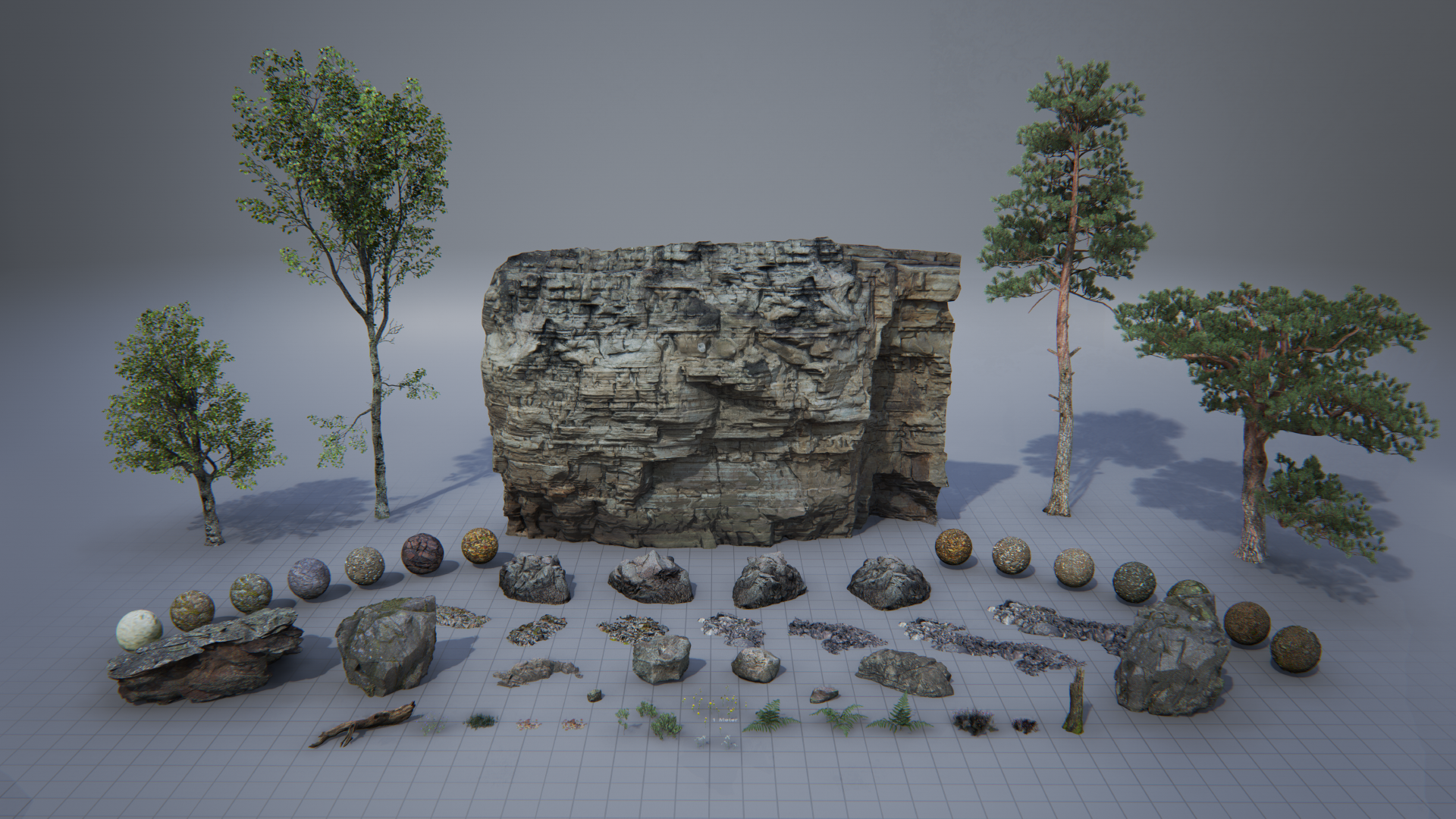
The asset pack I am using contains 4 types of tree, several rocks and smaller vegetation like grass. Each asset comes with its own materials.

EPIC GAMES (2015). Open World Demo Collection. [online] https://www.unrealengine.com/marketplace/open-world-demo-collection [Accessed 17/0/2018].

EPIC GAMES (2015). Open World Demo Collection. [Online Image]. Available at: https://cdn1.epicgames.com/ue/item/000_OverView-1920x1080-c3379c40227fa234cecd992feaade9b5.png [Accessed: 18/07/2018].

Wednesday, 11 July 2018

Week 8 - Wednesday: Tutorial Session

In this week's tutorial session I was shown a simple technique to get the most out of my texture creation process within Substance Painter. Using a 4086 x 4086 texture resolution in Substance instead of the default of 2048 x 2048 allows you to get a much cleaner result and avoid aliasing within texture maps. Once I am finished texturing in Substance, I can then save out the 4K resolution texture downscaled to 2048 to reduce the jagged aliasing on the texture map.

https://i2.wp.com/techzei.com/wp-content/uploads/2014/10/Anti-Aliasing.png?resize=1200%2C675&ssl=1
An example of an aliased image against one that has been anti-aliased.

I wish I had known to do this sooner as some or my older assets now have quite bad aliasing on them. I am going to be revisiting my armchair model in particular as you can see below some of the finer details are quite pixelated.

You can see some aliasing occurring on the metallic parts of the chair model.

JEEVA, K. (2015), Anti-Aliasing Key Principle [Online Image]. Available at: https://i2.wp.com/techzei.com/wp-content/uploads/2014/10/Anti-Aliasing.png?resize=1200%2C675&ssl=1 [Accessed: 11/07/2018].

JEEVA, K. (2015) Gaming Graphics Terminology Explained! [Online] Available from: https://techzei.com/gaming-graphics-terminology-explained/ [Accessed: 11/07/2018].

THACKER, J. (2016) 10 Power Tips for Substance Painter and Substance Designer [Online] Available from: https://www.gnomon.edu/blog/10-power-tips-for-substance-painter-and-substance-designer [Accessed: 11/07/2018].

Wednesday, 4 July 2018

Week 7 - Wednesday: Tutorial Feedback Using Polycount

Posting my work on Polycount

During the tutorial session my friend showed her work to the class and demonstrated how she had used Polycount to gather feedback from professional artists. My tutor recommended me to start doing the same as there are still some weeks remaining for the project, and this would give me time to take on feedback and make changes should I receive any.

I have often held off on posting works-in-progress online as I get worried people will judge my abilities based off of my unfinished pieces. On further consideration however I believe posting my progress on forums like Polycount is an important vector of dissemination. I will not only be able to receive valuable critique and exposure of my work to potential employers, but it will also force me to look at what other artists are working on and be mindful of how they are approaching projects. I believe this is all part of good networking practice and I want to start developing it seriously.

Update:

It looks like it's already working. I recieved a comment from a big inspiration of mine, B.O.W Qin:


B.O.W Qin's Artstation page is full of highly detailed mansion environments and this has been providing me with a trove of inspiration during my major project development:

QIN, B.OW. (2017), Scene lighting test samples[UE4] [Online Image]. Available at: https://www.artstation.com/artwork/VKLYg [Accessed: 06/07/2018].

I have been actively comparing my major project with Qin's work, so it is incredibly rewarding to have received acknowledgement from him. I will continue to post further updates on Polycount as my major project progresses.

Wednesday, 27 June 2018

Week 6 - Wednesday: Symposium Session 3

This week’s academic symposium has illustrated to me the importance of using explicit justified criteria for making judgements about my work. The session saw us split into groups and examine some posts from each other's blogs. Based on the feedback I received, I notice that so far my blog posts haven't established any external criteria that I am using to evaluate my creative decisions. I feel this is something that I need to rectify in order to maintain a level of objectivity in regards to my creative process. My personal opinion of "It looks good, therefore..." is not an acceptable justification to use for my key design choices. I am looking to establish a set criteria that anyone with a comparable knowledge or skill level to me, could use to arrive at a similar conclusion. I feel this is especially important to establish within this academic blog as my creative solutions will be evidence based, allowing me to draw directly from sources such as theorists and commentators. 

In regards to my reflective writing I was presented with three examples to help structure my posts:
  • Gibbs' Reflective Cycle
  • Johns' Model of Structured Reflection
  • Driscoll's Model of Reflection (The What Model)
Gibbs' Reflective Cycle

Gibbs’ reflective cycle breaks down each step of an activity and organises them into an easy to follow chart. I find myself liking this approach because it is easy to structure my reflections using the headings.

I think this will be useful in helping me to categorise my project into individual phases and thus be able to provide clearer reflections on each unique activity.

Johns' Model of Structured Reflection

Johns' Model poses questions that are classified by type rather than the order in which they should be asked. That is not to say there isn't a logical lead in for each question, however I find myself preferring the approach of Gibbs because I find it easier to categorise things in a set order rather than by category. Below I have tried to organise some questions using Johns' criteria for reflection based on an example from Oxford Brookes University website:
  • Aesthetic Questions - According to the Oxford Brookes University website, Johns' use of the word 'Aesthetic' is meant to relate to the actions I chose to take throughout the project. This is causing me a bit of a disconnect however, as I am inclined to link these questions purely to the visual aspect of my work (i.e why I have made certain artistic decisions) and not factor in the broader implications that Johns meant by using the word.
  • Personal Questions - How I identify my own actions as well as the external factors that have influenced me.
  • Ethics Questions - How I ask myself whether my actions were consistent with my beliefs and the accepted practice within my field. (i.e. No stealing work or using things without credit)
  • Empiric Questions - These questions identify how I have learnt throughout the process and ask me to pinpoint specific areas of growth.
Just from writing these questions I can already feel that I am going to struggle if I adopt this style for reflection. It feels like these questions are quite broad and I don't know if I will be able to focus as well if I use this approach.

Driscoll Model of Reflection

This approach formulates questions and places them within the following three categories:

  • What? - What is the purpose of the activity?
  • So What? - What are my responses to this?
  • Now What? - What do I take away from this and how can I adapt to a similiar situation in the future?
I quite like this approach for its simplicity. Although the categories are still quite broad, I feel they are somehow easier for me to define what to place in them unlike with Johns' approach. So far I am leaning towards using either the Gibbs' or Driscoll method for my reflective writing.

DRISCOLL, J. (2000) Practising Clinical Supervision. Edinburgh: Balliere Tindall

GIBBS, G. (1988) Learning by Doing: A guide to teaching and learning methods. Further Education Unit. Oxford Polytechnic: Oxford.

JOHNS, C. (1995) Framing learning through reflection within Carper’s fundamental ways of knowing in nursing. Journal of Advanced Nursing. 22. p. 226234.
 
OXFORD BROOKES UNIVERSITY (2018) About Johns’ model of structured reflection. [Online] Available from: https://www.brookes.ac.uk/students/upgrade/study-skills/reflective-writing-johns/ [Accessed: 27/06/2018]

Wednesday, 20 June 2018

Week 5 - Wednesday: Amended Project Schedule

I am now five weeks into the production cycle of my major project. So far I feel I have been making decent progress but unfortunately I wasn't able to hit the mark of my original schedule which had me completing all major 3D modelling by the end of week four. I feel that my original schedule was a bit unrealistic with the way that it was structured.

My original project schedule.

Therefore I have made the following amendments. I have increased the duration of time allowed for environment and asset modeling, as well as the time for UV mapping and texture work. Over the past 5 weeks the vast majority of my time has been spent on these three areas and I foresee that I will need more time here in order to bring the project up to the standard I want to achieve. In addition to this I have also made sure that these three areas run concurrently with each other as it makes more sense for me to work on each area as I go, rather than segment them up into individual tasks which I will tackle one after the other. I think this stops me from getting over zealous and creating too many models without enough time to implement them into Unreal Engine 4.

My updated project schedule with the activities extended and overlapping.

I have crossed off the weeks that I have completed so far, leaving me with just over seven weeks of the project remaining. Whilst I am not at the point I would have liked to have been, I believe things will speed up from here onwards. When I created assets during the early weeks of the project, I wasn't aware of the "exploding" technique when doing hard surface transfer in Substance Painter. This resulted in quite a big loss of time as I had to separately bake all the elements of the high poly model. Since changing my methods I have been able to create assets much faster, resulting in quick implementation of these assets within Unreal Engine. Also as the design of my environment has been coming into focus, I am finding myself with greater confidence to quickly create elements of the environment that fit in with my design.

My Project Calendar.

With seven weeks left I believe I will have enough time to meet my project goals and perhaps exceed the amount of assets that I thought I would originally be able to create.

Wednesday, 13 June 2018

Week 4 - Wednesday: Symposium Session 2

For the second academic symposia session I documented and presented my strategy for approaching the forefront of my industry. Below I have defined my relationship with the forefront into three distinct areas:

My relationship with the forefront of the games industry. I have broken it down into three areas.

The relationship of my creative process to the forefront, is one where I identify the current industry practice for environment design pertaining to video games and apply it to my own workflow. For me, this means adopting techniques such as modular level design and hard surface transfer, both of which contribute to my adherence to industry practice. By building my pipeline around these techniques. I hope to be able to show that I am capable of working to the standards of the industry, thus making myself more appealing to future employers. I also examine other techniques that I could potentially utilise in the future and lead to an efficient workflow. As time is the most valuable commodity at play any major breakthroughs at the forefront of the field must be evaluated. Methods such as using trim sheets to simulate bevelled edges across multiple assets is an example of an approach that I had not considered before but see a lot of time saving potential with.

Identifying my creative process in regards to the forefront.

Secondly I identify the technology at play within the industry and the software that drives creative change within the field. Upon giving my presentation I received some feedback to expand this area of investigation to not only include software but hardware as well. I felt this was a very pertinent observation as the computational limitations of the current generation very much determine the graphical capabilities of video games. After all there is not much good in making something ridiculously beautiful that isn't going to be able to run on current hardware! The limitations of hardware and building games to specification is an interesting topic for me as an environment artist and one that I must be mindful of as I create 3D content for games.

Below I have made specific mention of the software that I feel is at the forefront of the video game industry in terms of innovation and quality. I cite Unreal Engine 4 as the driving force of innovation not only within video games, but film and architecture as well. With the engine becoming freely available to use in 2015 coupled with the ever improving quality of real time graphics, I believe Unreal Engine is helping to build a unified methodology across all aspects of 3D visualisation, with a large benefit of this being a global community of artists providing each other with constant feedback and creative insight into problems. For me this is especially helpful as I am almost guaranteed a solution to any problem I may have as an artist. In terms of the technology and practices at play within the field of game art, this is most certainly evidence of Marshall Mcluhan's concept of a Global Village in action.

The technology I have identified as being at the forefront.

I have also made a direct comparison between Allegorithmic Substance Painter and Adobe Photoshop, highlighting the advantages the former has given my texture creation process over the latter. Indeed upon reflection, I have only used Photoshop a handful of times so far throughout my major project, whilst all of the textures for my environment have been created entirely within Substance Painter. This has been a remarkable change for me, as previously my texture creation pipeline was built exclusively around Photoshop. The instant feedback provided by a real time display of the texture on the model, has been a huge time saver and has given me complete control of how I want my models to look. This is something that Photoshop just can't compete with at the moment and the importance of using this software throughout my project's this year cannot be understated and for this reason I cite it as a key innovation at the forefront of the field.

Finally I conclude with an examination of the people and companies that are at the forefront of the industry, as well as noteworthy products from different mediums beyond that of video games. I do this because we live in an ever connected world and breakthroughs in one medium always have an effect on another. An example of this could be Neil Blomkamps Adam (2016) which used the Unity game engine to create its special effects thus showing that game engine technology is being considered for use in film by directors.

This slide is a breakdown of the artists, studios and pioneers whom make up the forefront of the industry.

I also wanted to place an emphasis on my approach to identifying artists at the forefront of the field, one where I would cross examine what each artist was saying and evaluate the accuracy of what they were saying. As illustrated above by the hammer versus the paintbrush, one artists approach may differ greatly from that of another artist. I believe that being able to evaluate their advice and compare it against what others have said, is better than taking what they say at face value.

As well as the individual artists, there are also the game studios that make up the industry. Taking a look at vastly different companies, comparing their business strategies and seeing how they are affecting the gaming industry. For example EA games is somewhat notorious for having microtransactions in their games. Most notably EA's Star Wars Battlefront 2 (2017) was met with backlash due to the inclusion of loot boxes. Whilst they made the game considerably more profitable, the gameplay suffered because of them. The fear was that should loot boxes continue to be implemented within other triple A games, the quality of those games would decline and the gameplay would in turn be built around the loot box system. I feel it is important to examine how both bad and good practices are being implemented at the forefront of the industry, and the affect this may have on me as an artist.

DINGMAN, H. (2015) Epic makes Unreal Engine 4 free to use [Online] Available from: https://www.pcworld.com/article/2891432/epic-makes-unreal-engine-4-free-to-use.html [Accessed: 13/06/2018]

FAILES, I. (2017) How Real-time Rendering Is Changing VFX And Animation Production – Cartoon Brew [Online] Available from: http://www.cartoonbrew.com/tools/real-time-rendering-changing-vfx-animation-production-153091.html [Accessed: 13/06/2018]

FIORE, Q. & MCLUHAN, M. (1967) The Medium is the Massage: An Inventory of Effects. Corte Madera: Gingko Press.

KAIN, E. (2017) Why EA Is Wrong To Say That 'Star Wars Battlefront II' Loot Crates Aren't Gambling [Online] Available from: https://www.forbes.com/sites/erikkain/2017/11/16/why-ea-is-wrong-to-say-that-star-wars-battlefront-ii-loot-crates-arent-gambling/#583346302d6c [Accessed: 13/06/2018] 

LIPTAK, A. (2017) How Neill Blomkamp and Unity are shaping the future of filmmaking with Adam: The Mirror – The Verge [Online] Available from: https://www.theverge.com/2017/10/4/16409734/unity-neill-blomkamp-oats-studios-mirror-cinemachine-short-film [Accessed: 13/06/2018]

Wednesday, 6 June 2018

Week 3 - Wednesday: Tutorial 2

Based on the feedback that I received from my tutorial session this week, I have tried to improve my online portfolio by making it easy for potential employers to navigate. I realise that before it wasn't obvious as to which project was using real-time graphics and which ones were pre-rendered. I have added icons to my project thumbnails to make things a little less confusing:

My updated Artstation portfolio.

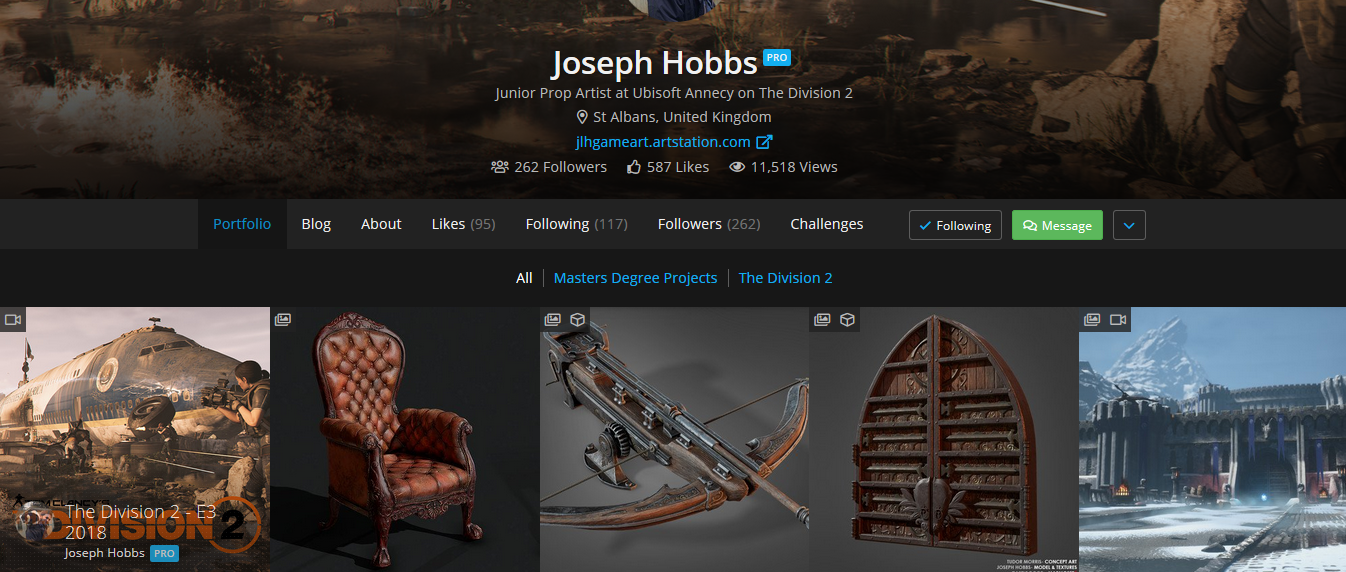
I am going to be applying for jobs this month and I want to ensure that my online portfolio is ready. Based on other feedback I will be adding some more pieces that show off individual assets. Similar to artists like Joseph Hobbs, who was a student last year. He has included some pieces on his Artstation page that showcase individual high quality assets.

 Joseph's portfolio has a strong presence of high quality assets that show he can create game ready props as well as environments.

I feel that if I include these in my portfolio as well it will show that I can model props that adhere to industry practice, something that my current portfolio isn't doing at the moment.

JOSEPH, H. (2018) Artstation - Joseph Hobbs. [Online] Available from: https://www.artstation.com/jlhgameart [Accessed: 06/06/2018]

Wednesday, 30 May 2018

Week 2 - Wednesday: Symposium Session 1

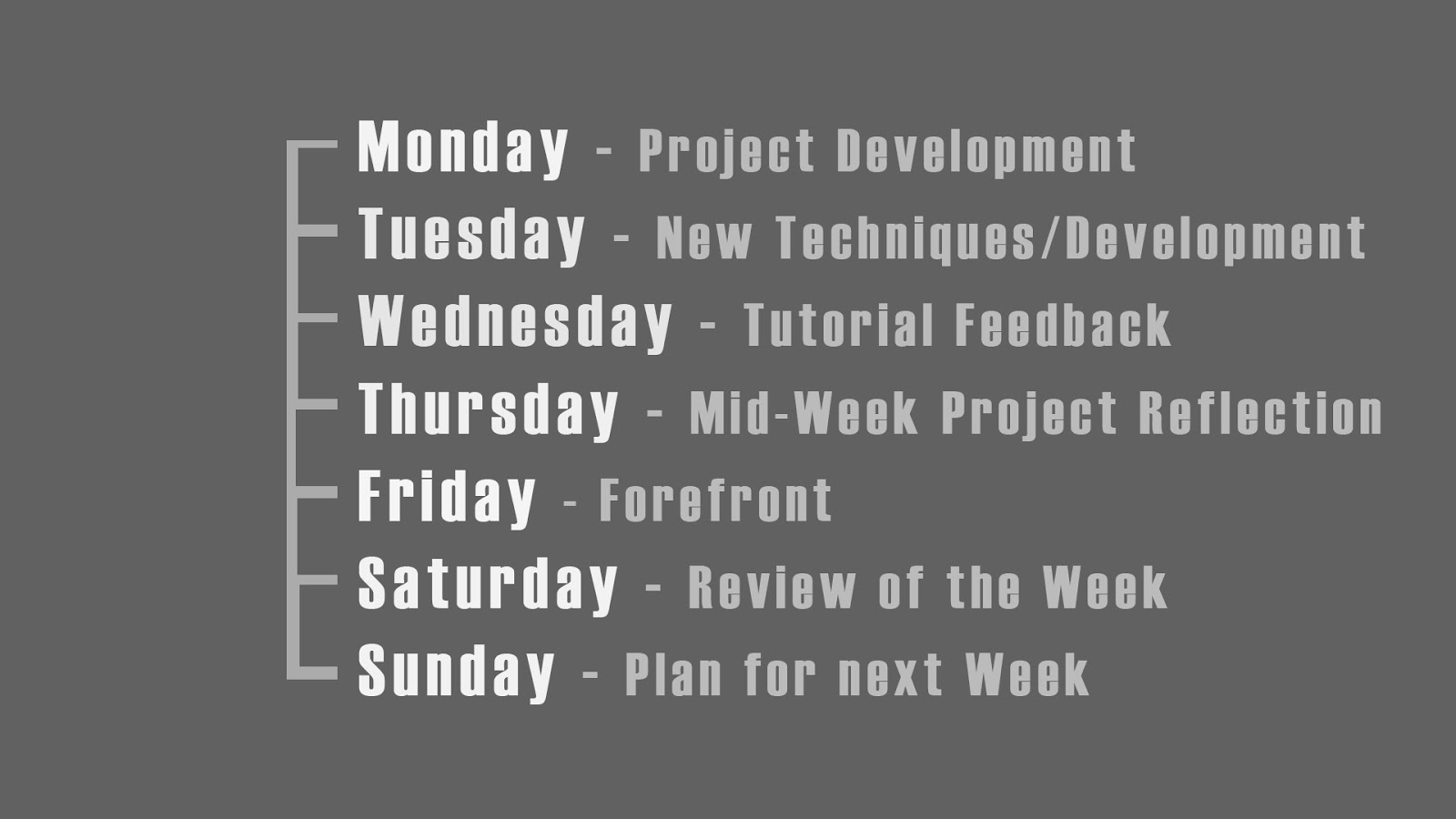
Today I had my first symposium session where I discussed with my peers how we would each be documenting our projects. I and a few other students brought up that we would be adopting a habitual approach where we would follow a rigid structure in regards to blog posts. You can see below an image from my presentation where I highlight my posting schedule:


Here you can see that I have suggested dedicating some days to a specific theme. I feel this style could help me keep things organised and also make it easy to summarise my development when it comes to my major project presentation as all the relevant posts can be organised by week and day.

To my surprise lots of people really liked the idea of dedicating certain days to a theme, such as my "Forefront Friday" posts. It was interesting to note that a lot of people weren't going to adopt this structure for their documentation and it was nice that I inspired some people to try my approach!

Whilst I feel segmenting the days like this is useful, I will most likely talk about different topics on some days depending on what I have achieved that week and my overall progress. I also won't be posting on the weekends because it seems unnecessary to do so when I discuss my project planning during the week.

I think my biggest takeaway from the symposia session was that forcing myself to take an almost ritualistic approach to documenting my work is the right way for me to go about doing things. This way I am forcing myself to constantly examine the forefront every week and not just when I feel inspired to do so. I think this is important for me as I tend to get too absorbed in my projects, and I believe it would be beneficial for me to take a step back and consider my work in relation to the front runners of the industry.

Tutorial Feedback

During my tutorial session I got an answer to an issue that was causing a lot of slowdown in my workflow. I was shown a method for surface transferring details without the need for baking each component of a model separately. This had been quite time consuming when creating the first part of my fireplace as I was having details being projected onto the wrong surfaces. My solution had been to bake the individual pieces separately which worked, but cost a lot of time when I had to edit the individual maps back together in Photoshop.

Fortunately with this new method I can bake all my details at once by moving the individual components of the model further apart from one another. This way I don't have to worry about projecting undesired details onto the wrong surfaces.

For the upper part of my fireplace model I have moved the individual details apart from another so that the surfaces do not overlap once I bake them in Substance Painter. The Red line represents the distance of the projection around the geometry. The further apart, the less likely the projections will overlap.

This technique is called "exploding" and in the image above you can see how I have moved the objects of the top part of my fireplace far apart so that the cage distance between them does not overlap. You can see the results of the bake below:

This is the Occlusion, Roughness and Metallic map that was created in Substance Painter from my exploded geometry. It was made without the need for cleaning it up in Photoshop as I had to do with the lower part of the fireplace.

I will be using this technique for the majority of my assets and I am SO glad I learnt this early on as it was a huge time saver for this asset. I am confident in the utility of this technique and will be permanently adding it to my creative arsenal.

Wednesday, 23 May 2018

Week 1 - Wednesday: Animation Expose

Today I watched the final year show of the animation, film and game art students. I was extremely impressed with the quality of work that was showcased today and I am both inspired and determined to meet the high standards that they have displayed throughout the show. I was particularly impressed with the cinematic for Kyros which was rendered entirely in Unreal Engine. A large focus of my research throughout this year has been on the viability of Unreal Engine as a legitimate tool for visualisation beyond video games, so I was pleased to see such a great example of this with Kyros.

I also had the opportunity to talk to professionals from the industry and show them my work. Attending events and meeting professionals is something I have been aiming to improve on as I feel it is crucial to not only getting my name out there, but improving my craft by exposing my work to critique. I received some great feedback from people who have been in the game industry for years and I was given some advice about my portfolio presentation, as well as some elements to focus on such as displaying props and individual assets on my Artstation page.


Overall the experince was a great inspiration and I am eager to get back to working on my project so that it can stand alongside some of the other great student projects the unversity has produced this year.

UNIVERSITY OF HERTFORDSHIRE (2018). Animation Exposé 2018. [Online Video]. May 23rd. Available from: https://www.youtube.com/watch?v=5a9sCTycaRU&t=20s. [Accessed: 23/05/2018].