I had two main goals when approaching the creation of my major project. The first was to test my artistic ability and see if I could convey a story through an environment scene. The second was to prove that I had the skills necessary to create a game-ready environment and assets that were fit for purpose within Unreal Engine. Both of these goals required their own set of criteria that has informed my creative decision making throughout the duration of this project.
To evaluate whether the visual design of my game environment successfully communicated what I wanted to say to my audience, I developed a set of criteria based on a methodology for analysing mise-en-scene within films. Film, much like video games, employ a visual language to convey emotion, themes and story to players and audiences. I felt that it was important to understand how filmmakers and set designs approach mise-en-scene and apply a similar level of analysis to my own work.
I paid consideration to the space, light, colour, differences of exterior and interior design, and set decoration to create a thematically appropriate environment that would tell its own story without the use of any dialogue. I feel this approach has helped me to critically and objectively evaluate the successes and shortcomings of my skills as an environment artist. By organising my environment into these categories I have been able to tackle each element of my design individually and evaluate them on their own merits. For example I experimented with lighting in a separate scene first so that I wouldn’t be tempted to leave the scene with one setup if it was starting to look good. I wanted to experiment with different lighting scenarios and give myself an unbiased perspective without interference from the other elements at play.
In addition to my evaluative criteria, I was influenced by a variety of sources from the forefront of the industry. I would study the work of other artists and try to evaluate what I felt made their work in particular at the forefront. Often times these examples would inspire my own creative process and I would attempt to emulate them within my own environment. Horizon Zero Dawn (2017) for example features an environment that has run rampant with overgrowth and it was this that prompted me to greatly increase the level of foliage and vegetation within my scene. I was able to justify this as a story element because it indicates to the player how much time has passed since anyone has dwelt in the mansion.
Alongside my criteria and artistic influences, I was also mindful of the technical limitations of Unreal Engine. I had to ensure that my scene would run at a solid sixty frames per second for optimal visual performance. I took particular care in making all of my assets fit-for-purpose within the engine, being aware of the polygon count of each asset. As my target audience are gaming studios and other environment artists, it was important for me to prove that I was adhering to the industry standard on both an artistic and technical level.
During the development of the environment I have received critique and feedback by posting my work on forums such as Polycount. This has helped me to not view my work in total isolation and align my expectations with reality. It would have been easy for me to create something that I thought was visually appealing and be done with it, but I have had to take on board feedback, apply evaluative criteria and build the environment to meet the technical specification of the game engine. When taken together, these factors have been responsible for the final results I have achieved during Semester C.
Showing posts with label Semester C. Show all posts
Showing posts with label Semester C. Show all posts
Friday, 10 August 2018

Final Reflections on My Learning Over Semester C
Over the course of my final major project I have developed my skills further as a 3D artist. I feel that particularly during this final semester I have really improved my abilities with both Substance Painter and Unreal Engine, the latter of which I feel my lighting has greatly improved in.
I set myself the goal of creating a strong portfolio piece alongside several individual assets that I could use in my portfolio. As such I was expecting this final term to act as a culmination of my skills, and wasn’t expecting to learn much more than refining my existing abilities. However as learning is something that happens regardless of whether you are actively seeking it, I have acquired a range of new techniques and processes that I believe will help me flourish as a 3D artist in the years ahead.
I feel that I have established a good workflow for creating assets and textures, setting up materials efficiently within Unreal Engine. I have improved the implementation of my 3D elements from Max to Unreal, taking into consideration the limitations of real-time game engines. I have also taken on feedback I received from other projects last term that have helped me greatly improve my texturing in regards to realism. I now no longer create random scuffs and add dirt to surfaces without consideration, I have tried to apply them where they would appear logically in the real world. All of these skills have helped me to improve my craft and create a major project that is considerably stronger than my work from last term.
The area that I believe I have learnt the most however is in my time management and self-reflective writing. Thanks to the adoption of Gibbs Reflective cycle, I feel I am able to evaluate myself and organise my thoughts on different activities into a consistent method of analysis. This has helped me to manage myself over the duration of this project by breaking down each task into sizeable and approachable sub-assignments. It has been through developing this approach that I feel I have learnt perhaps the most crucial skill as an artist, knowing which areas of my work to spend the bulk of my time on.
I believe I used this to great effect on this project by forcing myself to stop working on any 3DS Max elements during the last few weeks of development, and instead focus entirely on getting the foliage that was in my environment to look more convincing. As this was an element that covered large parts of my scene, I think I correctly identified this as the area to improve on in time for my deadline. Of course I would have loved to create a larger scene but polishing what I had already was of the most importance to me.
Examining the forefront has helped to both inspire and focus me as I work. By exposing myself to the incredibly high standards of the industry I have been galvanised to push myself to achieve more with my project. As I am entering the industry my competition is no longer other students but professional practitioners within the field. This means that I have needed to adopt the mentality of “if they can do it, so can I!”
Finally I have learnt the value of a strong social media presence this term. I have moved beyond posting my work solely to Artstation and researched other vectors of dissemination to spread my name. So far I have hosted my work on Youtube, BitChute, Polycount, Instagram, Facebook, Blogger and Patreon. By creating a unified brand across all these social media outlets I am aiming to achieve the widest possible audience for my work. Whilst my target audience is largely to be found on professional sites like Artstation and Polycount, I feel that cultivating a strong following on casual platforms will ultimately ensure greater exposure amongst other creatives across a wide range of fields.
I will always continue to learn. Some areas that I may not even consider important, may end up becoming the most useful skills I can acquire. As I move out into the competitive world of game art, I hope to continue to adopt new methodologies and modes of thinking using what I have achieved over this semester as a stable base for further improvement.
I set myself the goal of creating a strong portfolio piece alongside several individual assets that I could use in my portfolio. As such I was expecting this final term to act as a culmination of my skills, and wasn’t expecting to learn much more than refining my existing abilities. However as learning is something that happens regardless of whether you are actively seeking it, I have acquired a range of new techniques and processes that I believe will help me flourish as a 3D artist in the years ahead.
I feel that I have established a good workflow for creating assets and textures, setting up materials efficiently within Unreal Engine. I have improved the implementation of my 3D elements from Max to Unreal, taking into consideration the limitations of real-time game engines. I have also taken on feedback I received from other projects last term that have helped me greatly improve my texturing in regards to realism. I now no longer create random scuffs and add dirt to surfaces without consideration, I have tried to apply them where they would appear logically in the real world. All of these skills have helped me to improve my craft and create a major project that is considerably stronger than my work from last term.
The area that I believe I have learnt the most however is in my time management and self-reflective writing. Thanks to the adoption of Gibbs Reflective cycle, I feel I am able to evaluate myself and organise my thoughts on different activities into a consistent method of analysis. This has helped me to manage myself over the duration of this project by breaking down each task into sizeable and approachable sub-assignments. It has been through developing this approach that I feel I have learnt perhaps the most crucial skill as an artist, knowing which areas of my work to spend the bulk of my time on.
I believe I used this to great effect on this project by forcing myself to stop working on any 3DS Max elements during the last few weeks of development, and instead focus entirely on getting the foliage that was in my environment to look more convincing. As this was an element that covered large parts of my scene, I think I correctly identified this as the area to improve on in time for my deadline. Of course I would have loved to create a larger scene but polishing what I had already was of the most importance to me.
Examining the forefront has helped to both inspire and focus me as I work. By exposing myself to the incredibly high standards of the industry I have been galvanised to push myself to achieve more with my project. As I am entering the industry my competition is no longer other students but professional practitioners within the field. This means that I have needed to adopt the mentality of “if they can do it, so can I!”
Finally I have learnt the value of a strong social media presence this term. I have moved beyond posting my work solely to Artstation and researched other vectors of dissemination to spread my name. So far I have hosted my work on Youtube, BitChute, Polycount, Instagram, Facebook, Blogger and Patreon. By creating a unified brand across all these social media outlets I am aiming to achieve the widest possible audience for my work. Whilst my target audience is largely to be found on professional sites like Artstation and Polycount, I feel that cultivating a strong following on casual platforms will ultimately ensure greater exposure amongst other creatives across a wide range of fields.
I will always continue to learn. Some areas that I may not even consider important, may end up becoming the most useful skills I can acquire. As I move out into the competitive world of game art, I hope to continue to adopt new methodologies and modes of thinking using what I have achieved over this semester as a stable base for further improvement.
Final Reflections on my Career Goals
I have used this project as an opportunity to completely retool my portfolio so that it adequately reflects my current abilities as a games artist. My major project will serve as the highlight of my portfolio and I believe it to be my strongest piece for a number of reasons.
Firstly the scope of the project is sufficiently big enough to show employers that I am capable of managing my time effectively to meet deadlines and maintain a high level of quality whilst working on large scale projects.
Secondly I believe this project to be my first real success into the realm of real time graphics. My lighting has improved a great deal from previous projects I created this year and this has had a knock-on effect on the overall quality of the final images and promotional video. I finally feel I have shown my skills in the best possible light (pun intended).
Thirdly I have used this project as a means to demonstrate that I am a competent prop artist. I have been able to create several new pieces for my portfolio within short time frames that show I have an understanding of how to create game-ready props. The quality and process I used to create the assets still needs to be refined, but the inclusion of individual assets within my portfolio was something that I felt was needed to show off all of my relevant skills.
Lastly this project has become the most viewed and liked piece on my Artstation page, gaining me almost a hundred new followers in just two days. I believe now is the time to ride on this success and use this project to help me network with other like-minded artists. I am hoping that by building a strong network of artists my work will leave a strong impression on them and they may think of me should a suitable position ever arise. I have already had some interviews with both independent and triple A gaming studios, but ideally my hope is that I can find a role that will allow me to develop my skillset further whilst being allowed to develop an entirely new range of skills.
Firstly the scope of the project is sufficiently big enough to show employers that I am capable of managing my time effectively to meet deadlines and maintain a high level of quality whilst working on large scale projects.
Secondly I believe this project to be my first real success into the realm of real time graphics. My lighting has improved a great deal from previous projects I created this year and this has had a knock-on effect on the overall quality of the final images and promotional video. I finally feel I have shown my skills in the best possible light (pun intended).
Thirdly I have used this project as a means to demonstrate that I am a competent prop artist. I have been able to create several new pieces for my portfolio within short time frames that show I have an understanding of how to create game-ready props. The quality and process I used to create the assets still needs to be refined, but the inclusion of individual assets within my portfolio was something that I felt was needed to show off all of my relevant skills.
Lastly this project has become the most viewed and liked piece on my Artstation page, gaining me almost a hundred new followers in just two days. I believe now is the time to ride on this success and use this project to help me network with other like-minded artists. I am hoping that by building a strong network of artists my work will leave a strong impression on them and they may think of me should a suitable position ever arise. I have already had some interviews with both independent and triple A gaming studios, but ideally my hope is that I can find a role that will allow me to develop my skillset further whilst being allowed to develop an entirely new range of skills.
Week 12: Forefront Friday: S.O.N
S.O.N is an independently financed horror game that began development in 2015 by a single developer. I find S.O.N very intriguing because the game seems to be played through the lens of a VHS camera, which I think is an interesting take on the “found footage” horror trope that I haven’t seen done anywhere else.
I place this game at the forefront of the industry because this is such a unique concept and challenges how I think I am perceiving what I am seeing. In a way we are not playing the game but watching old footage of someone exploring the house. It’s a very Meta concept and makes for a lot of interesting questions about how we are perceiving what we are playing.
In relation to my major project, I think this games aesthetics are reflective of what I have been aiming to achieve. It’s taking a relatively mundane setting and turning it into something foreboding and sinister. I especially enjoy the camera static as I feel this is another relatively harmless thing being turned into something menacing as the creatures approach the camera. As the game is being developed by a small team I will be watching this games performance with interest.
With the cancellation of Silent Hills by Hideo Kojima, I think people are still waiting for the next great horror title to fill the void. I would be very impressed if the small team at RedG studios are able to do so, as this shows you don't always need the biggest budget to be successful.
PLAYSTATION (2018) S.O.N – Official Gameplay Trailer #2 | PS4 [Online Video]. July 22nd. Available from: https://www.youtube.com/watch?v=oPZElemPUmE [Accessed: 10/08/2018].
REDG STUDIOS (TBA) S.O.N. [DISC, DOWNLOAD] Playstation 4. San Mateo: Sony Interactive Entertainment.
I place this game at the forefront of the industry because this is such a unique concept and challenges how I think I am perceiving what I am seeing. In a way we are not playing the game but watching old footage of someone exploring the house. It’s a very Meta concept and makes for a lot of interesting questions about how we are perceiving what we are playing.
In relation to my major project, I think this games aesthetics are reflective of what I have been aiming to achieve. It’s taking a relatively mundane setting and turning it into something foreboding and sinister. I especially enjoy the camera static as I feel this is another relatively harmless thing being turned into something menacing as the creatures approach the camera. As the game is being developed by a small team I will be watching this games performance with interest.
Gameplay trailer for S.O.N.
With the cancellation of Silent Hills by Hideo Kojima, I think people are still waiting for the next great horror title to fill the void. I would be very impressed if the small team at RedG studios are able to do so, as this shows you don't always need the biggest budget to be successful.
PLAYSTATION (2018) S.O.N – Official Gameplay Trailer #2 | PS4 [Online Video]. July 22nd. Available from: https://www.youtube.com/watch?v=oPZElemPUmE [Accessed: 10/08/2018].
REDG STUDIOS (TBA) S.O.N. [DISC, DOWNLOAD] Playstation 4. San Mateo: Sony Interactive Entertainment.
Thursday, 9 August 2018
Week 12 - Thursday: Promotional Video
Today I have finished editing my promotional video for my game environment. I did not want to explain the project verbally as I felt to do so would be antithetical to the aim of my project, which was to see if I could convey the story through the environment design. I believe I was successful in this regard and so I feel it is far more effectiveto let my environment to do the talking for me.
My finished promotional video.
To engage my audience I feel that leaving them asking questions will influence them to check out more of my work. If they are generally interested in what they have seen, they will take the next step and view my portfolio. I have tried to edit this video in such a way that it leaves the audience wanting to know more and thereby opening up my youtube channel for active engagement where they can ask me questions about the project. Interaction between myself and my audience could ultimately lead to my work receiving a dedicated following.
Edit (15/08/2018)
I was told to add more information to my video so I have re-edited a second version and also made this available on my youtube channel:
Edit (15/08/2018)
I was told to add more information to my video so I have re-edited a second version and also made this available on my youtube channel:
Updated promotional video.
Wednesday, 8 August 2018
Week 12 - Wednesday: Rookies Results
This year I entered the annual Autodesk competition The Rookies. I was eager to see how my work would stack up against the competition from other schools and disciplines from across the creative field. I was surprised to be announced as a finalist for an internship at Cambridge based game studio Ninja Theory. Unfortunately I didn't win the internship which is a shame because I feel that if I had been able to include work from my major project I would have had a much better chance. In either case being a finalist was a great confidence boost to me as an environment artist. My final rank for my competition entry was a B, which means I have a lot of areas I can improve in.

I entered into the competition with six pieces of work, four of which recieved an award for excellence much to my surprise.

Overall The Rookies has provided me with the perfect opportunity to compare myself with the talent now entering the industry. Some entrants had very impressive portfolios and I have identified areas where my work has fallen short. Right now my main concern is to create more pieces that demonstrate the skills I have acquired over the course of my Master’s degree. Because the competition ended before my course had finished, I wasn't able to include my most recent work which I feel is the strongest. Next year I would like to enter the competition again and see if I can hit that A rank!

This has been an excellent experience to take part in and I feel that I can use these accolades to bolster my CV as I continue to apply for work within the industry.
AUTODESK (2018) The Rookies - The highest honour for creative media & entertainment students. [Online] Available from: https://www.therookies.co/ [Accessed: 08/08/2018]

My final rank for the competition.
I entered into the competition with six pieces of work, four of which recieved an award for excellence much to my surprise.

My work recieved four excellence awards.
Overall The Rookies has provided me with the perfect opportunity to compare myself with the talent now entering the industry. Some entrants had very impressive portfolios and I have identified areas where my work has fallen short. Right now my main concern is to create more pieces that demonstrate the skills I have acquired over the course of my Master’s degree. Because the competition ended before my course had finished, I wasn't able to include my most recent work which I feel is the strongest. Next year I would like to enter the competition again and see if I can hit that A rank!

The certificate I recieved via email.
This has been an excellent experience to take part in and I feel that I can use these accolades to bolster my CV as I continue to apply for work within the industry.
AUTODESK (2018) The Rookies - The highest honour for creative media & entertainment students. [Online] Available from: https://www.therookies.co/ [Accessed: 08/08/2018]
Tuesday, 7 August 2018
Week 12 - Tuesday: Completed Environment
I have finally finished the environment. I will be spending the next few days preparing my presentation and editing my promotional video. You can view the full project on my artstation page or see the images below:


I feel that I have met my deadlines and made use of the resources that I have had available to me throughout the duration of this project. I was able to factor in the time I had access to the studio and build my project schedule around these timeframes. There are some areas I would have like to create like a larger garden and master bedroom, however I feel I have achieved what I set out to do, which was to create an environment that tells a story.

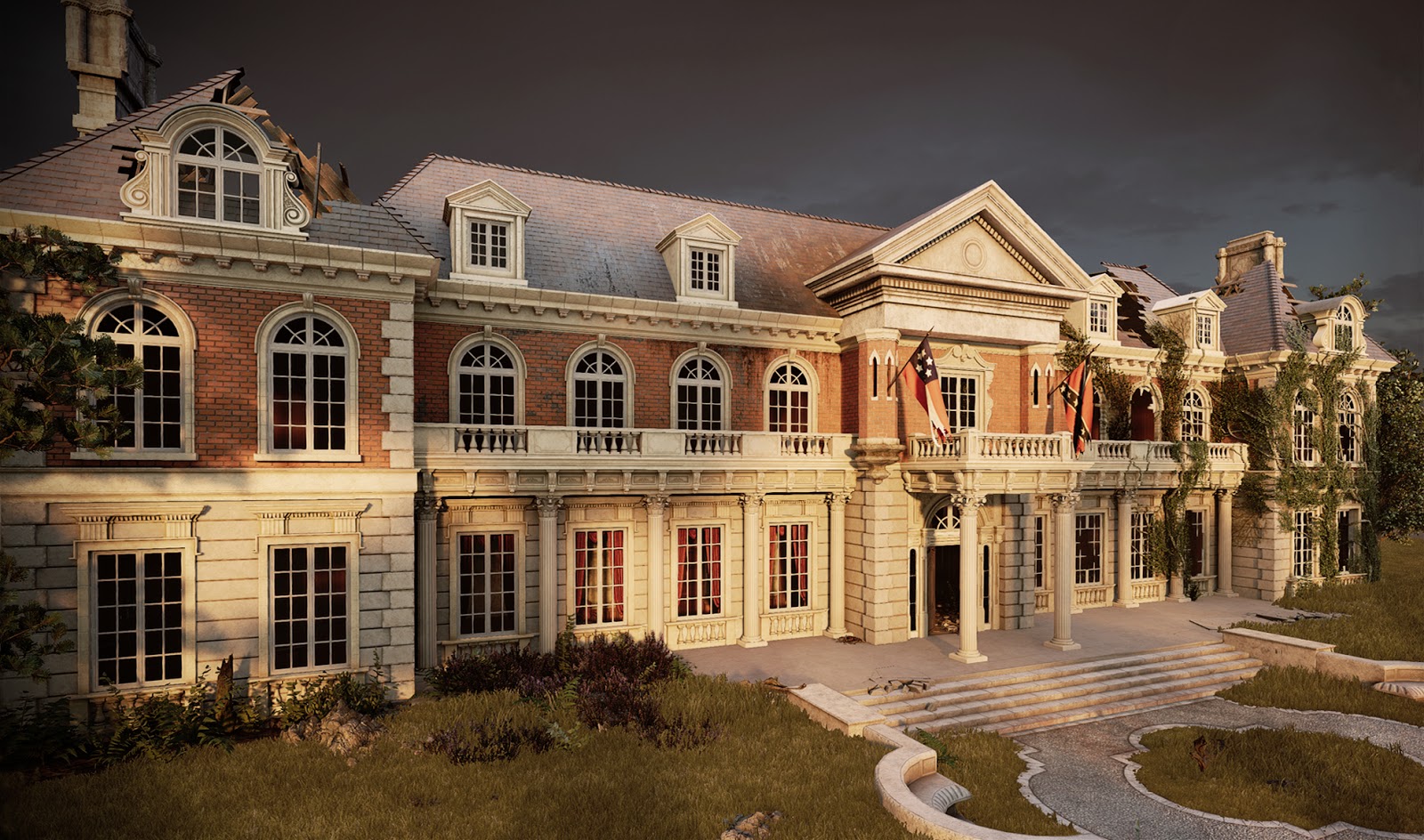


I feel that I have met my deadlines and made use of the resources that I have had available to me throughout the duration of this project. I was able to factor in the time I had access to the studio and build my project schedule around these timeframes. There are some areas I would have like to create like a larger garden and master bedroom, however I feel I have achieved what I set out to do, which was to create an environment that tells a story.
Monday, 6 August 2018
Week 12 - Monday: Creating Cameras and Practicing the Art of Cinematography
It is the beginning of the final week of my major project development. With my scene completed I will be spending today creating various camera angles that will best show off my environment. In preparation for this, I have been reading up on how cinematography is practiced within film and how certain shot types are used to affect an audience.
Cinematographer Blain Brown has compiled his experience into a book that serves as an introduction to cinematography as it is practiced on a professional level. It covers the essential concept of visual storytelling which is the facet of filmmaking that I find most intriguing and something I have been trying to emulate throughout my own work. I believe the language of Cinema is one that encompasses the art of the lens, composition, visual design and lighting. I feel that by learning these languages I can apply them to the field of game design and use them to help maximize every element within my game environment.
An important aspect of visual storytelling that I felt the author has highlighted is in setting the scene for the audience. Brown (2012:18) explains the importance of “establishing the geography,” whereby the cinematography gives the audience some idea of where they are, what kind of place it is and where objects and people are in relation to each other. Brown continues to explain the utility in letting the audience (or in my case the player) know the “lay of the land” within a scene. Stating that it helps them to orient themselves and prevents confusion that might divert their attention from the story. He highlights that one of the primary goals of the cinematography is to not confuse the audience, and this was a big reason why I was so eager to create an exterior alongside interior environments. I felt that it was important to establish the location and climate so that the player could project themselves seamlessly into the environment and believe it.
I am going to be paying close attention to the language of cinema as I choose my camera angles. This will be especially important as I create my promotional video for my environment. I am aiming to create a certain mood and this will require the camera movement and angles to reflect this.
BROWN, B. (2012) Cinematography: Theory and Practice: Image Making for Cinematographers and Directors., 2nd ed. New York: Focal Press.
Cinematographer Blain Brown has compiled his experience into a book that serves as an introduction to cinematography as it is practiced on a professional level. It covers the essential concept of visual storytelling which is the facet of filmmaking that I find most intriguing and something I have been trying to emulate throughout my own work. I believe the language of Cinema is one that encompasses the art of the lens, composition, visual design and lighting. I feel that by learning these languages I can apply them to the field of game design and use them to help maximize every element within my game environment.
An important aspect of visual storytelling that I felt the author has highlighted is in setting the scene for the audience. Brown (2012:18) explains the importance of “establishing the geography,” whereby the cinematography gives the audience some idea of where they are, what kind of place it is and where objects and people are in relation to each other. Brown continues to explain the utility in letting the audience (or in my case the player) know the “lay of the land” within a scene. Stating that it helps them to orient themselves and prevents confusion that might divert their attention from the story. He highlights that one of the primary goals of the cinematography is to not confuse the audience, and this was a big reason why I was so eager to create an exterior alongside interior environments. I felt that it was important to establish the location and climate so that the player could project themselves seamlessly into the environment and believe it.
I am going to be paying close attention to the language of cinema as I choose my camera angles. This will be especially important as I create my promotional video for my environment. I am aiming to create a certain mood and this will require the camera movement and angles to reflect this.
BROWN, B. (2012) Cinematography: Theory and Practice: Image Making for Cinematographers and Directors., 2nd ed. New York: Focal Press.
Friday, 3 August 2018
Week 11 - Forefront Friday: Promotional Video Research
In preparation for next week I have been looking at promotional videos of real time game environments created by other artists, so that I can examine them and make my video stand out. To clarify, I am not looking at game trailers but videos designed to showcase an environment within a game.
I have chosen these examples because they are all recent and were posted within a few months of each other, making them a good indicator of the competition I am facing as I publish my work onto the internet.
I would say that not all of these videos are at the forefront. I believe they are mainly adhering to an established standard for showing off game environments. I think that being aware of what is expected from the industry is a crucial skill and I want to make sure that my work is conforming to this standard.
Rob Linssen:
"Válenfall" - 7 days Ago
This is a stylised environment showing off the large scale of the location. Lots of sweeping shots give it a good sense of scale.
Joseph Armour:
"The Pale Elk" - 2 Months Ago
https://vimeo.com/274110496
This is a more kinetic video with some movement within the shots. My own video will most likely be much slower paced with less animation.
Emma Drew:
"Abandoned study" - 3 Months Ago
https://vimeo.com/269523304
This is an interesting project for me because it is similar in theme to what I am going for. I like to see how others have executed the same concept. She has shown off a lot of the foliage in this video which is something I want to do as well.
Vistorovschi Victor:
"Torrens Gallery" - 6 Months Ago
This video is really professionally made. The editing is very well paced and does an excellent job showing off the environments details.
My thoughts on these examples:
I have tried to select a range of artists across different skill levels. Whilst the quality of the videos may vary, all of these environments have let the visuals do the talking. I will be choosing to do this for my promotional video as well because I feel that if I try to explain my project it will come off as looking amateurish in comparison. Besides that, one of the primary objectives of my project was to tell a story through visual means. It would be antithetical to my goals to explain the plot and concept when I have intentional left those as a mystery for people to solve.
One thing I have noticed is that music they have chosen is very understated and in some cases is mostly ambient noise. I think this is a good idea because the visuals are the focus. I have a particular song in mind that should enchance the mood I am wanting to create and not compete with the environment itself.
Shot Inspiration:
I have also looked at this video of the Winchester mystery house because I feel it has some eerie shots that will lend themselves well to my environment:
ARMOUR, J. (2018) The Pale Elk. [Online Video]. June 8th. Available from: https://vimeo.com/274110496 [Accessed: 03/08/2018].
DREW, E. (2018) Abandoned Study. [Online Video]. May 13th. Available from: https://vimeo.com/269523304 [Accessed: 03/08/2018].
HKDEUS (2018) Torrens Galley. [Online Video]. January 27th. Available from: https://www.youtube.com/watch?v=XIeohE6i0h0 [Accessed: 03/08/2018].
HOUZZ TV (2018) Winchester Mystery House POV Fly Through. [Online Video]. February 3rd. Available from: https://www.youtube.com/watch?v=3S5505SeNLA [Accessed: 03/08/2018].
PROJECT R0LIN (2018)"Válenfall" - Stylized Environment Flythrough. [Online Video]. August 1st. Available from: https://www.youtube.com/watch?v=26jUcpYosBw [Accessed: 03/08/2018].
I would say that not all of these videos are at the forefront. I believe they are mainly adhering to an established standard for showing off game environments. I think that being aware of what is expected from the industry is a crucial skill and I want to make sure that my work is conforming to this standard.
Rob Linssen:
"Válenfall" - 7 days Ago
This is a stylised environment showing off the large scale of the location. Lots of sweeping shots give it a good sense of scale.
Joseph Armour:
"The Pale Elk" - 2 Months Ago
https://vimeo.com/274110496
This is a more kinetic video with some movement within the shots. My own video will most likely be much slower paced with less animation.
Emma Drew:
"Abandoned study" - 3 Months Ago
https://vimeo.com/269523304
This is an interesting project for me because it is similar in theme to what I am going for. I like to see how others have executed the same concept. She has shown off a lot of the foliage in this video which is something I want to do as well.
Vistorovschi Victor:
"Torrens Gallery" - 6 Months Ago
This video is really professionally made. The editing is very well paced and does an excellent job showing off the environments details.
My thoughts on these examples:
I have tried to select a range of artists across different skill levels. Whilst the quality of the videos may vary, all of these environments have let the visuals do the talking. I will be choosing to do this for my promotional video as well because I feel that if I try to explain my project it will come off as looking amateurish in comparison. Besides that, one of the primary objectives of my project was to tell a story through visual means. It would be antithetical to my goals to explain the plot and concept when I have intentional left those as a mystery for people to solve.
One thing I have noticed is that music they have chosen is very understated and in some cases is mostly ambient noise. I think this is a good idea because the visuals are the focus. I have a particular song in mind that should enchance the mood I am wanting to create and not compete with the environment itself.
Shot Inspiration:
I have also looked at this video of the Winchester mystery house because I feel it has some eerie shots that will lend themselves well to my environment:
A promotional video of the Winchester mystery house.
ARMOUR, J. (2018) The Pale Elk. [Online Video]. June 8th. Available from: https://vimeo.com/274110496 [Accessed: 03/08/2018].
DREW, E. (2018) Abandoned Study. [Online Video]. May 13th. Available from: https://vimeo.com/269523304 [Accessed: 03/08/2018].
HKDEUS (2018) Torrens Galley. [Online Video]. January 27th. Available from: https://www.youtube.com/watch?v=XIeohE6i0h0 [Accessed: 03/08/2018].
HOUZZ TV (2018) Winchester Mystery House POV Fly Through. [Online Video]. February 3rd. Available from: https://www.youtube.com/watch?v=3S5505SeNLA [Accessed: 03/08/2018].
PROJECT R0LIN (2018)"Válenfall" - Stylized Environment Flythrough. [Online Video]. August 1st. Available from: https://www.youtube.com/watch?v=26jUcpYosBw [Accessed: 03/08/2018].
Thursday, 2 August 2018
Week 11 - Thursday: Grand Piano
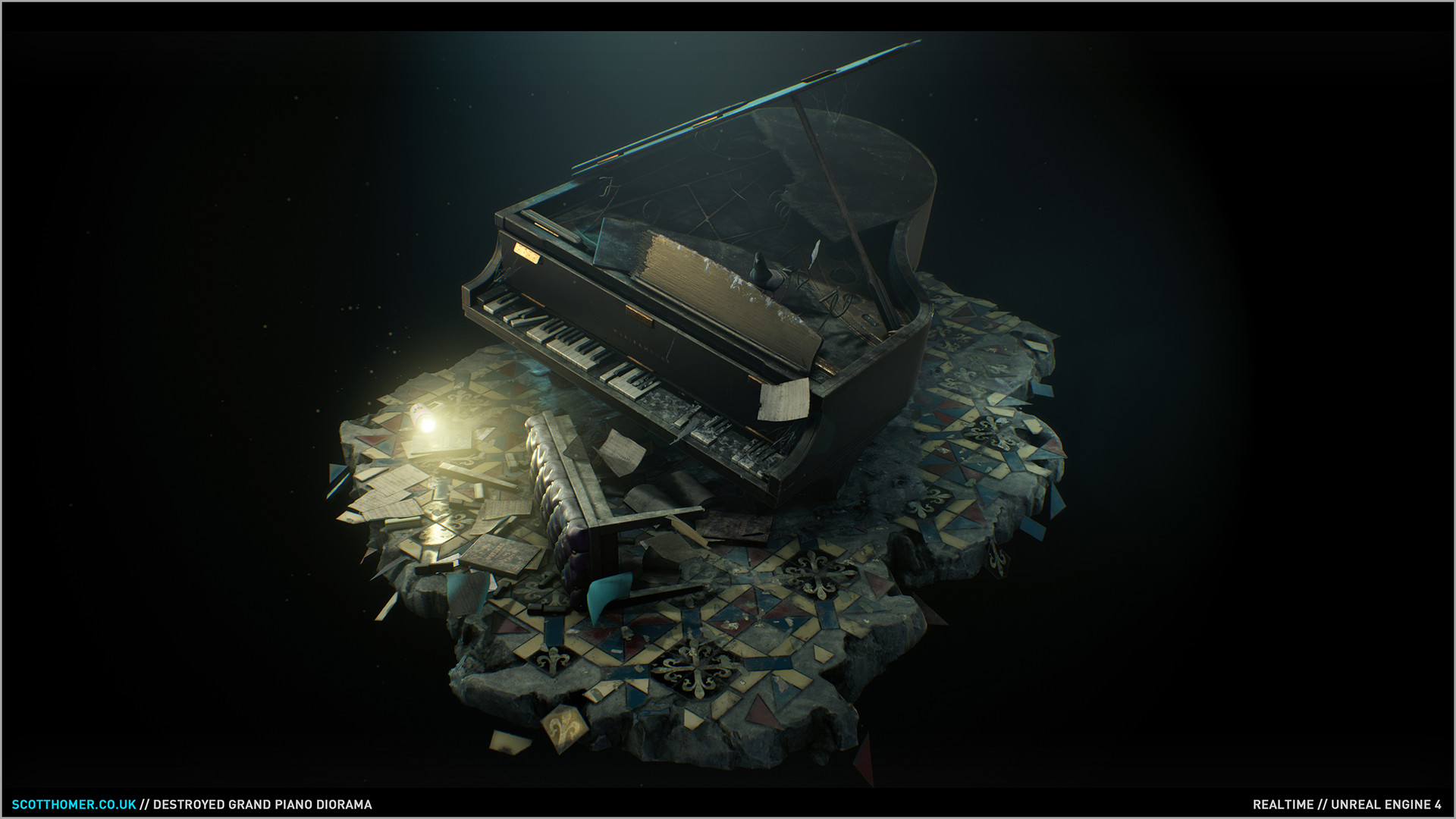
Scott Homer Destroyed Grand Piano (2017).
It was the beauty of the grand piano being completely destroyed that made me want to create one for myself. My Unreal Engine scene has been occuppied with calculating light bakes at the moment which has left me with not much else to do besides 3D modelling. I decided to spend this time creating another strong asset piece to include in my portfolio.

A grand piano I created in 3DS Max. The low poly model is in blue on the left.
It took me three days spread across doing lighting tests within Unreal Engine to finish the asset:

The finished portfolio piece.
I am going to be using this asset at the end of the hallway so that it gives the illusion there is much more to explore.
CHUPP'S PIANOS. (2018). 1926 Mason & Hamlin Model AA Grand Piano [Online Image]. Available at: https://www.chuppspianos.com/pianos/mason-hamlin/1926-mason-hamlin-model-aa-grand-piano-ebony-fully-restored/ [Accessed: 30/07/2018].
CHUPP'S PIANOS. (2018). Restored 1930 Steinway Model D Grand Piano [Online Image]. Available at: https://www.chuppspianos.com/pianos/steinway/steinway-model-d/1930-model-d-grand-piano-270927/ [Accessed: 30/07/2018].
HOMER, S. (2017). Destroyed Grand Piano Diorama [Online Image]. Available at: https://www.artstation.com/artwork/XXEdl [Accessed: 30/07/2018].
Wednesday, 1 August 2018
Week 11 - Wednesday: Tutorial and adding foliage to the interior
In todays tutorial, I received some feedback on my foliage decals. They were considered unrealistic and the details of on the surfaces projected by them were coming through underneath. Thankfully I was shown a much better way of creating realistic vines using planes to simulate leaves and parallax occlusion mapping to add a bit of depth.
I first went back to 3DS Max and created some planes that were mapped with a leaf texture. What you see in the images below are the leaf planes with their alpha masks displayed:

For my leaf planes I have added some edge loops so that I can animate the leaves slightly in Unreal Engine. This also gives the leaves some better definition as curving the planes makes it easy to see the leaves from multiple angles in the engine.

I used real geometry from the vine decal that I had created to help me align the leaves. Using the align spacing tool I was able to quickly create a spline path and then make my leaves follow it just as I had done with the pattern on my rug asset.

Below you can see the texture maps I created for the individual leaves:
When taken into Unreal Engine the vines look like this:

I have used my original alpha mask from the vine decal to cut out the plane. Using parallax occlusion mapping I was able to give some further depth to the cut out vine texture. The leaves are using their own material as you can see in the image above.
Below you can see the effect of all the vines clustered together in the scene:

I think these are looking much better than what I had before. Bringing some greenery into the interior is also going to help make the environment pop. In terms of my criteria for determining my colour palette, I think the inclusion of the colour green is going to emphasise that nature is slowly taking over the mansion.
I first went back to 3DS Max and created some planes that were mapped with a leaf texture. What you see in the images below are the leaf planes with their alpha masks displayed:

Two types of vines I created to put in my environment. One is a generic vine card that I can repeat throughout my scene and the other is a specific piece that I can use to hang over the balcony in the entrance hall.
For my leaf planes I have added some edge loops so that I can animate the leaves slightly in Unreal Engine. This also gives the leaves some better definition as curving the planes makes it easy to see the leaves from multiple angles in the engine.

A close up of my leaf planes with alpha masks displayed.
I used real geometry from the vine decal that I had created to help me align the leaves. Using the align spacing tool I was able to quickly create a spline path and then make my leaves follow it just as I had done with the pattern on my rug asset.

The leaves following the paths I created. The vine geometry will not be used in the engine only the leaves and the larger plane.
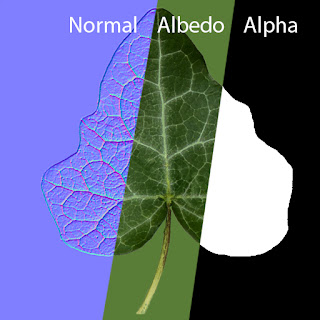
Below you can see the texture maps I created for the individual leaves:

The normal, albedo and alpha maps for the leaf.
When taken into Unreal Engine the vines look like this:

The vine model in Unreal Engine.
I have used my original alpha mask from the vine decal to cut out the plane. Using parallax occlusion mapping I was able to give some further depth to the cut out vine texture. The leaves are using their own material as you can see in the image above.
Below you can see the effect of all the vines clustered together in the scene:

Multiple vines placed together to create the ivy on the house.
I think these are looking much better than what I had before. Bringing some greenery into the interior is also going to help make the environment pop. In terms of my criteria for determining my colour palette, I think the inclusion of the colour green is going to emphasise that nature is slowly taking over the mansion.
Tuesday, 31 July 2018
Week 11 - Tuesday: Interview with Playground Games
I've just gotten off a skype interview with Don Arceta the lead environment artist at Playground Games.
I received some feedback on my major project environment that I will be adding to my Unreal Engine scene. The main points of critique were for the floor in the hallway, that he said looked far too rough, and that the walls that could perhaps have the imprints of where portraits used to hang on them.


One of the shots that I recieved feedback on.
I enjoyed the interview and have taken this as an opportunity to improve my handling of a professional interview setting. I was somewhat nervous but I tried to prepare for the interview by gathering as much information that I could, to answer any questions he may have had about my work. I was asked to reflect on what I felt was my weakest and strongest areas, but fortunately this question did not catch me off guard as I have been reflecting on these very things as I write my blog.
I was complimented on my work and Don said he was loving my environment so far. I asked questions about where I would fit within the company and was told it would be somewhere within the asset team. To my surprise however I was told that most of the 3D modelling was outsourced to a third party. I found this a shame because this is my favourite part of the process. For my career I would ideally like to be one of the people creating the 3D assets, so I will be continuing to apply for other opportunities in addition to this.
Whilst this may not lead to anything, I am confident that my work can stand up to scrutiny. I look forward to completing this project so that I can fully display it on my Artstation page. I only showed Don work-in-progress screenshots on the Polycount forums so I am eager to finish this and show it off properly.
I was complimented on my work and Don said he was loving my environment so far. I asked questions about where I would fit within the company and was told it would be somewhere within the asset team. To my surprise however I was told that most of the 3D modelling was outsourced to a third party. I found this a shame because this is my favourite part of the process. For my career I would ideally like to be one of the people creating the 3D assets, so I will be continuing to apply for other opportunities in addition to this.
Whilst this may not lead to anything, I am confident that my work can stand up to scrutiny. I look forward to completing this project so that I can fully display it on my Artstation page. I only showed Don work-in-progress screenshots on the Polycount forums so I am eager to finish this and show it off properly.
Monday, 30 July 2018
Week 11 - Monday: Project Recap
At the start of week eleven I feel my environment is really starting to come together. I have imported the majority of my assets and have got the lighting to where I want it to be. The remaining steps will be to improve the foliage on the exterior and hopefully bring some inside as well.


The exterior still needs a lot of work as this is where most of my foliage will be seen. I am hoping to bring some greenery to the main entrance hall as well because this will add some nice contrasting green light to the interior.
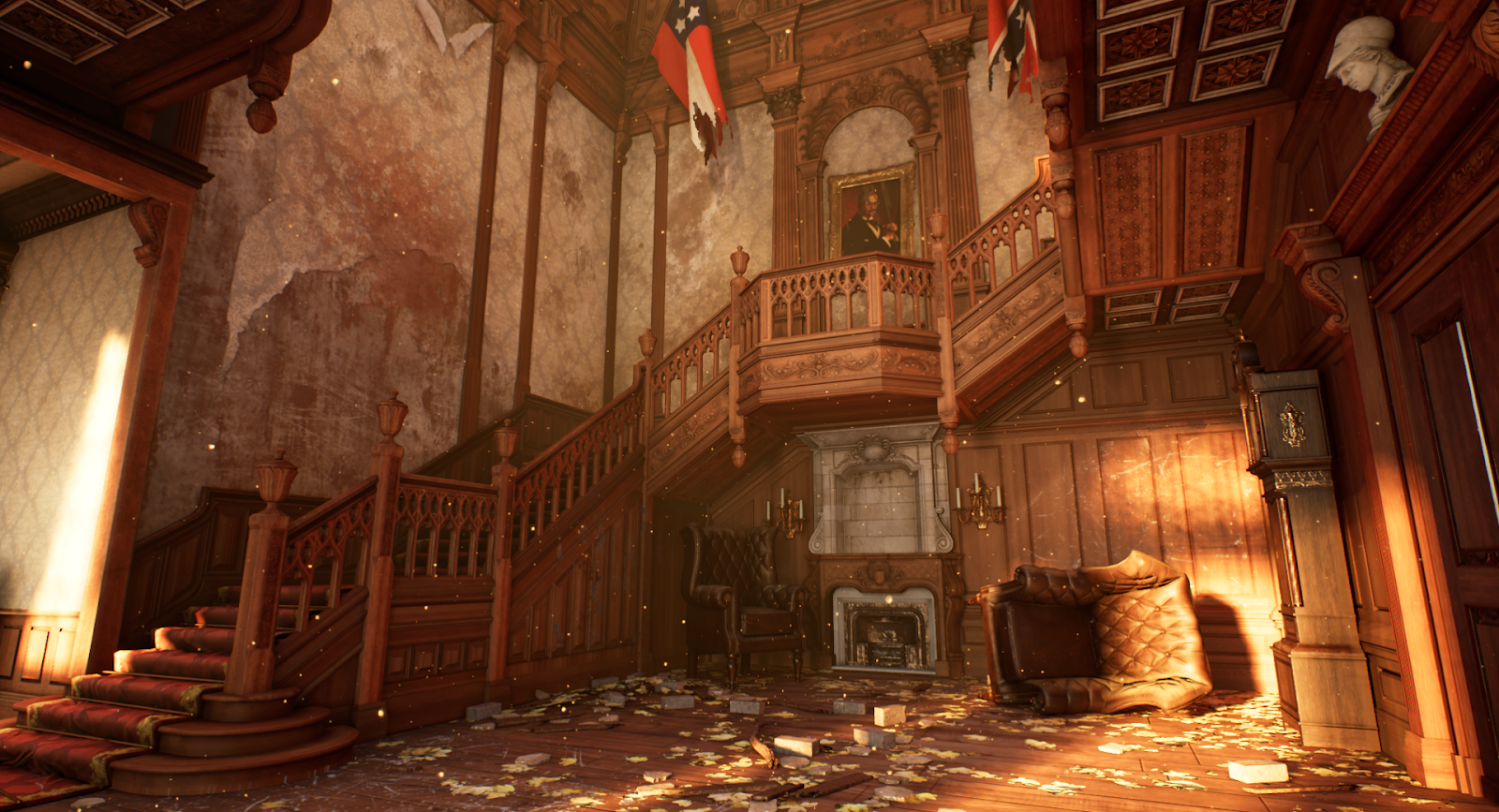
The entrance hall.

View of the hallway.

View of the first floor balcony.

In the hallway looking out towards the entrance hall.
The exterior still needs a lot of work as this is where most of my foliage will be seen. I am hoping to bring some greenery to the main entrance hall as well because this will add some nice contrasting green light to the interior.
Friday, 27 July 2018
Week 10 - Forefront Friday: The Artwork of Walid K-Perrussel
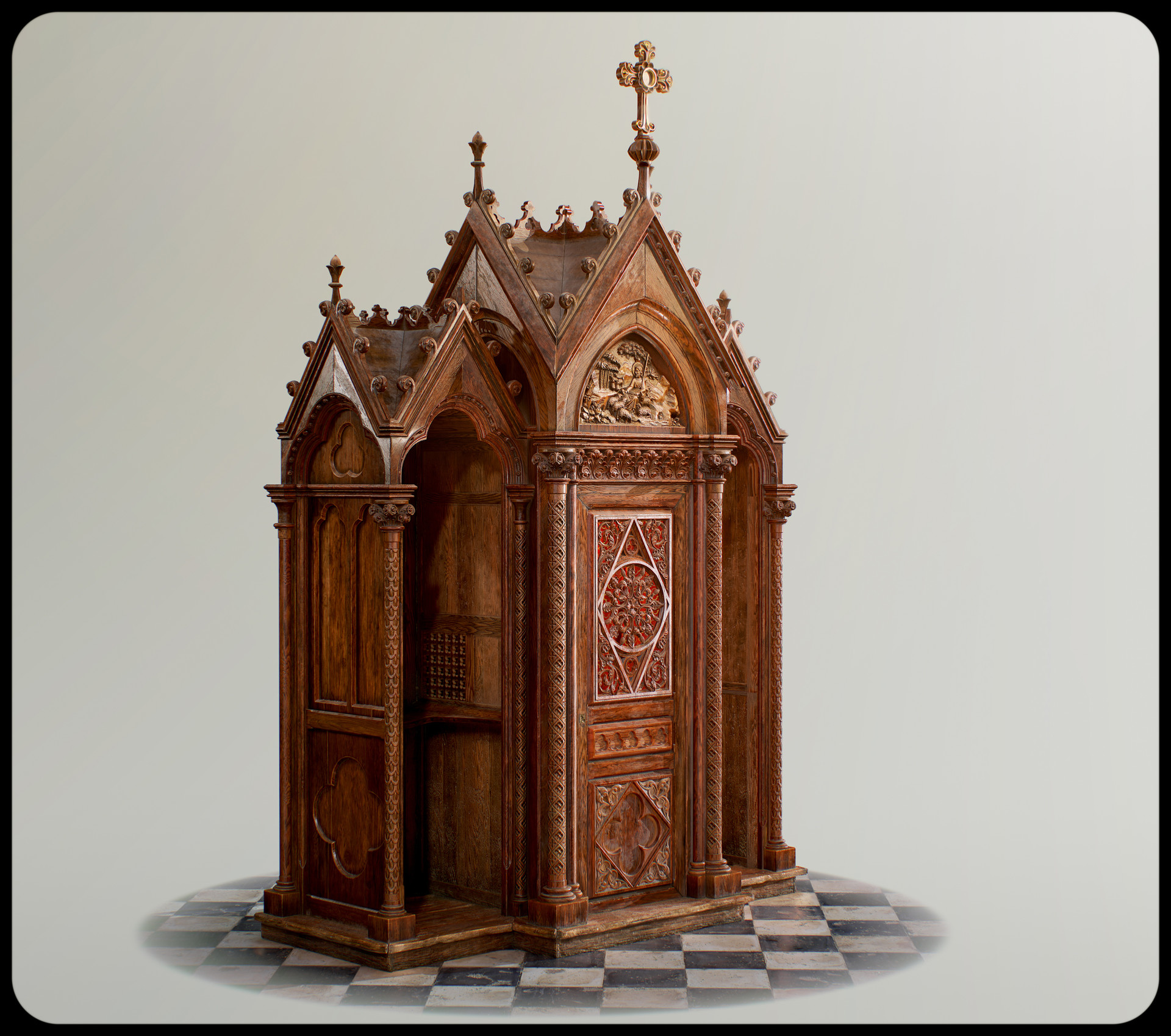
This week I have been studying the artwork of environment and prop artist Walid K-Perrussel. I was browsing Artstation looking for inspiration when his highly detailed model of a gothic confessional caught my attention.
 K-PERRUSSEL, W. (2018), Gothic Confessional. [Online Image]. Available at: https://www.artstation.com/artwork/Jxz6R [Accessed: 27/07/2018].
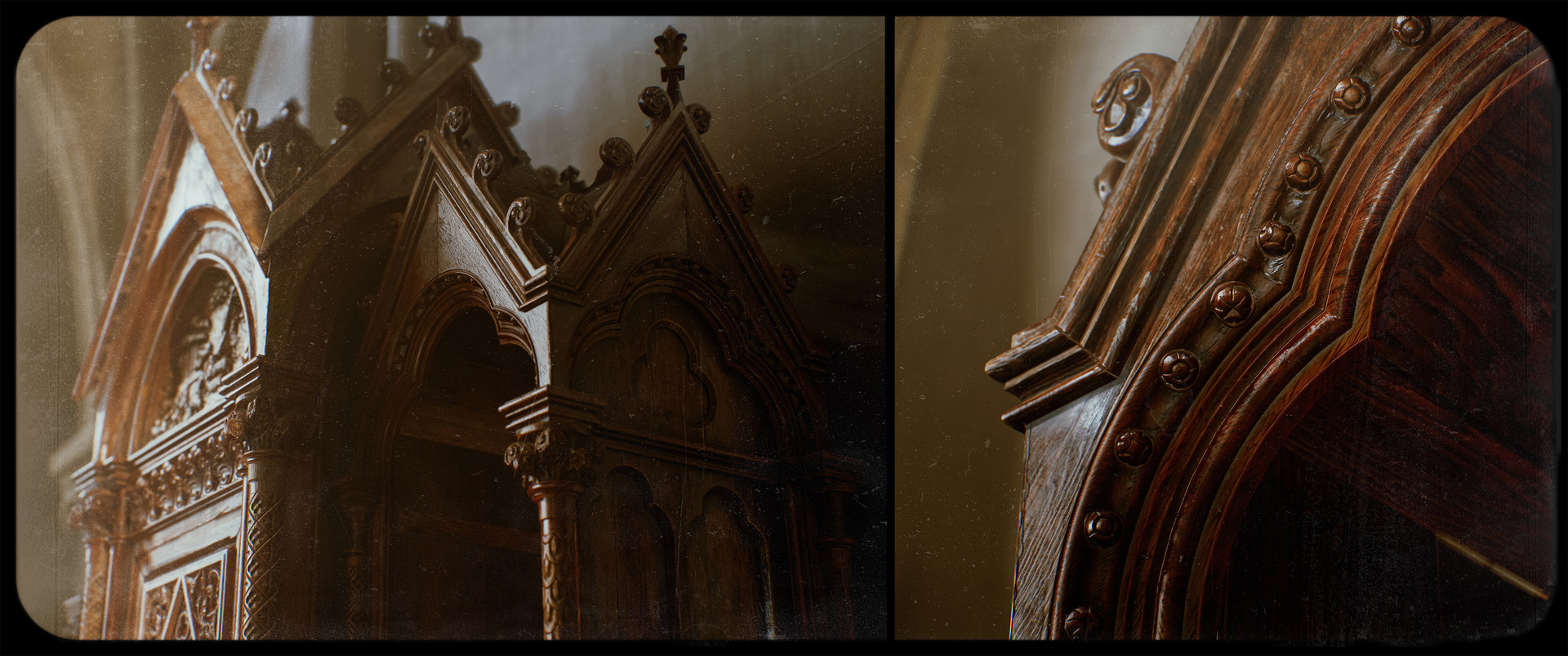
I identify this piece of art at the forefront of the industry because Walid has employed an array of the best tools used for texture creation to achieve a level of quality and realism with this asset. Walid has stated that he used a combination of Substance Designer and Painter as well as Megascans to create the wood textures for the model. The results are incredibly realistic and as someone who has been trying to create similar wood carved assets for my major project, I can see the obvious difference in quality between us as artists.
K-PERRUSSEL, W. (2018), Gothic Confessional. [Online Image]. Available at: https://www.artstation.com/artwork/Jxz6R [Accessed: 27/07/2018].
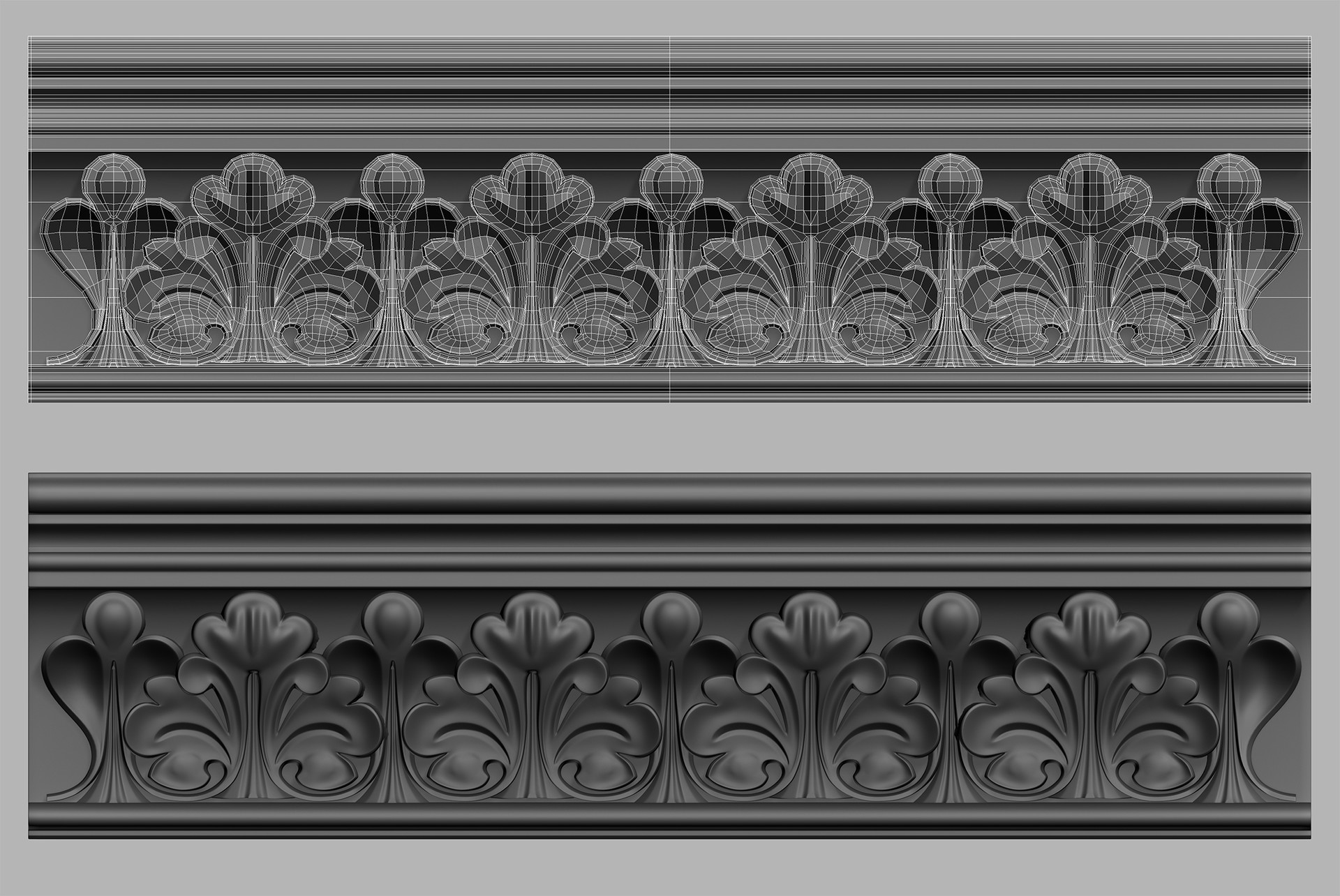
One thing that I found interesting, was that Walid had used 3DS Max to create the ornate high poly details of the model, as opposed to sculpting them in ZBrush. This is reassuring information to me as I create my high poly details in much the same way, by subdividing the geometry and adding smooth modifiers to them in 3DS Max. I have often worried that if I didn't use ZBrush to create high poly detail then I would be less competitive from an employability standpoint. It's a relief to know that using Max as an alternative is still viable amongst professionals.
K-PERRUSSEL, W. (2018), Sub-D Ornate: Gothic Confessional. [Online Image]. Available at: https://www.artstation.com/artwork/Jxz6R [Accessed: 27/07/2018].
This piece was a bit of an eye opener for me because the texture work Walid has displayed looks so realistic. The wood grain in particular is very life like when compared to the wood texture I made using Substance Painter. I would like to start investing time into learning to use Megascans, as it is clear that it produces photo-realistic results.
I identify this piece of art at the forefront of the industry because Walid has employed an array of the best tools used for texture creation to achieve a level of quality and realism with this asset. Walid has stated that he used a combination of Substance Designer and Painter as well as Megascans to create the wood textures for the model. The results are incredibly realistic and as someone who has been trying to create similar wood carved assets for my major project, I can see the obvious difference in quality between us as artists.
K-PERRUSSEL, W. (2018), Gothic Confessional. [Online Image]. Available at: https://www.artstation.com/artwork/Jxz6R [Accessed: 27/07/2018].
One thing that I found interesting, was that Walid had used 3DS Max to create the ornate high poly details of the model, as opposed to sculpting them in ZBrush. This is reassuring information to me as I create my high poly details in much the same way, by subdividing the geometry and adding smooth modifiers to them in 3DS Max. I have often worried that if I didn't use ZBrush to create high poly detail then I would be less competitive from an employability standpoint. It's a relief to know that using Max as an alternative is still viable amongst professionals.
K-PERRUSSEL, W. (2018), Sub-D Ornate: Gothic Confessional. [Online Image]. Available at: https://www.artstation.com/artwork/Jxz6R [Accessed: 27/07/2018].
This piece was a bit of an eye opener for me because the texture work Walid has displayed looks so realistic. The wood grain in particular is very life like when compared to the wood texture I made using Substance Painter. I would like to start investing time into learning to use Megascans, as it is clear that it produces photo-realistic results.
Thursday, 26 July 2018
Week 10 - Thursday: Foliage Decal Experimentation
Today I have been creating decals designed to replicate the intricate vines growing on buildings like this:

Here is vine decal I created based on the image above.

I created a 3D model and baked it onto a flat surface plane in Substance Painter:


Below you can see a larger surface area created using the same technique:

The vine decal has an alpha mask to blend it into the wall. You can see what it looks like within the scene below:

I am trying to layer the scene with various decals so I can really make it look like it is overgrown.

I think it's going to be really important to bring foliage into the interior. These decals are my first step to bringing in the more naturalistic elements from outdoors.
NORTHAN, C. (2012), I also can't get enough of when vines take over buildings: [Online Image]. Available at: http://verveevolving.blogspot.com/2012/04/naturally.html [Accessed: 26/07/2018].

Vines ensnaring a house.
Here is vine decal I created based on the image above.

A vine decal for use in Unreal Engine.
I created a 3D model and baked it onto a flat surface plane in Substance Painter:

The vine created in 3D.

The 3D vine on the plane ready to be baked into a texture.
Below you can see a larger surface area created using the same technique:

A larger vine texture I created to go on the front of the house.
The vine decal has an alpha mask to blend it into the wall. You can see what it looks like within the scene below:

Pasting the vine decal into the Unreal Engine scene. I can move it over any surface.
I am trying to layer the scene with various decals so I can really make it look like it is overgrown.

The vines ensnaring the walls of the entrance hall.
I think it's going to be really important to bring foliage into the interior. These decals are my first step to bringing in the more naturalistic elements from outdoors.
NORTHAN, C. (2012), I also can't get enough of when vines take over buildings: [Online Image]. Available at: http://verveevolving.blogspot.com/2012/04/naturally.html [Accessed: 26/07/2018].
Wednesday, 25 July 2018
Week 10 - Wednesday: Tutorial Session
Hofstadter's law is a self-referential time-related adage, coined by Douglas Hofstadter and named after him. Hofstadter's Law: "It always takes longer than you expect, even when you take into account Hofstadter's Law". In relation to my major project this means that even factoring in my additional contingency time on my schedule, certain tasks are going to run beyond my allotted time frames.

I am aiming to have all the development work of my major project complete by the end of week eleven. However factoring in Hofstadter's law, I have decided to spend the last week polishing what I already have in my environment as opposed to creating any new major assets.
During my tutorial session I was introduced to the concept of "triage" which is a medical term used to assign degrees of urgency towards patients with wounds or illnesses to decide the treatment order of a large number of patients or casualties. Whilst grim, the concept is quite helpful in determining what areas of my project I should spend my remaining time working on. I was demonstrated vividly that if something couldn't be salvaged then it was optimal to let it go and work on something that was achievable. With this in mind I will be aiming to perfect the debris and finish adding foliage to my environment. I have been using elements such as grass and trees from the Unreal Engine "Open World Demo" as these are high quality vegetation assets that have saved me a great deal of time that I haven't had to model myself.
As these foliage elements are not the focus of the environment and I am not gearing my portfolio toward naturalistic objects, I feel it will be acceptable to use them as window dressing to flesh out the mansion environment. Doing this should save me time and enable me to meet the deadline I have set myself for week eleven.
HOFSTADTER, D. (1979) Godel, Escher, Bach: An Eternal Golden Braid, 20th anniversary ed. New York: Basic Books.

The last week of my project plan. Week eleven will be the last week I will spend on project development.
I am aiming to have all the development work of my major project complete by the end of week eleven. However factoring in Hofstadter's law, I have decided to spend the last week polishing what I already have in my environment as opposed to creating any new major assets.
During my tutorial session I was introduced to the concept of "triage" which is a medical term used to assign degrees of urgency towards patients with wounds or illnesses to decide the treatment order of a large number of patients or casualties. Whilst grim, the concept is quite helpful in determining what areas of my project I should spend my remaining time working on. I was demonstrated vividly that if something couldn't be salvaged then it was optimal to let it go and work on something that was achievable. With this in mind I will be aiming to perfect the debris and finish adding foliage to my environment. I have been using elements such as grass and trees from the Unreal Engine "Open World Demo" as these are high quality vegetation assets that have saved me a great deal of time that I haven't had to model myself.
As these foliage elements are not the focus of the environment and I am not gearing my portfolio toward naturalistic objects, I feel it will be acceptable to use them as window dressing to flesh out the mansion environment. Doing this should save me time and enable me to meet the deadline I have set myself for week eleven.
HOFSTADTER, D. (1979) Godel, Escher, Bach: An Eternal Golden Braid, 20th anniversary ed. New York: Basic Books.
Tuesday, 24 July 2018
Week 10 - Tuesday: Additional Rooms
I have been creating additional rooms to flesh out the mansion environment that should create the illusion that the level is much larger than it actually is. I have done this by creating a long corridor that branches off from the main entrance hall and opens up into a larger space. When viewed from the stairway it creates a nice sense of scale.


I want to simulate light beams being projected through the curtains as I think this will further illustrate the time of day and make the player feel the heat and stuffiness of the building.

The curtains themselves were created using the cloth simulation similar to my carpet model. I have kept them quite low poly.
BARNWELL, J. (2017) Production Design for Screen: Visual Storytelling in Film and Television. New York: Bloomsbury Visual Arts.

The hallway viewed from the staircase.
Using my established criteria for defining interior space, I have tried to use the boundaries of this hallway to constrain the players movements, locking them in one direction as they proceed down the long corridor. I think this creates a sense of foreboding and I am looking forward to reflecting this in my promotional video, as I want the camera to glide slowly down the hallway as the music intensifies.

The hallway corridor which will be bridging the entrance hall and sitting room together.
The hallway has been constructed of smaller components that I will be repeating within Unreal Engine. I created these curtains with the intention that they could be seen from the exterior as well, hinting that the player can explore in that direction.

Modular curtains and windows.
I want to simulate light beams being projected through the curtains as I think this will further illustrate the time of day and make the player feel the heat and stuffiness of the building.

Here are my curtains textured within Substance Painter. I sneakily reused my wallpaper texture and recoloured it red.
The curtains themselves were created using the cloth simulation similar to my carpet model. I have kept them quite low poly.
BARNWELL, J. (2017) Production Design for Screen: Visual Storytelling in Film and Television. New York: Bloomsbury Visual Arts.
Monday, 23 July 2018
Week 10 - Monday: Small Chair
As I draw closer to the end of my degree, I have been researching ways that I can make my portfolio stand out and be more marketable to employers. I found an article on Artstation interviewing industry veteran Robert Hodri, who is currently the senior environment artist at id Software. In the interview he highlighted what to focus on when building a game-centric portfolio.
"At the beginning of your career, you normally won’t be working on a whole level or environment where you have to do everything on your own. At least that’s how it is when you’re working on bigger AAA games. Usually you’re assigned to work on smaller props. That’s why I think it’s important to have at least a couple of high quality props and textures in your portfolio. That can be anything from crates, rocks to weapons and vehicles. Just show that you can create good game art and are familiar with the whole process. Making high poly meshes and baking them down on a low poly is something that every 3D artist needs to know and your portfolio should show that." - Robert Hodri, Senior Environment Artist at id Software.
With this statement in mind I have been creating some more props that I will be displaying in my portfolio. I have been trying to find a balance between giving the model a nice silhouette and keeping it low poly. As such this asset is a lot more expensive than the previous armchair I had created. Currently the mesh sits at around 9k triangles. I can reduce the mesh further so that it is less expensive in-game, but right now I feel getting a strong portfolio piece is of greater importance.
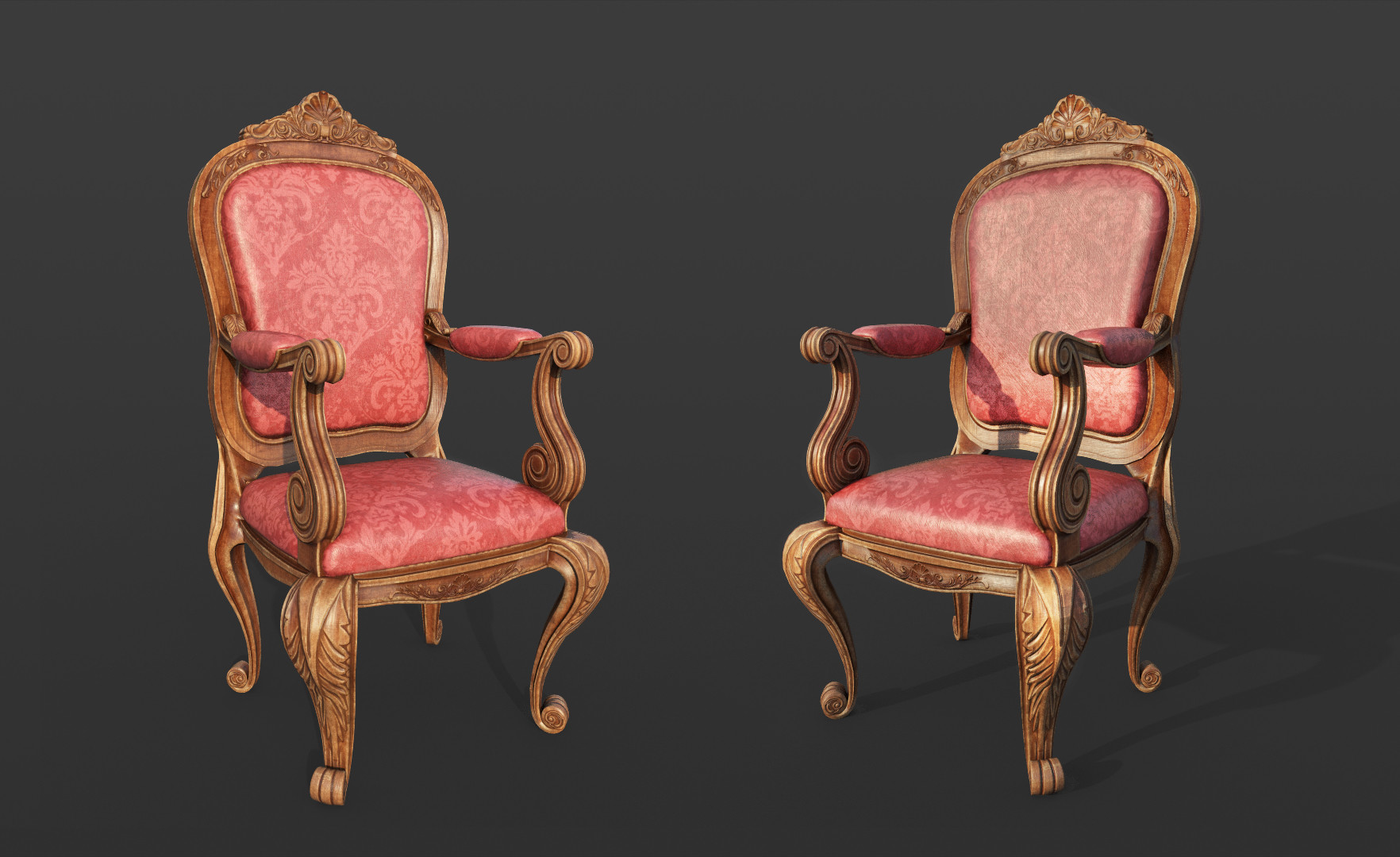
I now have two distinct chair assets in my portfolio showing that I can create props in different styles if needed. I based this model off of this Italian Baroque chair as I felt it would provide me with a good challenge:

I am going to continue tailoring my Artstation page to what triple AAA studios are looking for, as I feel these will be where the most employment opportunities are coming from.
ESCH, N. (2018), One 19th Century Italian Baroque Chair in Peacock Blue [Online Image]. Available at: https://www.monc13.com/products/one-19th-century-italian-baroque-chair-in-peacock-blue-furniture-seating [Accessed: 23/07/2018].
MON, S. (2017) Everything You Need to Know to Become a Game Environment Artist. [Online] Available from: https://magazine.artstation.com/2017/03/game-environment-artist/ [Accessed: 23/07/2018]
"At the beginning of your career, you normally won’t be working on a whole level or environment where you have to do everything on your own. At least that’s how it is when you’re working on bigger AAA games. Usually you’re assigned to work on smaller props. That’s why I think it’s important to have at least a couple of high quality props and textures in your portfolio. That can be anything from crates, rocks to weapons and vehicles. Just show that you can create good game art and are familiar with the whole process. Making high poly meshes and baking them down on a low poly is something that every 3D artist needs to know and your portfolio should show that." - Robert Hodri, Senior Environment Artist at id Software.
With this statement in mind I have been creating some more props that I will be displaying in my portfolio. I have been trying to find a balance between giving the model a nice silhouette and keeping it low poly. As such this asset is a lot more expensive than the previous armchair I had created. Currently the mesh sits at around 9k triangles. I can reduce the mesh further so that it is less expensive in-game, but right now I feel getting a strong portfolio piece is of greater importance.
My new chair props that I have put in my portfolio.
I now have two distinct chair assets in my portfolio showing that I can create props in different styles if needed. I based this model off of this Italian Baroque chair as I felt it would provide me with a good challenge:

A 19th Century Italian Baroque Chair that I used as reference.
I am going to continue tailoring my Artstation page to what triple AAA studios are looking for, as I feel these will be where the most employment opportunities are coming from.
ESCH, N. (2018), One 19th Century Italian Baroque Chair in Peacock Blue [Online Image]. Available at: https://www.monc13.com/products/one-19th-century-italian-baroque-chair-in-peacock-blue-furniture-seating [Accessed: 23/07/2018].
MON, S. (2017) Everything You Need to Know to Become a Game Environment Artist. [Online] Available from: https://magazine.artstation.com/2017/03/game-environment-artist/ [Accessed: 23/07/2018]
Friday, 20 July 2018
Week 9 - Forefront Friday: Star Wars Battlefront (2015)
I am planning to include a lot of foliage and vegetation growing inside of my mansion environment to emphasize how much time has passed since people actually lived there. This will mean that I need to create some unique assets myself as nothing within the demo pack will help with this.
Before creating my own vegetation I have decided to research some examples at the forefront to better understand how the games industry approaches realistic vegetation.
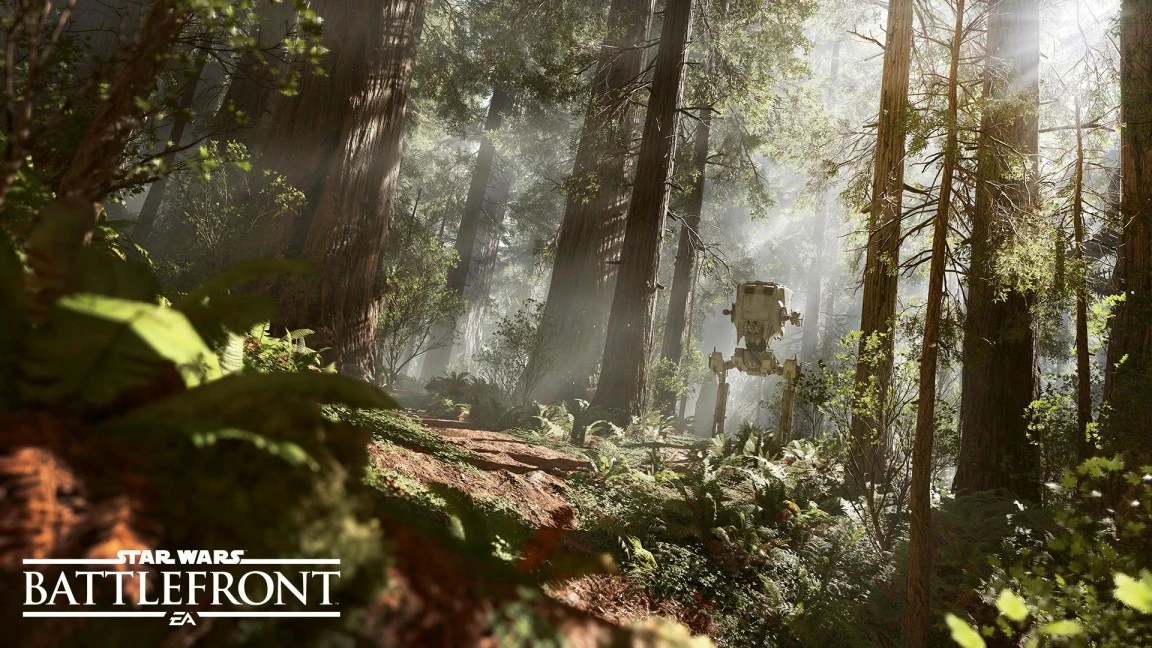
One game that has used photorealism to great effect is DICE Studios and EA Games “Star Wars Battlefront” (2015). Whilst the game itself has been the target of much criticism due to EA’s business practices, few could argue that the games graphics are incredible.

The planet Endor recreated in Star Wars Battlefront 2015.
I consider Star Wars Battlefront (2015) to be at the forefront of the industry because of the level of consideration that has gone into recreating the iconic environments from the films, and the detailed processes DICE have employed to create photo-realistic terrain.
The team at DICE would shoot photos on-location and plan their trips using a breakdown beforehand so they knew which assets needed to be captured during that shooting session. An article from website 3D Scan Expert states that the team put in a lot of effort to ensure that these photo shoots were efficient, because with Photogrammerty often times people end up shooting either too many or too few photos. Below you can see an example of the breakdowns the team would use when going on a photo shoot.

An example of the breakdowns DICE Studios used to help organise their photo sessions.
The massive amount of photos were then taken and turned into usable game assets. The team would go through more of less the same phases as they would if they were creating the vegetation in a traditional way but in a quicker time frame. Below you see a comparison between the estimated time to create an asset for an earlier game (Battlefield 4) that used traditional methods and the Photogrammetry pipeline used Star Wars Battlefront. Compare the lengthy time for high poly modelling in a traditional way compared to creating the asset via photo scanning.

A comparisson of the time required to create an asset with Photogrammetry versus traditional methodology
It is quite clear that DICE have put in great effort into planning the creation of vegetation for their game. My project plan mainly factored in hard surface modelling and texture creation. I did leave myself a small window to create organic assets but it is clear that such a small window will not yield results anywhere near as impressive as Star Wars Battlefront.
This is not a huge issue for me as I am not focused on becoming an organic modeler for my career. Therefore I don’t wish to spend too much time creating detailed vegetation. Photogrammetry definitely seems like the best option for realistic vegetation and foliage due to the near perfect replicas it produces. Because of this, the ability to create detailed vegetation from scratch may not be the most sought skill in the industry at the moment.
Because I don’t have the resources available to create realistic photo scanned models, one option may be for me to download another asset pack from the Unreal Engine marketplace, one that is well suited to create indoor vegetation. I have already saved time on assets such as trees and grass on the exterior sections of my environment, however I am still interested in creating individual pieces such as ivy and weeds myself. Because I want them to conform to the shape of my building perfectly, this is something that I feel I will have better control over if I create them myself.
Ultimately I feel a blending of both my own and professionally made assets will be the best course. I have already made use of the Unreal Engine marketplace, so by studying the assets available I will be able to see how they were created and apply this knowledge to my own work.
DICE. (2015) Star Wars Battlefront. [DISC, DOWNLOAD] Microsoft Windows, PlayStation 4, Xbox One. Redwood City: Electronic Arts.
DICE. (2015), EndorDICE. [Online Image]. Available at: https://vignette.wikia.nocookie.net/battlefront/images/8/81/EndorDICE.jpg/revision/latest?cb=20151111221829 [Accessed: 20/07/2018].
DICE. (2015), PhotoBreakdown. [Online Image]. Available at: https://3dscanexpert.com/wp-content/uploads/star-wars-battlefront-3d-scanning-elements-768x432.png [Accessed: 20/07/2018].
GAMASUTA. (2016) GDC: See how DICE used photogrammetry to bring Star Wars Battlefront to life . [Online] Available from: https://www.gamasutra.com/view/news/265747/GDC_See_how_DICE_used_photogrammetry_to_bring_Star_Wars_Battlefront_to_life.php [Accessed: 20/07/2018]
LIEVENDAG, N. (2016) How 3D Scanning was used to create the worlds of Star Wars Battlefront. [Online] Available from: https://3dscanexpert.com/3d-scanning-star-wars-battlefront/ [Accessed: 20/07/2018]
Subscribe to:
Posts (Atom)