Wednesday, 18 July 2018

Week 9 - Wednesday: Tutorial Session

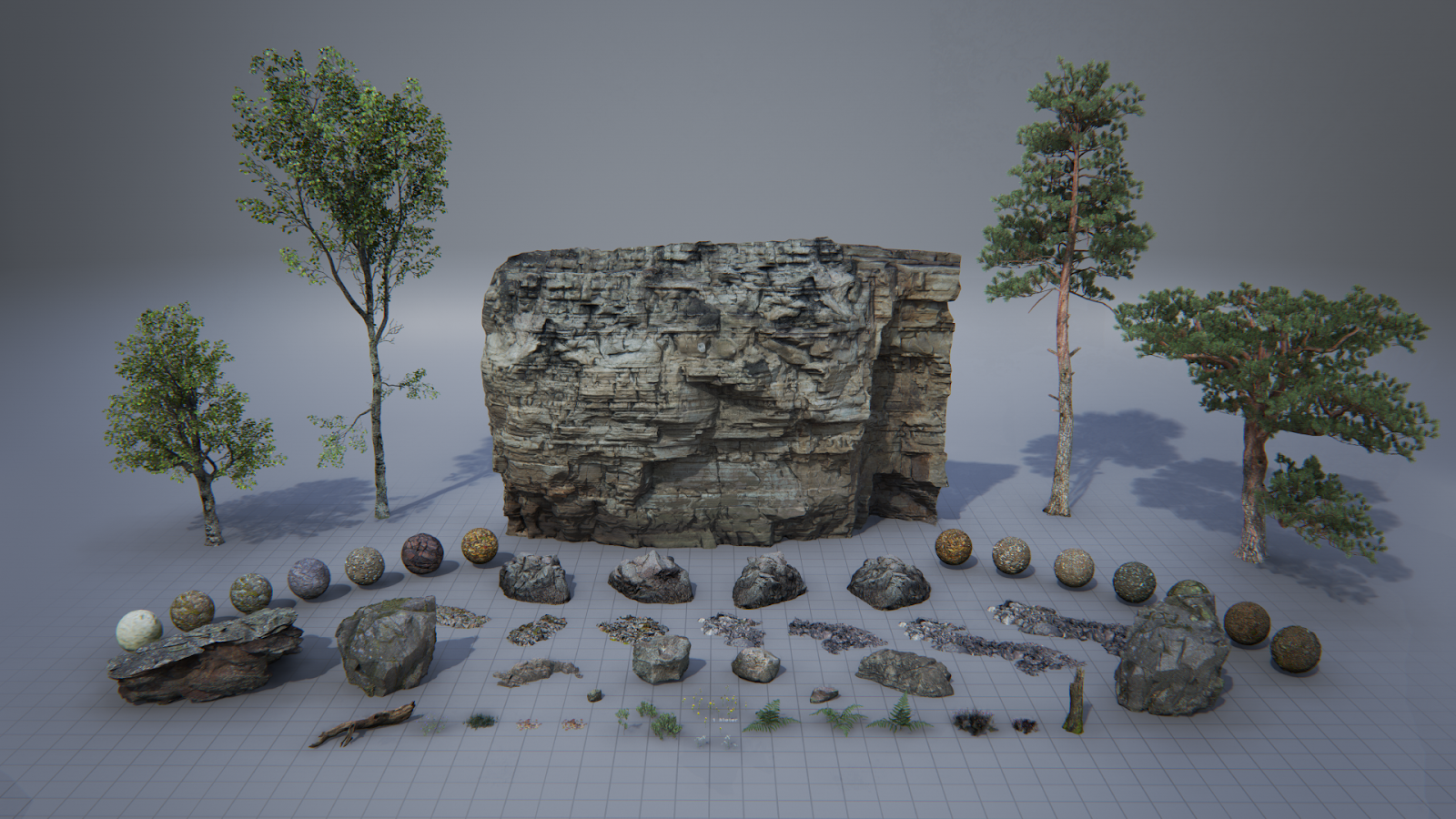
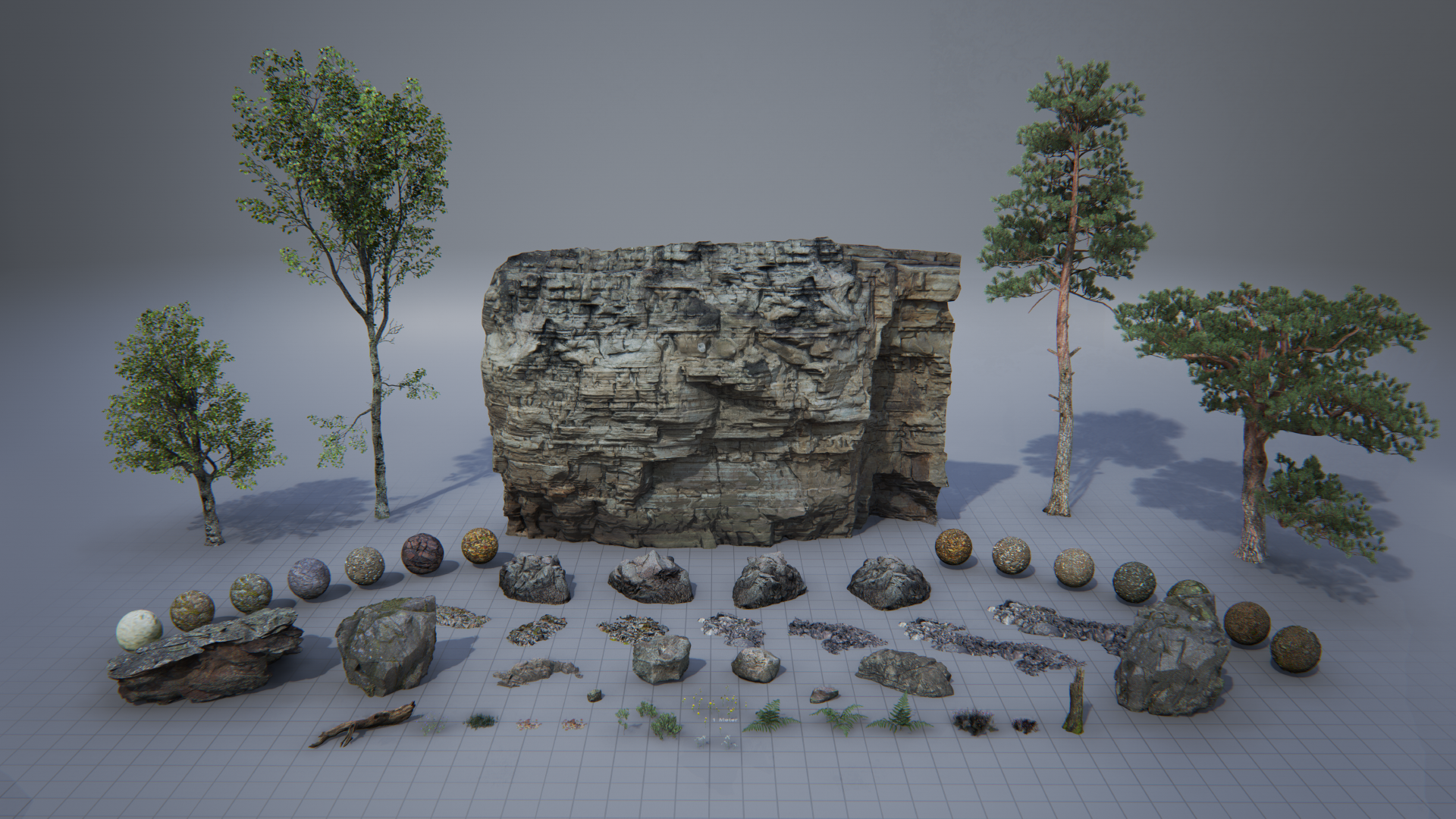
For this week's tutorial session I have been getting some help with adding foliage to my scene in Unreal Engine. Because I don't have the time to invest in creating my own trees, I was recommended to use some of the freely available assets on the Unreal Engine marketplace. I downloaded the Epic Games Open World Demo Collection (2015), which has given me access to a few tree assets as well as some grass. I have also been creating some custom vines that will be growing on the walls of the exterior.

 The vines I have created in 3DS Max.

I was introduced to the foliage brush within Unreal Engine and was shown how to apply lots of assets over a large surface area efficiently. I have begun painting the grass into my environment scene:

The exterior with the grass beginning to be painted in using the foliage brush.

One problem that I have noticed with using the foliage brush is that it treats all the objects that have been painted with it as one asset. Because there is so much grass in the scene the lightmap for this element is ridiculously huge. It was causing my light bake times to get very expensive so as a solution to this I have disabled shadow casting on the grass. This will make the grass look slightly less-realistic, however because there is so much of it in the scene the fact that each blade of grass isn't casting a shadow shouldn't be noticeable.

I am starting to place trees within the scene as well. I am hoping to create some nice long shadows across the environment to indicate the time of day and create some visual interest with the lighting, as currently it feels rather flat.

The asset pack I am using contains 4 types of tree, several rocks and smaller vegetation like grass. Each asset comes with its own materials.

EPIC GAMES (2015). Open World Demo Collection. [online] https://www.unrealengine.com/marketplace/open-world-demo-collection [Accessed 17/0/2018].

EPIC GAMES (2015). Open World Demo Collection. [Online Image]. Available at: https://cdn1.epicgames.com/ue/item/000_OverView-1920x1080-c3379c40227fa234cecd992feaade9b5.png [Accessed: 18/07/2018].

Tuesday, 17 July 2018

Week 9 - Tuesday: Roof Damage

In addition to the debris that I have added to the interior, I am also trying to add external damage to the mansion. I took a look at reference of derelict buildings, some from games and others from real photos, to help me focus in on which details to create.

https://cdnb.artstation.com/p/assets/images/images/006/493/351/large/mark-ranson-steamshotcarentan-03.jpg?1499031560
Days of War map Carentan.

 Bush Park, Detroit.


 A derelict house in Ireland.

One element that I really like across all of these images is the large holes in the roofs revealing the scaffolding underneath.

I decided this would be perfect to add to my scene because the roof takes up such a large space in the environment but is an almost featureless element. Adding some variation like holes and broken tiles will really help to break up the flat surface.

I started by cutting out a hole in the geometry of my roof in 3DS Max and then built some exposed wooden planks that would fit in the holes:

Wooden scaffolding that I created in 3DS Max and then textured in Substance Painter. I tried to make the wood look as old and warped as possible.

I created a few planks and then pieced them together into a pattern that I could repeat. I created a wooden plank texture in Substance Painter and then exported the pieces into Unreal Engine.

Here you can see the wooden planks repeated a few times in Unreal Engine. They have helped to break up the otherwise simple roof elements.

I am going to add similar holes across the roof and perhaps even some broken windows. I am aiming to make the exterior scene instantly tell the player everything they need to know about the state of the mansion inside.

Front view of my roof debris.

ALLEN, K. (2005), Derelict house at Raw [Online Image]. Available at: https://www.geograph.org.uk/photo/76559 [Accessed: 16/07/2018].

FERNANDEZ, M. (2012), Detroit o el atractivo de una ciudad hundida [Online Image]. Available at: https://www.yorokobu.es/detroit-o-el-atractivo-de-una-ciudad-hundida/ [Accessed: 16/07/2018].

RANSON, M. (2017), Days of War map Carentan [Online Image]. Available at: https://www.artstation.com/artwork/OVB6y [Accessed: 15/07/2018].

Monday, 16 July 2018

Week 9 - Monday: Debris Simulation

After reading up on how I can better utilise the mise-en-scene of my environment, I decided that I wanted to exaggerate the level of decay that the mansion has fallen into. To do this I came up with a way for quickly adding a large amount of debris to my scene, which I have implemented within my environment today.

Simulating the Debris

Before starting I had two factors to consider. The first was time. This would be how long it would take for me to populate the scene with all the debris that I wanted to include. The second factor was object placement. This would be to make sure that the debris was placed logically and looked natural within the environment.

I could have chosen to spend a lot of time placing objects in my scene manually by eye, but that would have wasted precious hours. Conversely I could have placed things in the scene quickly without much consideration for the logical placement of objects, but that would result in an illogical mess that would look somewhat fake.

The last few weeks of my major project plan.

Because this is the beginning of week nine and I only have three weeks remaining to complete the environment, I decided that time was the most important factor at play. I had the idea to use the Mass FX tool within 3Ds Max to simulate the falling of debris within my scene. By simulating falling objects in the environment like this I could make the debris placement look natural whilst saving myself a LOT of time.

First I had to test whether this technique would work for my purposes. To experiment with my idea, I created a dummy scene with simple box geometry and applied physics to each box. You can see the result of this test below.

Mass FX simple box geometry simulation.

As you can see this was both a quick and realistic way of creating a mess. The boxes fall in a convincing manner resulting in a more natural placement of the objects than I would have been able to achieve if I had tried to place them within my scene by eye.

The beauty of this setup is that I can choose to add more or less objects to the simulation and this will affect the final result of the debris being scattered across the environment.

Once I was satisfied that the simulation was going to work, I created some assets to use as debris. The objects are all using the same texture, making it easy for me to add further details to the material in Unreal Engine. I intend to add a layer of dust to the objects which will only affect the top facing surfaces of the models. This will help break up repetition, as multiple bricks will have dust covering them at a different angle from one another.

 My fully textured debris assets as seen in Substance Painter.

Below you can see the wireframes of the assets. I tried to keep them low poly but high enough so that their silhouettes would still look good.

 The wireframes of the debris assets.

I applied physics to the objects and then created a dummy scene so that I could quickly simulate the objects falling onto each other.

The end result of the Mass FX simulation.

A close up of the debris. You can see how organic the placement of the objects is.

I ran the simulation a few times and once I was happy with the final output I baked the final debris into static geometry and exported it out of 3DS Max into Unreal Engine.

The debris model in my scene within Unreal Engine. I added some additional leaves to the floor as a texture with an opacity mask.

I am pleased with the end result as I feel already this is making the abandoned mansion feel far more authentic. I would like to continue to layer up the floor with additional dirt masks and other bits of debris.

I think it was absolutely worth expending a little extra time experimenting with mass FX simulations as now I can use this technique again and can potentially speed up my workflow by a large amount.

Friday, 13 July 2018

Week 8 - Forefront Friday: Horizon Zero Dawn (2015)

I am at the end of week eight of my major project development. This leaves me with just three weeks remaining to finish my environment. I believe I will be able to complete this project on schedule and as such I am going to be sticking very closely to the final weeks of my project plan.

 Entering the final four weeks of my project development.

Before I start next week I have been researching games that I feel have particularly strong environment design. Horizon Zero Dawn (2017) is game that features a post-apocalyptic world that is slowly being enveloped by nature. I love the juxtaposition of nature and technology and I think this has given the game incredibly strong visuals.

Horizon Zero Dawn trailer.

I place this game at the forefront of the industry because it offers a fully open world similar to the Legend of Zelda: Breath of the Wild (2017). Unlike Zelda however, this game has a far more realistic graphical style which makes the fact that it can display all those assets on screen at once very impressive.

I have been drawing inspiration from the Game's foliage and vegetation that is growing everywhere in the world and ensnaring old structures. I want my environment to have a similar feel, in that nature is beginning to take its course and overtake the mansion.

Over the next few weeks I am going to be experimenting with creating my own foliage and using it within Unreal Engine. I feel this is perhaps one of the most important elements that will be within my environment, as realistic feeling vegetation will make my project far more believable. I am making references of how Horizon Zero Dawn has used particular types of vegetation that I think will be effective in my scene. So far I am interested in creating ivy because I like how it conforms to the shape of buildings and isn't placed randomly.

GUERRILLA GAMES (2017) Horizon Zero Dawn. [DISC, DOWNLOAD] Playstation 4. San Mateo: Sony Interactive Entertainment. 

PLAYSTATION (2015) Horizon Zero Dawn - E3 2015 Trailer | PS4. [Online Video]. June 15th. Available from: https://www.youtube.com/watch?v=Fkg5UVTsKCE [Accessed: 13/07/2018].

Thursday, 12 July 2018

Week 8 - Thursday: Substance Painter Texture Sets

I've been thinking how I can best utilise every element of my environment so that the mise-en-scene feeds the player as much visual information about the story as possible. I have a large area of empty wall space that I think could be put to better use, so today I will be experimenting with ways in which I can make them more thematically appropriate.

Below you can see an image of how the walls look in the current version of the scene:

 This is an image from my scene where the walls have no material applied to them.

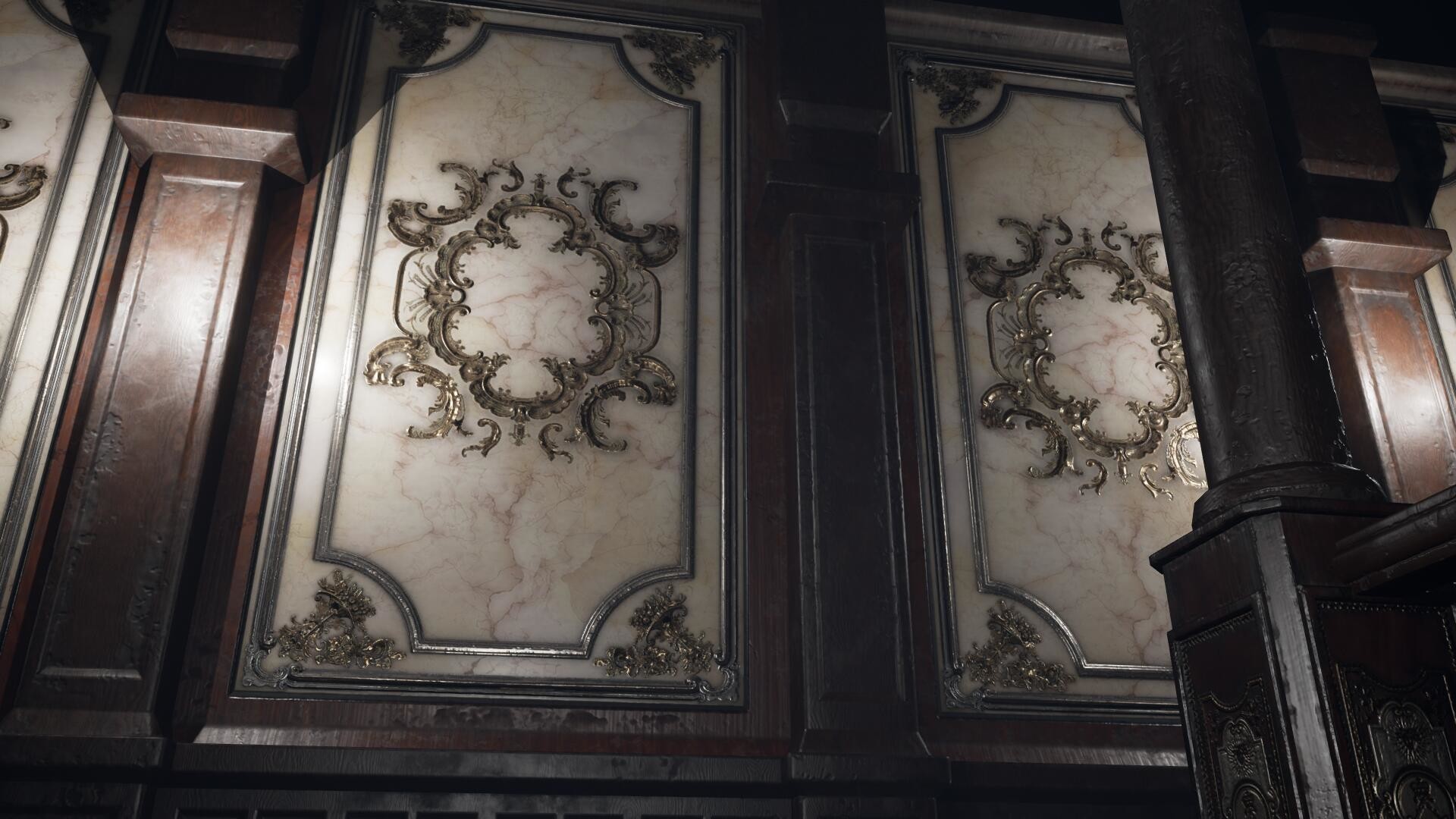
If you loaok at the walls carefully you can see an early pattern that I have modelled onto them. This is because I originally wanted to use a baroque pattern similar to B.O.W. Qin's work:
https://cdnb.artstation.com/p/assets/images/images/005/081/445/large/b-o-w-qin-w5.jpg?1488332739
B.O.W. Qin's ornate wall panels.

Whilst I felt these looked nice, I didn't think using this element within my scene would be furthering my project goals which is to tell a story purely through visuals alone. I wanted to take this opportunity to show the level of decay the mansion has fallen into and didn't think using these patterns were the best way of doing that.

So deleting these, I have gone back into 3DS Max and created some new walls. I want to be able to give each segment of the wall it's own unique level of decay. I'm not sure what the best way to do this will be, but I know that I want to do this all within the material and not rely entirely on using decals in Unreal Engine. I can still choose to add them later on to further the level of decay on the walls,  but I would rather be able to paint unique details in Substance Painter first so that I can make them less repetitive.

My new walls in 3DS Max. Each segment has been individually UV mapped with each one having its own material.
 
It is fortunate that I couldn't decide on the design of my walls sooner because it has led me to learning about Texture Sets within Substance Painter:
A video tutorial explaining texture sets within Substance Painter.

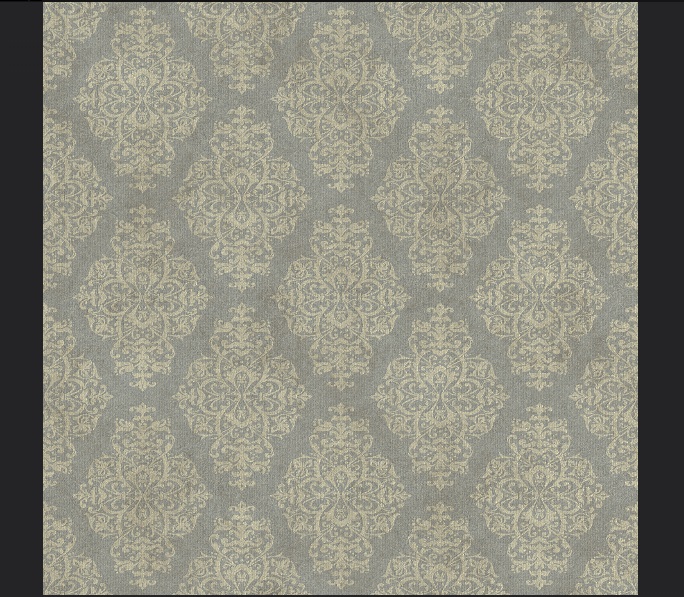
I have decided to use wallpaper to cover my walls. This is because I think wallpaper gives me a lot of room to get creative with the level of dereliction. I can make some strips of wallpaper peel off whilst others can be ripped. I think this will give me a nice mix of visuals and will push the "abandoned" vibe much more than if I had used the baroque pattern.

This is the wallpaper texture that I created in Substance Painter.

After watching the tutorial on how texture sets work, I found that I can load all of my different wall segments and paint them in on go within Substance Painter. I have made a wall paper pattern and layered it up with varying levels of decay. When I begin painting in Substance I will be able to create custom levels of grime and dirt. See an example of this below:

I can paint on varying levels of decay to my wallpaper material. Some I will leave cracked, whilst others will be peeled off.

I have loaded all of my walls into the program. I had to copy my material layers from one set of materials to another in order for this to work. See the image below for what I mean:

Notice the layers tab in the top right of this image. I started by creating one material that I could paint details on to and when I was happy this looked good, I copied all of these layers into the other material slots. I have 8 materials in total.

I've had to copy each layer into a new material slot for this to work. Currently Substance doesn't let you paint them across all the elements within the scene, so I had to cycle between the material slots to paint on certain parts of the walls. Doing this has let me paint each wall segment with its own unique pattern.

So far I am really pleased with the look of these new walls and I feel they are going to be much stronger than what I originally had in mind. After this success I think I will see if there are other areas that I could perhaps make look more decayed.

A close up of the peeled wallpaper I have created in Substance Painter.

ALLEGORITHMIC (2015) Substance Painter Tutorial – Fundamentals 04: Texture Sets [Online Video]. August 13th. Available from: https://www.youtube.com/watch?v=2NFXuFQYjvo [Accessed: 12/07/2018].

Q. B.O.W. (2017), My daily study Ⅱ-Ⅰ [Online Image]. Available at: https://www.artstation.com/artwork/8LndO [Accessed: 12/07/2018].

Wednesday, 11 July 2018

Week 8 - Wednesday: Tutorial Session

In this week's tutorial session I was shown a simple technique to get the most out of my texture creation process within Substance Painter. Using a 4086 x 4086 texture resolution in Substance instead of the default of 2048 x 2048 allows you to get a much cleaner result and avoid aliasing within texture maps. Once I am finished texturing in Substance, I can then save out the 4K resolution texture downscaled to 2048 to reduce the jagged aliasing on the texture map.

https://i2.wp.com/techzei.com/wp-content/uploads/2014/10/Anti-Aliasing.png?resize=1200%2C675&ssl=1
An example of an aliased image against one that has been anti-aliased.

I wish I had known to do this sooner as some or my older assets now have quite bad aliasing on them. I am going to be revisiting my armchair model in particular as you can see below some of the finer details are quite pixelated.

You can see some aliasing occurring on the metallic parts of the chair model.

JEEVA, K. (2015), Anti-Aliasing Key Principle [Online Image]. Available at: https://i2.wp.com/techzei.com/wp-content/uploads/2014/10/Anti-Aliasing.png?resize=1200%2C675&ssl=1 [Accessed: 11/07/2018].

JEEVA, K. (2015) Gaming Graphics Terminology Explained! [Online] Available from: https://techzei.com/gaming-graphics-terminology-explained/ [Accessed: 11/07/2018].

THACKER, J. (2016) 10 Power Tips for Substance Painter and Substance Designer [Online] Available from: https://www.gnomon.edu/blog/10-power-tips-for-substance-painter-and-substance-designer [Accessed: 11/07/2018].

Tuesday, 10 July 2018

Week 8 - Tuesday: Applying Mise-en-scène to my Game Environment

Over the past few weeks I have been better acclimating myself with the concept of mise-en-scène. Whilst the expression is mainly used to describe the design aspects of a film production, I believe the visual storytelling philosophy covered by mise-en-scène is equally applicable to the realm of video games. I have been reading two books on the subject from different authors which I believe have helped focus the visual design of my major project.

The first book I read from author Jane Barnwell titled “Production Design for Screen: Visual Storytelling in Film and Television”, gave me an effective new methodology for evaluating the set design in films (although I intend to apply this methodology to the visual design of game environments). The author has separated the set designers work into five distinct areas of analysis, each of which is given its own chapter.

Below I have broken down the five categories from the book and extrapolated some questions from them that I can then ask myself to help evaluate the design of my environment. They are as follows:

  1. Space – How have I used this to convey the size, scale and geography of the location to the player? 
  2. In and Out. (Or Interior and Exterior) – How does the look of the environment change between the exterior locations to the interiors scenes? Are they all lit in the same way? What are the boundaries of the interior, and do they constrain the player’s actions in any way and can you use this to create an emotion or atmosphere? 
  3. Light – What are the light sources and their position within the environment? Are they a certain colour and does this convey any character or story elements to the player? Have you used the light to illicit any emotions? 
  4. Colour – Have you chosen a specific colour palette and ask yourself what the intention of this was? What is the emotional colour of the scene? Have you used the colour red anywhere and if so, does it denote anything important? 
  5. Set Decoration – Has this been used to explain the character of the person who resides in this location? What period and style have you chosen and is it consistent with the story?
When asking myself these questions I can see some aspects that my environment design has excelled in and others that I have barely considered at all.

I believe so far my “set decoration” has done well in conveying the personality and character of the previous owner. I have populated the environment with ornate objects that speak of an older time when hand crafted objects were far more valued. The classical design of the furniture and main stairway emphasise the wealth of the mansions former occupant. I want to illicit a sense of intimidation as the player explores the mansion and I believe classical architecture does this well.

My use of colour on the other hand has been rather weak. I didn’t give much consideration to this aspect and the interior in particular feels much too washed out. I chose to keep my colour palette in line as much as I could with images of real abandoned homes that I have studied online, however this has resulted in a very plain looking scene. I would like to improve this element as well as my lighting, as it isn’t telling the player anything about the story. Originally I wanted the scene to be set at twilight as a visual metaphor for the sun setting over this once prosperous home, but I think this is an element that will need to be exaggerated. After all video games are a visual medium and they take on an almost “hyper-realism” where everything is a little more extreme than it is in real life.

The second book I read by Jean Whitehead titled “Creating Interior Atmosphere: Mise-en-scène and Interior Design”, highlighted to me the importance of taking advantage of my medium and using each element of mise-en-scène that I have control over to convey the story or message. Whitehead mentions that the use of distinctive visuals themselves can be the primary means in which a director conveys a story. In my case I would like to use the mise-en-scène to literally be the only method of storytelling in my game. Therefore I have decided to exaggerate the visuals of my abandoned mansion and really show off the state of ruin it has fallen into.

To do this I think I will need to add more debris and decay to all of my assets that populate the scene. I intend to study some other environments from games and analyse how they have used mise-en-scène to amplify the storytelling.

BARNWELL, J. (2017) Production Design for Screen: Visual Storytelling in Film and Television. New York: Bloomsbury Visual Arts.

WHITEHEAD, J. (2017) Creating Interior Atmosphere: Mise-en-scène and Interior Design. New York: Bloomsbury Visual Arts.

Monday, 9 July 2018

Week 8 - Monday: LOD Test

Level of Detail or LOD, is a method for simplifying the geometry of a mesh so that the game engine requires less resources to display it in-game. A common use of this is to display a large array of assets on screen at once without a severe hit to the games performance. The LOD will progressively raise or lower the detail of the assets relative to the player's proximity to them. If done effectively the reduced visual quality of the models will often go unnoticed. A noteworthy example of this would be the 2017 game The Legend of Zelda: The Breath of the Wild, in which a vast landscape is fully open for the player to explore.

legend zelda breath of the wild botw hyrule
The Legend of Zelda: Breath of the Wild (2017) uses LOD's to display the vast kingdom of Hyrule that loads in detail the closer the player gets.

Whilst I am certainly not creating anything near the scale of Hyrule, I acknowledge the importance of using Levels of Detail to boost a game's performance. I have several high poly assets that I want to reduce in size and decided to practice using LOD's on one of them. I selected my model of a Corinthian capital because it has about 10k triangles, making it a good specimen to experiment with.

 My Corinthian capital model at about 10k tri's.

I had two options for creating LOD's for this model. I could either use 3DS Max and manually create lower resolution versions of the model, or I could use the in-built LOD feature within Unreal Engine. I chose to use Unreal Engine as I was able to provide a better representation of the technique in action, which you can see in the animation below:

 Here you can see the result of applying different LOD's. Ideally they would be applied the further away from the camera they are, but to better illustrate my results I have manually toggled them on. Notice how drastically the triangle count drops in the top left of the screen per LOD.

I intend to apply LOD's to some of the higher density assets that I have in my scene. I think anything above 5K triangles that will be repeated en masse should have at least one LOD. As I am creating a smaller scale environment I can get away with not using LOD's on a lot of geometry. That being said, I intend to use LOD's to straight up halve the amount of triangles on some assets as the effect is almost unnoticeable from a distance. For the Corinthian capital I will limit the asset to two LOD's as the geometry starts to look very jagged from LOD 2 onwards.

Using LOD's in my environment is important to show that it is fit for purpose as a fully functional game environment within Unreal Engine.

NINTENDO. (2017) The Legend of Zelda: Breath of the Wild. [CARTRIDGE] Nintendo Switch. Kyoto: Nintendo

UNREAL ENGINE. (2018) Creating and Using LODs. [Online] Available from: https://docs.unrealengine.com/en-us/Engine/Content/Types/StaticMeshes/HowTo/LODs [Accessed: 9th July 2018]

Friday, 6 July 2018

Week 7 - Forefront Friday: Death Stranding

Death Stranding (TBA) is an upcoming video game that was first revealed at E3 in 2016. I cite this as an example of the forefront because of its prioritisation of narrative over gameplay in a climate where story driven games are being seen as less viable by larger game studios such as EA games for example.

Death Stranding is a unique case because it has generated an enormous amount of interest without revealing any information about how it will actually play. Because of this, I feel it serves as a great example of video games subverting the medium and challenging what we expect from them. With the casting of high profile actor Norman Reedus as the leading role, I believe Death Stranding is blurring the lines between video games and film. When asked whether there would be a blending between the two mediums, the games director Hideo Kojima responded:

“The process is almost the same. The only difference nowadays is if they are interactive or not. When it comes to the fact of controlling, being able to adjust the camera, I think that will keep changing and this will be an element that will increasingly be combined and maybe the line between these two mediums will disappear.”

Kojima is somewhat infamous for having lengthy cutscenes in his games and I am expecting Death Stranding to be no exception. However it looks like this game will be pushing the boundaries as to what it means to be a cinematic gaming experience. The emphasis on narrative could mean that the game will be unlike anything ever released. Either way I find this to be a very interesting title that could catch the attention of filmmakers eager to experiment with the way visual stories are told.

In terms of my major project development, I am eager to place an emphasis on the story aspect of my game environment, as I believe my skills as an artist will reflect how clearly the story is conveyed through the imagery. If Death Stranding proves to be successful there could be a greater demand for story driven games and my focus as an artist could be directed towards creating similar projects.

KOJIMA PRODUCTIONS (TBA) Death Stranding. [DISC, DOWNLOAD] Playstation 4. San Mateo: Sony Interactive Entertainment.

MAKUCH, P. (2017) EA Talks About Closing Visceral And Single-Player Games. [Online] Available from: https://www.gamespot.com/articles/ea-talks-about-closing-visceral-and-single-player-/1100-6454535/ [Accessed: 14/06/2018]

SHANLEY, P. (2018) 'Death Stranding': Hideo Kojima on Taking a "Different Approach to Single-Player Games" [Online] Available from: https://www.hollywoodreporter.com/heat-vision/death-stranding-hideo-kojima-casting-lea-seydoux-lindsay-wagner-1119548 [Accessed: 14/06/2018]

Thursday, 5 July 2018

Week 7 - Thursday: Lighting Experimentation

Lighting in Unreal Engine is an area that I have little confidence in. Whilst I understand the basic functions of the different types of lights and the other elements such as the skydome, there are some nebulous attributes that I am still struggling to understand. There are numerous values which can be edited within Unreal Engine and each one has a knock on effect that will determine how the final light bake will render. To make matters worse, I am stuck using an outdated version of the software so I am somewhat limited in how I approach lighting my environment. I am aware that later versions of the software have made improvements on the lighting aspect but for now I have to make do with what I've got.

To help me better understand the technical side of lighting scenes, I have been watching a series of video tutorials entitled "The Unreal Engine Lighting Academy". The author covers a variety of topics but one series I am particularly interested in, involves creating the lighting for a real time architectural visualisation scene:

This is the eleventh video in a series on lighting environments within Unreal Engine. This video focuses on a lighting setup for an architectural visualisation scene.

The video strips out the default lighting of the engine and rebuilds all the elements again from scratch. Because of this I was able to gain a better understanding of what everything does in the engine as I put them back into the scene one at a time. Below you can see a new scene I created in Unreal Engine so that I could quickly test different lighting settings without waiting for lengthy bake times.

This is a new scene that I created with my own custom lighting setup.

I wanted to see the effects of an HDRI lit skydome within an environment. I stripped out all the lighting elements and created a giant sphere within the scene. Following the video tutorial I found a good HDRI image and applied it to the sphere within the scene. What you see in the images here is the baked lighting from the HDRI skydome.

This image shows only the results of the skylight I created. Take note of the soft shadows I was able to achieve.

I like the subtle lighting the HDRI image is giving the environment. I think this will prove quite helpful for my main scene as the image itself would work as a nice backdrop for my mansion environment.

The HDRI skysphere works as a nice background for the environment.

In the video tutorial, the author mentions that he is using a multi-bounce skylight plugin. The effect of which is to more accurately bake the lighting. Below you can see the effect of a single bounce compared to multiple bounces.

A lighting bake created in Unreal Engine that demonstrates the difference in lighting quality between a single bounce and multiple bounces from a skylight. On the left is the default value and on the right is the multi-bounced skylight.

I have cropped the image below to give a better look at the effect the multiple bounces is having on the scene.

Multiple bounces from the skylight cause indirect lighting to be reflected on surfaces.

Originally Unreal Engine only allowed a single bounce for the skylight and I fear this may be true for the version I am using. I want the lighting bake to appear as realistic as I possibly can and may need to simulate these effects if need be, as I can't install custom plugins on the school machines.

51DAEDALUS. (2017) Unreal 4 Lighting Academy - Session 3.1 [Online Video]. 13th May. Available from: https://www.youtube.com/watch?v=pIbpHCtmDjo. [Accessed: 05/07/2018].

LUOSHUANG. (2015), Lightmass: multi-bounced sky lighting. [Online Image]. Available at: https://forums.unrealengine.com/development-discussion/rendering/112827-lightmass-multi-bounced-sky-lighting?140006-Lightmass-multi-bounced-sky-lighting=. [Accessed: 05/07/2018].

Wednesday, 4 July 2018

Week 7 - Wednesday: Tutorial Feedback Using Polycount

Posting my work on Polycount

During the tutorial session my friend showed her work to the class and demonstrated how she had used Polycount to gather feedback from professional artists. My tutor recommended me to start doing the same as there are still some weeks remaining for the project, and this would give me time to take on feedback and make changes should I receive any.

I have often held off on posting works-in-progress online as I get worried people will judge my abilities based off of my unfinished pieces. On further consideration however I believe posting my progress on forums like Polycount is an important vector of dissemination. I will not only be able to receive valuable critique and exposure of my work to potential employers, but it will also force me to look at what other artists are working on and be mindful of how they are approaching projects. I believe this is all part of good networking practice and I want to start developing it seriously.

Update:

It looks like it's already working. I recieved a comment from a big inspiration of mine, B.O.W Qin:


B.O.W Qin's Artstation page is full of highly detailed mansion environments and this has been providing me with a trove of inspiration during my major project development:

QIN, B.OW. (2017), Scene lighting test samples[UE4] [Online Image]. Available at: https://www.artstation.com/artwork/VKLYg [Accessed: 06/07/2018].

I have been actively comparing my major project with Qin's work, so it is incredibly rewarding to have received acknowledgement from him. I will continue to post further updates on Polycount as my major project progresses.

Tuesday, 3 July 2018

Week 7 - Tuesday: Bringing the Exterior into Unreal Engine

I have begun bringing the exterior of my environment into Unreal Engine. The majority of the assets all use either the brick material that I created or the grey limestone for the base. There are some elements that will require unique materials such as the triangular roof pediment.

The exterior face of the mansion in Unreal Engine.

You can see how I have applied the brick material to the walls. I have used parallax occlusion mapping to give them a bit of depth. I will be adding grime and other decals to the bricks to make it look less repetitive.

Close up of my brick material on the walls of the mansion.

The environment is feeling very sterile and empty at the moment. I've decided to strip out all the lighting and placed a neutral light source in the scene, so that I can get a good sense of how all the materials will look without interference from strong contrasting light.


As you can see in these images there are still a lot of things that need to be brought into the engine. I am currently working on the roof at the moment. It is a high priority of mine to make it look as good as possible as it covers such a large area of the mansion.

Creating a Custom Roof Material

I have started to create a seamless roof material in much the same way that I created my bricks. I found this to be a good technique when creating my brick material because using real geometry lets you easily generate height maps, and these were very effective with parallax occlusion mapping.

Below you can see how I have lined up the tiles on a 2048 x 2048 plane so that the pattern repeats evenly:

My roof tiles aligned to a 2048 x 2048 plane for easy texture tiling.

I've angled the tiles so that there will be some depth when it comes to the parallax occlussion mapping:

You can see how I have angled the tiles so that I get some depth with the height maps for the parallax occlusion mapping.

Here is the texture as it appears in Substance Painter:

The roof tile texture in Substance Painter.

I've baked the geometry onto the texture and now I need to hook it up in Unreal Engine. Once I have got the basic materials set up within my scene, I'm going to rebuild the lighting and do some experimentation to get everything looking the way I imagine.

Monday, 2 July 2018

Week 7 - Monday: Custom Brick Texture

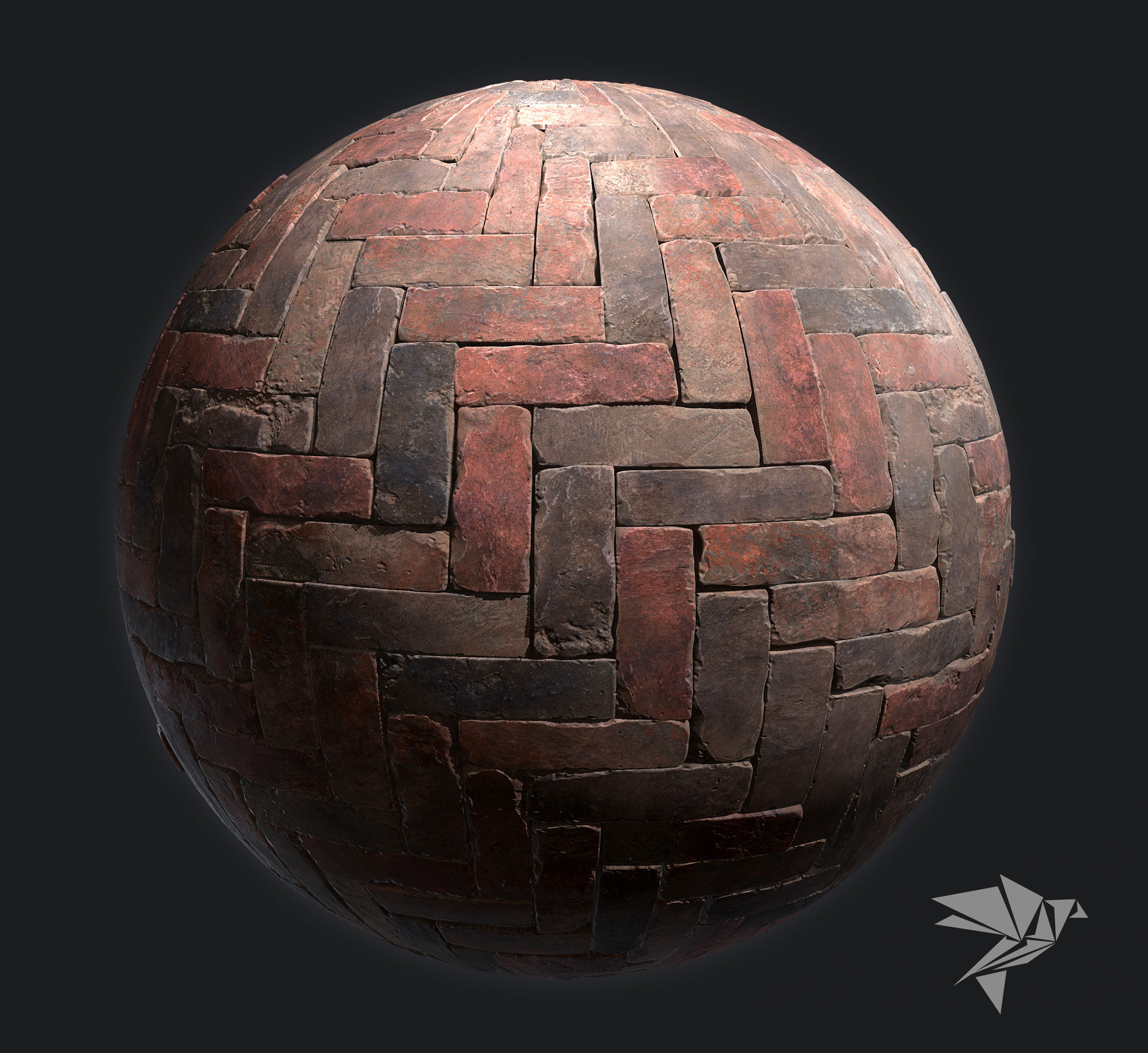
I have started bringing the external features of my mansion into Unreal Engine. I decided as I was doing so to try and create my own brick material for use on the exterior walls of the mansion. I was inspired by some custom materials that 3D game developer Mark Ranson has been posting on his Artstation page, which he created by baking high poly geometry down into a tileable texture.

Mark Ranson's brick material inspired me to create my own.

I felt it would be very useful to try doing this for myself, as I would be able to create the brick material to my own specification rather than rely on Google images and hope that it would have what I was looking for.

I started by creating a single brick model and tessellating the mesh so that it was dense enough to start adding details. I then stacked some editable modifiers onto the mesh so that I could add differentiation to each individual brick and avoid obvious tiling.

My brick model with added noise and displacement modifiers to help vary its shape.

Once the brick setup was complete, I created a 2048 x 2048 plane and subdivided it evenly so that I could accurately space the bricks across it:

By spacing the bricks evenly across this plane I intended to create a completely seamless texture.

I then rotated some of the bricks to create a little more variation in the pattern, as I felt it would look strange if they were aligned perfectly with one another:

The rotated bricks add some further variation to the pattern.

I then exported the 2048 x 2048 plane into Substance Painter and baked the high poly geometry onto it. You can see that the bake still looks rather flat. I intend to add parallax occlusion mapping as Mark has done with his material to help add some height to the texture.

A flat plane baked with the normal maps generated by the brick pattern that I made.

I added some standard Substance Materials to the texture and painted some of the bricks a slightly different colour to make it look more varied. I ended up toning this done however as it made the texture look very repetitive when it was tiled over a large surface:

The painted texture in Substance Painter.

Once I was happy with the look of the material I loaded it into Unreal Engine. I was pleased that I succeeded in creating a completely seamless texture but I am worried it will look unrealistic if it covers such a wide area:

My seamless brick texture as seen in Unreal Engine.

I have tried to make the tiling less noticeable by placing columns in front of open areas. So far I haven't applied the parallax occlusion mapping to the material yet and this may help to break it up further.

The brick material applied to an external wall.

As a test I think this was a successful exercise. I was able to create a seamless texture in a relatively short amount of time and should I need to do something similar again in the future, I know I can rely on this method.

Whilst the technique is sound, I think that the overall appearance of the material needs improvement. When comparing this material to something created using photogrammetry techniques, mine looks very fake. I would like to start blending this material with dirt and decals in Unreal Engine to help ground it in some realism.

RANSON, M. (2018). High-Quality PBR Industrial Herringbone Brick [Online Image]. Available at: https://www.artstation.com/artwork/59X1A [Accessed: 02/07/2018].