Monday, 11 June 2018

Week 4 - Monday: Project Management Review

At the start of week 4 I have got several assets created for my environment such as my grandfather clock and fireplace. Now I would like to complete the interiors that house them. My schedule has only given me a week left to do the remaining environment modelling, and I now realise that I was being over optimistic to think that I would have most of the environment completed by this stage.

 My chart with only a week left  to model the environment!

I definitely miscalculated the time it would take to model the environment, and so far I have found that I have been doing other tasks alongside the environment modelling phase. I am going to reorganise this schedule as I think isolating the different activities does not reflect how I work. I have noticed myself switching between activities quite frequently and I think this has proved beneficial so far because I have started using Unreal Engine much earlier than I would have if I had stuck to my original plan. Because of this I was able to innovate my production pipeline and speed up my texture creation process amongst other things. I also think it is refreshing to be able to switch to a different assignment when one task becomes too repetitive. This has given me a fresh perspective on my project as I am not looking at it purely in 3DS Max but across a range of programs from Unreal Engine to Substance Painter.

Friday, 8 June 2018

Week 3 - Forefront Friday: The Artwork of Jonas Ronnegard

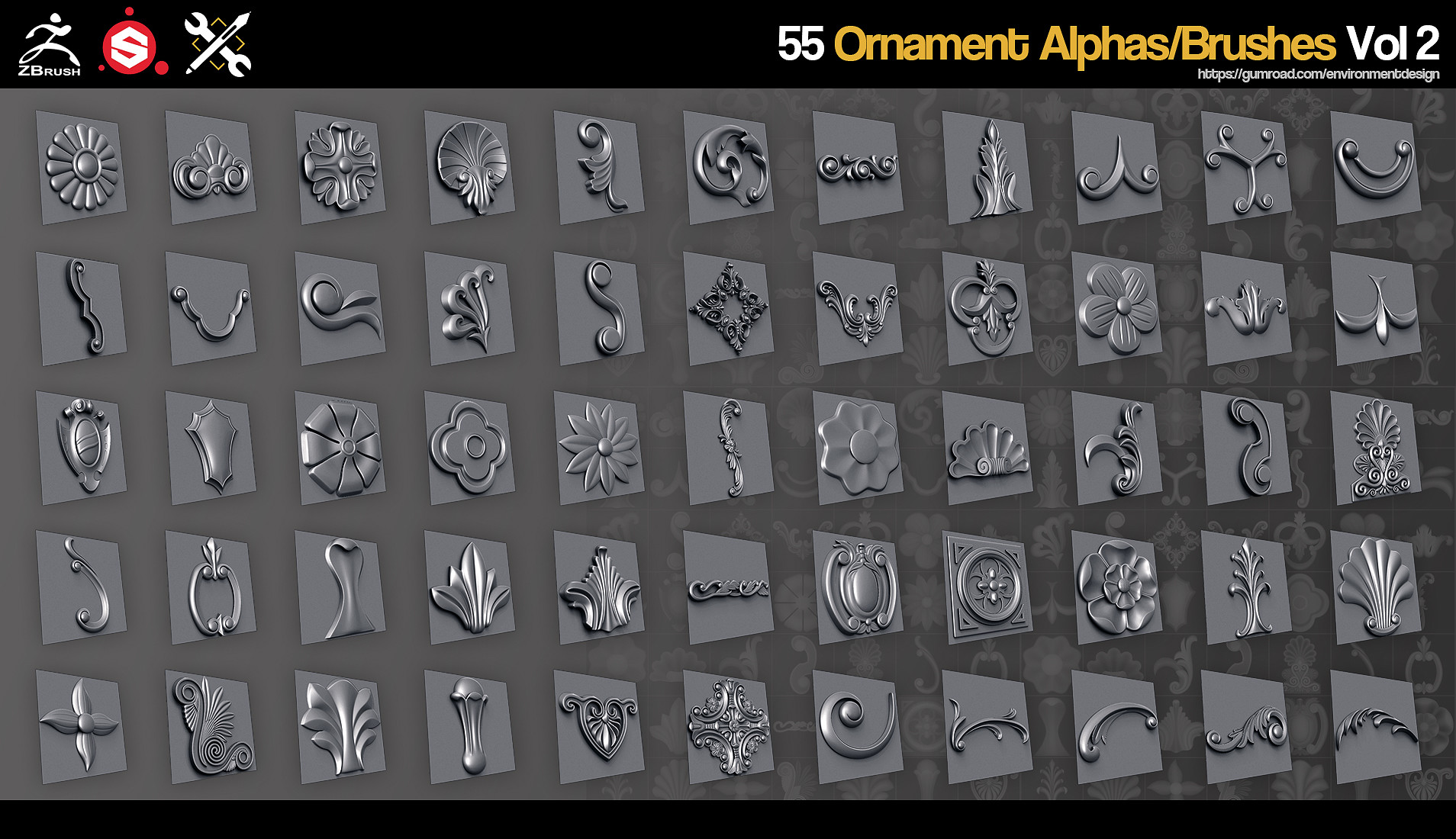
Jonas Ronnegard is a freelance environment artist who has built an arsenal of tools and resources for other artists to purchase. I was very impressed with his portfolio on Artstation and one video in particular, where he demonstrates the effectiveness of his ornamental brushes in ZBrush made my jaw drop. 

You can watch the video here at: https://www.youtube.com/watch?time_continue=119&v=dNUHjB4YK5c

https://cdnb.artstation.com/p/assets/images/images/007/197/755/large/jonas-ronnegard-main03.jpg?1504387560
A selection of the alpha brushes that Jonas has created.

This is honestly why I need to start using ZBrush as Jonas showcases with ease how quickly he was able to create ornate details and then texture them in Substance Painter. When it comes to my own workflow I spend a lot of time carefully positioning details within 3DS Max and then exporting them for hard surface transfer. Whilst I feel I have gotten the workflow down, when compared to the cutting edge brush details created by Jonas, I obviously could be a lot faster in this area. For me this seems the quickest way to simulate details because when I start to use a lot of high poly models in my 3D scenes the computer performance starts to struggle. This is a problem not present in ZBrush as the software can display an incredibly high amount of polygons without performance loss.

Studying Ronnegard's portfolio I can already see areas that I need to improve in such as organic modeling. As an environment artist I need to make sure I am capable of both hard surface and natural details. Currently my portfolio leans very heavily toward architectural models and if I am to reach the high standards set by Jonas Ronnegard, I will need to prove that I can diversify whilst retaining a consistent quality throughout my work.

RONNEGARD, J. (2017). JRO - 55 Ornament Brushes/Alphas Vol 2. [Online Image] Available at: https://www.artstation.com/artwork/5ggxA [Accessed 08/06/2018].

JROTOOLS. (2017) Ornament Alphas/Brushes Vol 2 - Preview. [Online Video] September 5th. Available from: https://www.youtube.com/watch?time_continue=119&v=dNUHjB4YK5c [Accessed: 08/06/2018]

Thursday, 7 June 2018

Week 3 - Thursday: Grandfather Clock

A big source of inspiration for me is the work of artist Joel Zakrission from DICE game studios. Joel has lots of intricately modelled assets on his Artstation all of which are extremely high quality.

https://cdnb.artstation.com/p/assets/images/images/003/120/839/large/joel-zakrisson-mansion4.jpg?1469958977
ZAKRISSON, J. (2017). Mansion Hall. [Online Image] Available at: https://www.artstation.com/artwork/deoLe [07/06/2018].

I think his mansion environment is fantastic as it features so many varied assets that really help bring the scene to life. I particularly like the grandfather clock so I went about creating one for my scene.

Here's the model as seen in 3DS Max:

My grandfather clock asset. From left to right: the low poly, wireframe and high poly model.

For the clock face I reused the swirly decals that I had modelled for other assets like the fireplace and the sconce:

The high poly clock face.

I used material ID masks in Substance painter to help me quickly apply a metallic gold material onto the swirly details. In the images above notice that the details on the high poly models are all an orange colour. This was how I generated the material ID's for the texture.

You can see how the finished asset looks in my Unreal Engine scene below:


Currently I feel that some elements of the clock still need work. The clock hands seem far too dark and I can't see any ot the detail on them. I also feel that lighting my scene effectively will be crucial in getting comparable results to Joel Zakrisson, as he has used a complimentary blue light to add some contrast to his scene.

I think the asset is a success from a technical standpoint as it has a very low polycount and readable silhouette. In fact I probably could have gotten away with using more polygons if I wanted, as it is a hero asset that will only feature once in the environment.

I used this as test to see if I could create a high poly game ready asset. I intend to make several more assets of this quality to give myself a greater chance of employability by diversifying my portfolio.

Wednesday, 6 June 2018

Week 3 - Wednesday: Tutorial 2

Based on the feedback that I received from my tutorial session this week, I have tried to improve my online portfolio by making it easy for potential employers to navigate. I realise that before it wasn't obvious as to which project was using real-time graphics and which ones were pre-rendered. I have added icons to my project thumbnails to make things a little less confusing:

My updated Artstation portfolio.

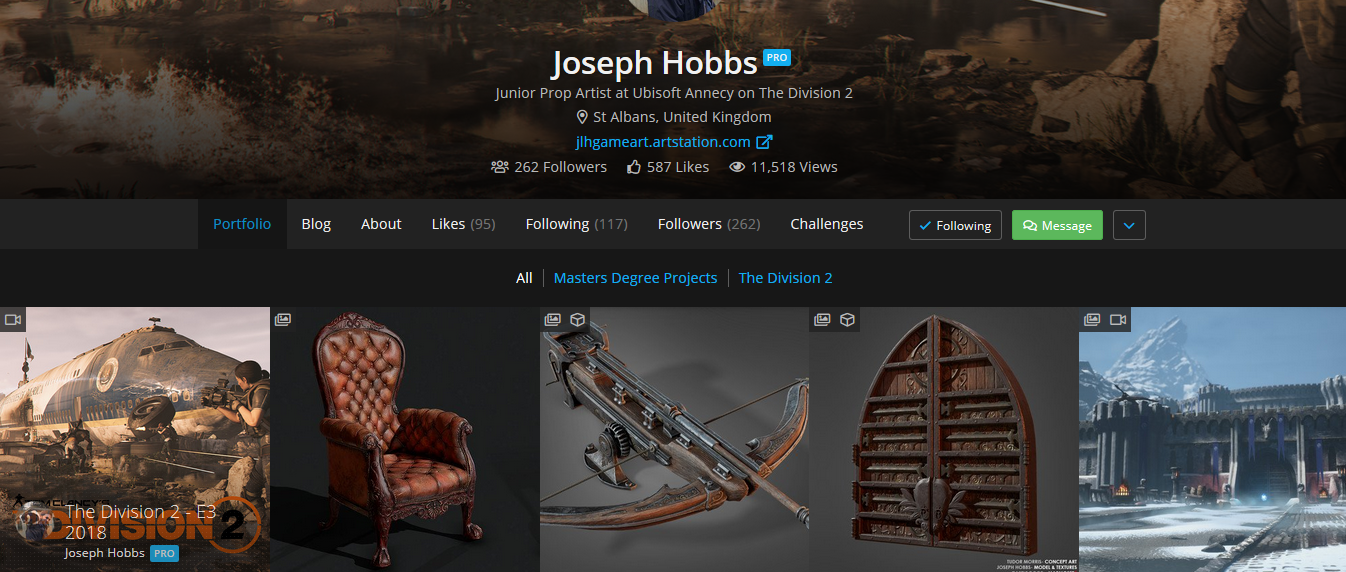
I am going to be applying for jobs this month and I want to ensure that my online portfolio is ready. Based on other feedback I will be adding some more pieces that show off individual assets. Similar to artists like Joseph Hobbs, who was a student last year. He has included some pieces on his Artstation page that showcase individual high quality assets.

 Joseph's portfolio has a strong presence of high quality assets that show he can create game ready props as well as environments.

I feel that if I include these in my portfolio as well it will show that I can model props that adhere to industry practice, something that my current portfolio isn't doing at the moment.

JOSEPH, H. (2018) Artstation - Joseph Hobbs. [Online] Available from: https://www.artstation.com/jlhgameart [Accessed: 06/06/2018]

Tuesday, 5 June 2018

Week 3 - Tuesday: Completed Entrance Hall

I have finally completed the modeling for the entrance hall area. I have created a render in 3DS Max and hidden some of the walls so you can see inside better:

A render of my entrance hall interior.

The next phase will be to UV map some of the more complicated features and ensure that everything goes into the engine correctly.

With the entrance hall area I have tried to conform to the requirements of Unreal Engine 4. As such when I bring this geometry into the engine, I will need to make sure that the elements are brought in efficiently. To illustrate what I mean, I have taken the time to break down this area into how I want to bring the assets into the engine. By doing this I hope to ensure that my assets are fit for purpose within Unreal Engine, making it easier for me to work with all of the 3D elements that I will be using.

A breakdown I created to help me bring my assets into Unreal Engine.

I have categorised my assets into three types:
  • Individual assets: These are the models that will come into the engine as separate entities. For example I am keeping the bannister posts individual assets because it's easier to position them without error in 3DS Max first.
  • Repeated assets: These are models that I can easily repeat in Unreal Engine without error. I will only import one of this type and then position it repeatedly in the engine.
  • Single asset: This represents a complex set of models that I will be importing into the engine as a single asset for easy placement.
Because of the complex shape of this room, I haven't used modularity with some of the assets. Making each bannister post an individual asset for example is highly problematic as I have what could be just a single asset being imported into the engine multiple times. The awkward layout of the entrance hall has made it quite difficult to use modularity in this case and whilst I acknowledge this is inefficient, I don't want to risk having any noticeable gaps in the balcony railings. Other assets are more forgiving however and I think I can position these in the engine without any problems.

The majority of the surfaces in the entrance hall are wooden, so I already have my material instance setup to make the texturing process quick. The next task will be to ensure that everything is imported into the engine correctly so that I can finish the first room of my environment.

Monday, 4 June 2018

Week 3 - Monday: Stairway Rug

I have been looking at some other game environments with a similar theme to my project and found this piece by artist Zack Parkinson:

PARKINSON, Z. (2017). Abandoned Scottish Manor. [Online Image] Available at: https://www.artstation.com/artwork/BDXzl [04/06/2018].

I feel that the ruffled carpet on the stairway gives a lot of credibility to Zack's environment because it is slightly messy, which adds a touch of realism to the scene. I was curious about how he went about creating this asset and I found this article from 80 Level.com which provided a lot of helpful information on how Parkinson created his environment.

80 LEVEL (2017) Tips and Tricks of 3d Interior Production. [Online] Available from:
https://80.lv/articles/tips-and-tricks-of-3d-interior-production/ [Accessed: 04/06/2018]

Zack stated that he used Marvelous Designer to create the folds of his carpet. Unfortunately I didn't have access to this software, so I ended up creating my stairway carpet entirely within 3DS Max. I still used the ProOptimiser modifier that he suggested to reduce the poly count at the end. My method had the drawback of not being able to create the final UV map first as I wasn't simulating fabric but manually creating the folds onto the geometry myself. This was a time consuming method but I did come up with some creative solutions to speeding the process up a bit. In future I would like to invest in learning Marvelous Designer as any tool that can make my workflow more efficient will always be worth it in my opinion.

I started by extruding the faces of my existing stairway and adding cuts along the surface of the faces. Adding additional edges will cause the geometry to "tighten" in those areas when smoothed. You can see the results of this in the image below:

The folds in the geometry were modelled manually and then smoothed out using the Turbo Smooth modifier.

On the left hand side is the model with the additional edges that I added to create the appearance of fabric. On the right side is the model once it has been smoothed with the Turbo Smooth modifier. You can see this is quite a simple way of adding creases to geometry. A benefit to this method is that I had complete control of where I wanted the creases to appear, something that simulations don't always give you.

The finished carpet.

Once the model has been smoothed, the resulting polygon count of the geometry is very expensive:

The wireframe view of the high poly model.

The folded details at the end of the carpets were simulated using the Cloth modifier in 3DS max. I chose to simulate these details instead of modelling them as I had done for the smaller creases on the steps. I felt as these folds were going to be far more complex, it would be easier to get a realistic looking result by using the Cloth simulation rather than modelling them myself. I created a new poly plane and applied the Cloth modifier alongside a series of collision objects for the cloth to interact with. You can see the simulation below:

An animation of my cloth simulation in action.

Once the simulation was complete and I was happy with how the folded fabric looked, I then converted the plane into an editable poly and stitched it together with my main carpet model. Once it was attached I then turbo smoothed the geometry and added the Shell modifier to give some thickness to the carpet:

The completed carpet combined with the folded cloth simulation.

With the high poly model completed I then added the ProOptimiser modifier to greatly reduce the polycount of the model:

Creating a low poly carpet by using the ProOptimiser modifier. You can see how the mesh has been converted into triangles making it ideal for game engines.

I may have perhaps reduced the details of the carpet too much, as I now have a lot of ugly jagged edges. I wasn't sure if I could get away with more polygons for a single asset when it was already quite heavy to begin with. If I were to do this again I probably would increase the poly count, as visual quality is more important for this project then whether the thing is optimised well. Zack Parkinson seemed to keep his carpet quite high poly to preserve the details and this is something I wished I had done as well:

PARKINSON, Z. (2017). ProOptimizer - Preserve UV's. [Online Image] Available at: https://80.lv/articles/tips-and-tricks-of-3d-interior-production/ [04/06/2018].

With the low poly model complete, I created my UV maps and exported both the high poly and low poly models into Substance Painter for normal detail and ambient occlusion baking. You can see the base colour, normal value and ambient occlusion pass on the texture below:

The results of baking the high poly model onto its low poly counterpart in Substance Painter.

I looked at some images of stair carpets online and wanted to add some additional details to the texture such as a pattern running along the edges of the carpet. To do this would be a little tricky as I would need the pattern to adhere to the folds of the fabric in order to maintain realism. I started by selecting one of the ornate details that I had made earlier to use for my pattern:

The detailed 3D model I chose to use as the trim pattern on my carpet.

Once I had my details selected I used a feature within 3DS Max called the Align Spacing Tool. This lets you select geometry and make it follow along a spline path:

Taking a model and making it conform along a spline.

You can see this was a helpful tool for creating a pattern for the edge of the carpet:

The model following the spline path. I can increase the amount of times the pattern repeats along the selected path if I wish.

I exported my baked texture from Substance Painter and applied it to a square plane within 3DS Max. This enabled me to trace out a spline path along the edges of the carpet. The spline paths are represented by the thick white lines:

Creating spline paths along the edges of my carpet.

Below you can see the pattern following along the spline path:

My 3D model has been applied to the spline paths along the edges of my carpet texture.

Because these are all 3D models, I then had to turn them into a texture so that I could apply the pattern to my material in Substance Painter.

The pattern is comprised of hundreds of 3D models and needs to be turned into a texture.

Once the pattern was finished I then rendered the scene from a top-down orthographic view in 3DS Max. I then took the render into Photoshop and created this alpha mask for the pattern that I could use in Substance Painter:

I created this alpha mask from my render in 3DS Max.

This let me add my pattern to my material in the precise location that I wanted it. Once the alpha mask was in Substance Painter it was a quick process to create the final look of the material. You can see the finished stairway rug below:


Here's how it looks in the scene so far:


Overall I am quite pleased with the asset. There are still a few things I am going to change such as the underside of the carpet which looks a bit strange when you are close to it in the engine. I will be aiming to add more assets like this to the environment as I feel the 'messy' look of the carpet helps to show that the mansion is abandoned.

Whilst it did take a long time to setup, I do think the results of my technique were successful. However if I can save time I would still like to learn how to use Marvelous Designer as I cannot afford to spend this amount of time on every asset in my scene.

I'm going to be using 80 Level a lot more from this point onward as they have lots of helpful level breakdowns that I would like to reference to help me get better as an environment artist and perfect my workflow.

Friday, 1 June 2018

Week 2 - Forefront Friday: Scorn

Scorn (2018) Scorn is an upcoming first-person shooter horror game set to be released this October. The game features striking visual designs inspired by the work of H.R Giger. I find this game to be an interesting example of the forefront because it is a modern take on an artist's work that has influenced a lot of iconic games over the past few decades. I find it particularly interesting to see how this art style has been translated to the high fidelity 3D environments seen in Scorn.

 An early trailer for the game Scorn.

Dark Seed is a game from the early 1990's with a surrealistic art syle based on H.R. Giger's artwork. It is exciting for me to see how Scorn has been inspired by the same artist and brought this visual style into the modern technological age, allowing for fully interactive 3D alien landscapes.

https://proxy.duckduckgo.com/iu/?u=https%3A%2F%2Fwww.myabandonware.com%2Fmedia%2Fscreenshots%2Fd%2Fdark-seed-1dl%2Fdark-seed_14.png&f=1
A screenshot from the 1992 game Darkseed. The game features environments based on the work of H.R. Giger.

The developers have claimed they have designed the game around the idea of "being thrown into the world", and as such, very little context is given about the game's setting. This is an element that I love in video games, as ambiquity and trying to decipher the story for yourself is a big draw for me and is something I wish to include in my own work.

The developers have explained that they want to make the unsettling environment feel like a character in itself and this is an amazing concept that lends itself to a lot of creative visual storytelling. I want my own environment to almost take on a life of its own. As the player explores deeper into the mansion's dark halls, I want it to feel like they are slowly being swallowed by the monstrous structure.

CYBERDREAMS (1992) Dark Seed. [DISC] Amiga, MS-DOS, Amiga CD32, Macintosh, Sega Saturn, PlayStation. Calabasas: Cyberdreams.

EBB SOFTWARE (2018) Scorn - Part 1 of 2: Dasein. [DOWNLOAD] Microsoft Windows. San Francisco: Humble Bundle.

GAME NEWS OFFICIAL (2016) SCORN Official Trailer (2017). [Online Video]. July 9th. Available from: https://www.youtube.com/watch?v=BKTkCa5nB_8 [Accessed: 01/06/2018].

VENTURES, E. (2017) Exclusive Interview with Lead Developer of Scorn. [Online] Available from: http://opiumpulses.com/article/189 [Accessed: 01/06/2018]

Thursday, 31 May 2018

Week 2 - Thursday: Ornate Details and Sconce Model

Throughout opulent architectural design, I have noted the prominence of sweeping ornate decals. This is a design element that is particularly common within the Baroque architectural period and the excessive amount of detail exemplifies the elegance and decadence of the people who used to reside in such places.

Baroque decals.

Because these designs are very much a staple of classical architecture, I felt my mansion environment would feel incomplete if it did not include them. The owner of my mansion was someone who sought to impress, therefore it makes logical sense that his home would replicate the excessive style of the Baroque architectural period.

I decided to invest some time into creating different elements that I could repeat throughout my environment:

I created these details in 3DS Max. I kept them low poly so that I could easily simulate curved surfaces by applying the turbo smooth modifier to them.

As a test, I combined my newly created details together to make a sconce prop which is a type of light fixture that protrudes from a wall.

The elements combined together to create the main body of the sconce asset.

I wanted to create a small asset that I could show all of the details I had created in a concise way. I have added this piece to my Artstation portfolio and will continue to update it as I create more assets.

The elements combined together to create the main body of the sconce asset.

Below you can see how the asset looks in the game engine so far. It's looking a little blown out on the candle sticks at the moment so I will need to edit the material's attributes for better integration within the environment.

The completed sconce in the Unreal Engine environment.

JUST IN LOVE WITH BERN.I (2018), Fabulous Shangri-la Hotel Paris [Image]. Available at: https://justinlovewithberni.com/fabulous-shangri-la-hotel-paris/ [Accessed: 31/05/2018].

SUMMERSON, J. (1980) The Classical Language of Architecture. Revised and enlarged ed. London: Thames and Hudson.

Wednesday, 30 May 2018

Week 2 - Wednesday: Symposium Session 1

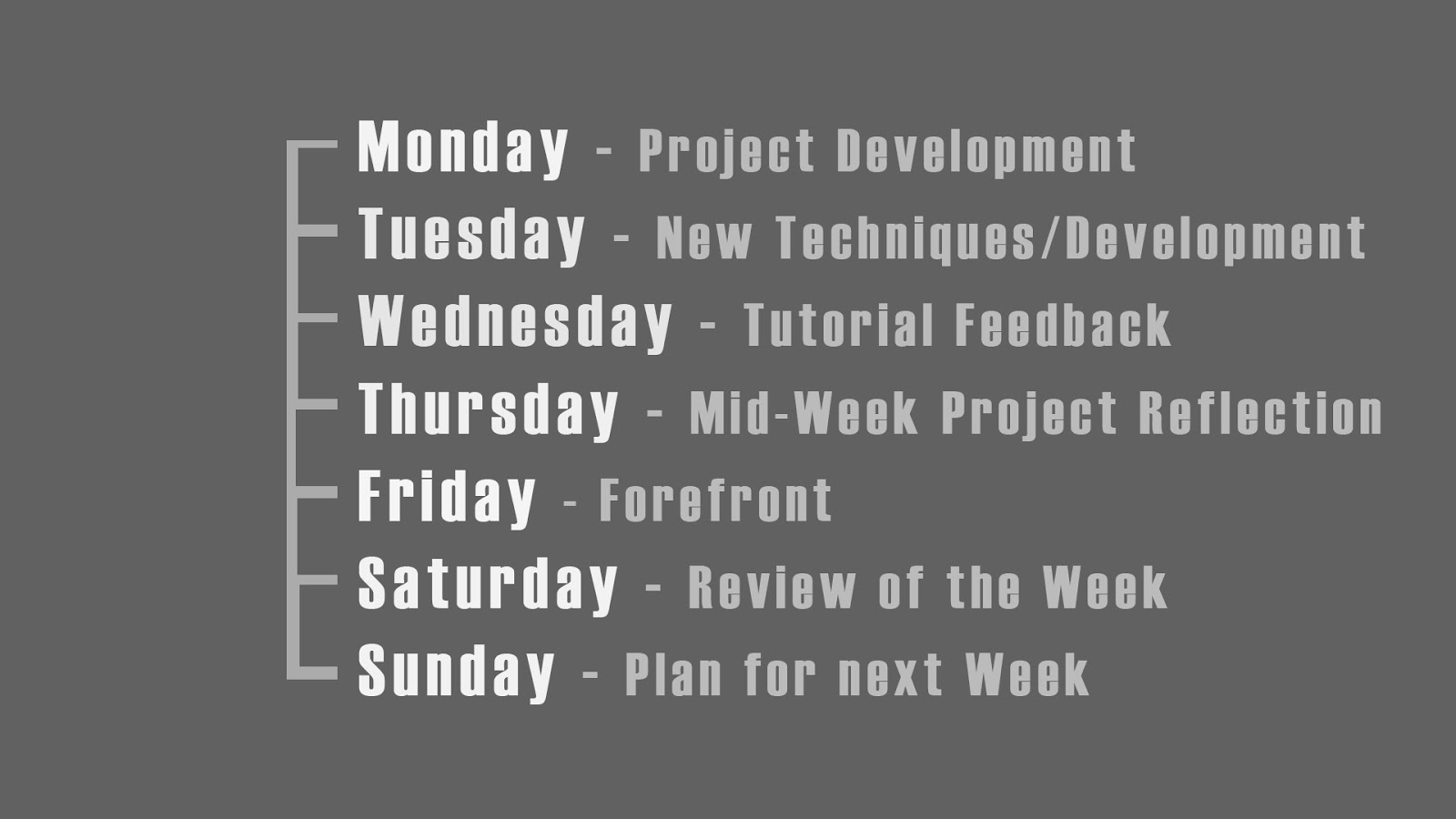
Today I had my first symposium session where I discussed with my peers how we would each be documenting our projects. I and a few other students brought up that we would be adopting a habitual approach where we would follow a rigid structure in regards to blog posts. You can see below an image from my presentation where I highlight my posting schedule:


Here you can see that I have suggested dedicating some days to a specific theme. I feel this style could help me keep things organised and also make it easy to summarise my development when it comes to my major project presentation as all the relevant posts can be organised by week and day.

To my surprise lots of people really liked the idea of dedicating certain days to a theme, such as my "Forefront Friday" posts. It was interesting to note that a lot of people weren't going to adopt this structure for their documentation and it was nice that I inspired some people to try my approach!

Whilst I feel segmenting the days like this is useful, I will most likely talk about different topics on some days depending on what I have achieved that week and my overall progress. I also won't be posting on the weekends because it seems unnecessary to do so when I discuss my project planning during the week.

I think my biggest takeaway from the symposia session was that forcing myself to take an almost ritualistic approach to documenting my work is the right way for me to go about doing things. This way I am forcing myself to constantly examine the forefront every week and not just when I feel inspired to do so. I think this is important for me as I tend to get too absorbed in my projects, and I believe it would be beneficial for me to take a step back and consider my work in relation to the front runners of the industry.

Tutorial Feedback

During my tutorial session I got an answer to an issue that was causing a lot of slowdown in my workflow. I was shown a method for surface transferring details without the need for baking each component of a model separately. This had been quite time consuming when creating the first part of my fireplace as I was having details being projected onto the wrong surfaces. My solution had been to bake the individual pieces separately which worked, but cost a lot of time when I had to edit the individual maps back together in Photoshop.

Fortunately with this new method I can bake all my details at once by moving the individual components of the model further apart from one another. This way I don't have to worry about projecting undesired details onto the wrong surfaces.

For the upper part of my fireplace model I have moved the individual details apart from another so that the surfaces do not overlap once I bake them in Substance Painter. The Red line represents the distance of the projection around the geometry. The further apart, the less likely the projections will overlap.

This technique is called "exploding" and in the image above you can see how I have moved the objects of the top part of my fireplace far apart so that the cage distance between them does not overlap. You can see the results of the bake below:

This is the Occlusion, Roughness and Metallic map that was created in Substance Painter from my exploded geometry. It was made without the need for cleaning it up in Photoshop as I had to do with the lower part of the fireplace.

I will be using this technique for the majority of my assets and I am SO glad I learnt this early on as it was a huge time saver for this asset. I am confident in the utility of this technique and will be permanently adding it to my creative arsenal.

Tuesday, 29 May 2018

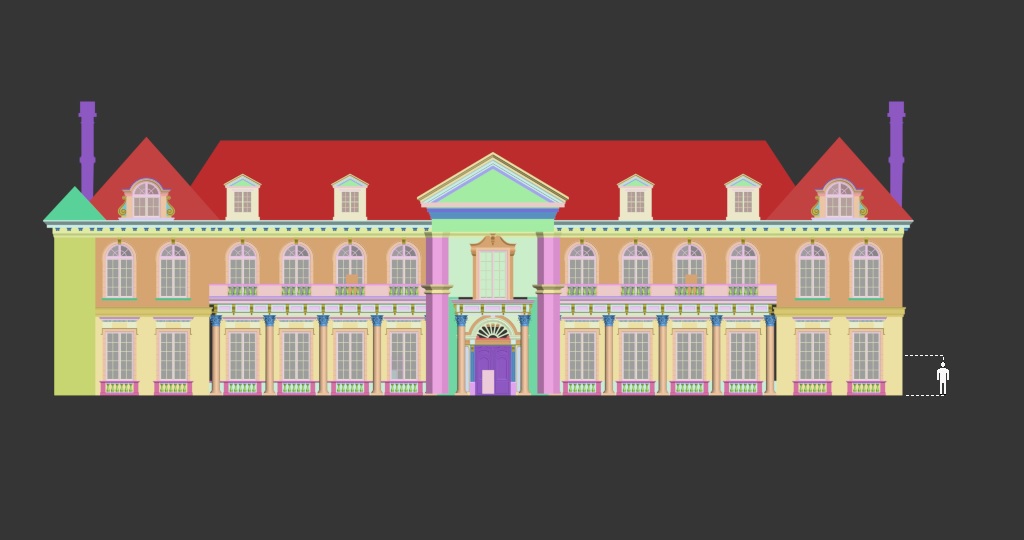
Week 2 - Tuesday: Mansion Exterior

This week I have finalised the exterior face of the mansion environment. I am eager to include this part of the environment within my Unreal Engine scene, as I feel having an exterior provides players with a sense of place and scale rather than having them start inside the mansion.

Completed front section of the mansion exterior.

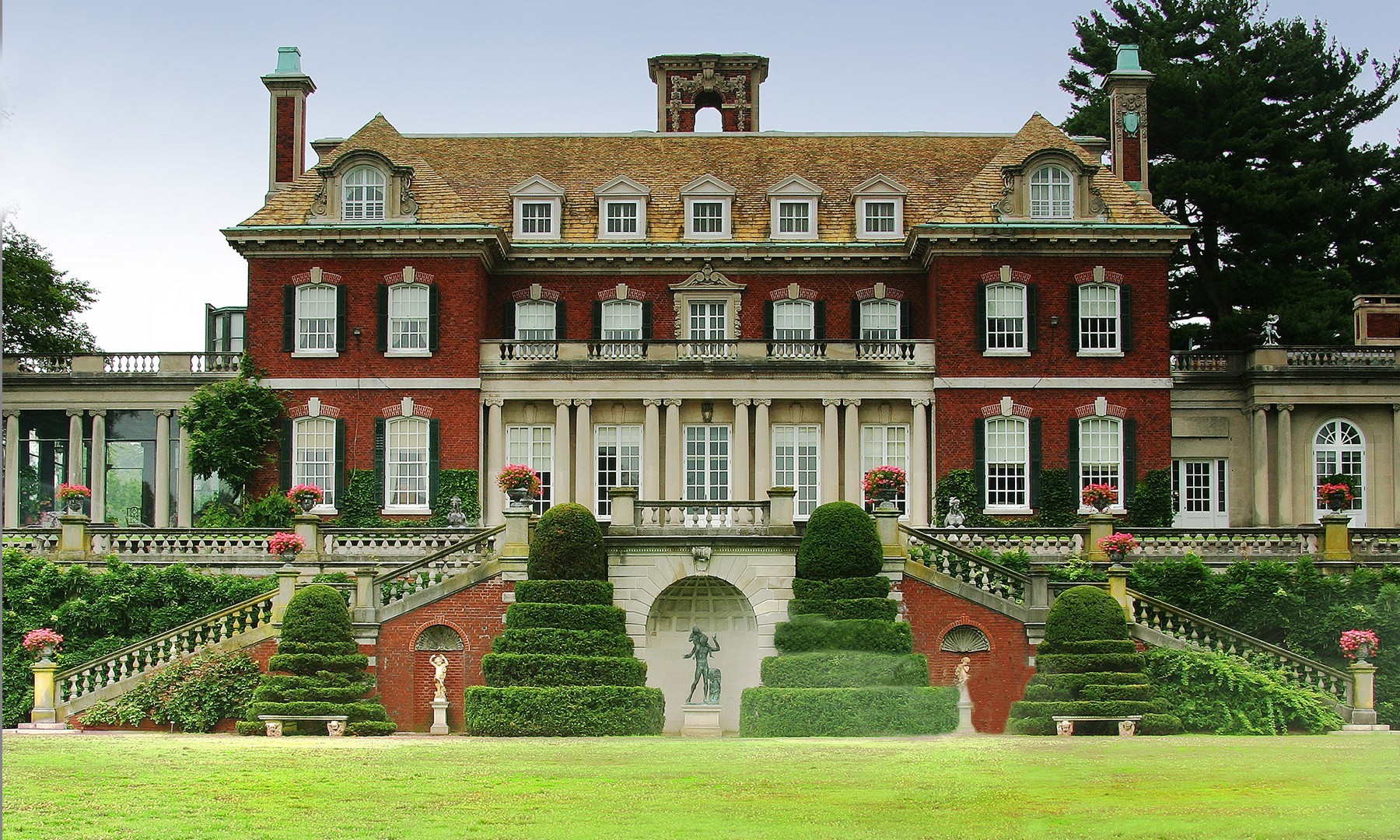
Originally I wanted the exterior to look more like a traditional southern US mansion, however I felt this would limit the scale of the environment too much. Instead I drew inspiration from northen mansions as they convey a much stronger sense of grandeur and wealth.

https://res.cloudinary.com/simpleview/image/upload/crm/newyorkstate/929_e17983ed-fa11-afaa-3db74ead7bc2e2c4.jpg
 Old Westbury gardens a mansion in New York state. Built in 1906.

Because the location of the abanoned mansion is left a secret to the player, I think I can fake some of the finer details. I want to make a strong environment piece first and foremost, so I am willing to overlook some historical inaccuracy.

Front orthographic view with person for scale.

The building is mainly comprised of a modular wall piece that I created to fit within the grid spacing system of Unreal Engine:

Render of my modular exterior piece.

You can see how the pieces fit together in the animation below:

A demonstration of the modular pieces fitting seamlessly together.

I felt it was important to have the exterior finished during the modeling of the interior rooms so that I could make their dimensions match the outside in a realistic way. Now that I have the exterior completed, I will be finishing the interior scenes and texturing them first as this is where the bulk of my assets will be housed.

I will bring the exterior of the mansion into Unreal Engine once I am happy with how the interior rooms look in the game.

PATH THROUGH HISTORY. (2018), Old Westbury Gardens [Online Image]. Available at: https://paththroughhistory.iloveny.com/listings/Old-Westbury-Gardens/30477/#.W2h6k6LLxEo [Accessed: 29/05/2018].

Monday, 28 May 2018

Week 2 - Monday: Project Aims and Time Management

As it is the start of the second week of my major project development, I feel it will be helpful for me to evaluate what I am aiming to achieve and the methods I will use to present the project as a whole.

Making assets conform to game engine requirments

Currently this project is being created with the intention that it will run through Unreal Engine 4. As such it is not only about making the models look good, but also making sure that the models and assets I create meet the requirements of the engine. For me this means using my poly budget wisely to create assets that are readable from a distance. 

For example the silhouette of an object in a game is important for players that are navigating the environment in order for them to understand what the thing is supposed to be. That may sound obvious but for some assets I created during previous projects I only focused on making them low poly without giving much consideration for the silhouette, and as a result the assets looked less believable. From this point onward I am aiming to make the shape of the assets in my environment read better from further away, as I feel this is something future employers will be paying attention to when looking at my work.

Plans for Distribution:

I will be using the Unreal Engine to create still renders of the environment and then distributing these via Artstation. I will also create a fly-through video of my game level that showcases all the details of the environment from different angles. I feel that a video accompaniment compliments still images nicely and gives people a closer look at the intricacies of the environment. 

Currently I have only considered Artstation as the main vector of disseminating my project, however I will be doing some research into other potential vectors that I can use to maximise my projects viewership.

What I am hoping to improve on:

My ability with lighting and scene composition is rather weak at the moment. When I enter my career I would like to mainly focus on asset modelling and texturing as this is where I feel I am strongest. However as I am working solo on this project I need to pick up the slack in other departments, particularly lighting as this is an element that will contribute greatly to how good the final environment looks. 

Because my knowledge and understanding of lighting is lacking in comparison to my other skills, I will be investing some time in studying some of the free to download scenes from the Epic Games launcher so that I can get to grips with the intricacies of lighting in Unreal.

Project Planning:

As it is the start of my second week working on the project, I may need to factor in more time for me to practice lighting in Unreal Engine. So far I have allowed only a few weeks at the start of the project to create the 3D elements that I will need. This may have been a little too optimistic, as I now realise I will be creating the environment in tandem with the other assignments such as UV mapping and creating textures for the models in Substance Painter.


The start of week two on my project plan.

I feel that I have made a lot of progress during the first week although I haven't modelled as much as I thought by this point. I will be reorganising this schedule to better reflect my working habits, so I can accurately plan my project accordingly.

Friday, 25 May 2018

Week 1 - Forefront Friday: Unreal Engine 4

The forefront of the video game industry can be identified by an array of different artefacts, individuals and processes. I think a good indicator of the forefront is when a technique, process or piece of software changes the way practitioners within the industry create their games. I believe Unreal Engine 4 is one such piece of software.

Throughout this year I have been building my workflow around real time rendering through Unreal Engine 4. As an environment artist I consider this an essential piece of software because it is the primary method I use to display my art. Real time graphics have offered me a new way to interact with my work during production, giving me instant feedback to any creative changes I make meaning I no longer have to wait for a render to finish before I can see the final result of my work. It is largely for this reason that I believe Unreal Engine in particular is at the forefront of not just the games industry but across all areas of 3D visualisation.

Instead of a static image displayed on screen, Unreal Engine offers artists dynamic vantage points displayed in real time. If they find an issue they can then make changes immediately with instant feedback. This is great from a design perspective as artists no longer have to wait for hours at a time to get a new rendering of a proposed change. This emphasis on interaction has played a big part in design firms within the architectural sector turning to real-time technology for visual solutions. From the Unreal Engine blog, Ken Pimentel lists Italian architectural firm Lissoni Associates and Neoscape, a creative agency that focuses on design for real estate, as companies revolutionizing their design process through interactive real-time graphics powered by Unreal Engine. (Pimentel 2018).

Indeed, my main reason for choosing to study at the University of Hertfordshire was that my architecture company was looking to get into real time visualisation using Unreal Engine, and I felt that there was a lot I didn’t know about this field and I could see there were a lot of benefits to using real time rendering. Because of these Unreal Engine’s relevance at the forefront of the field of 3D visualisation is constantly increasing. It has shifted its identity away from being solely known as a tool for game development, to a legitimate means of producing high end visualisations for numerous industries ranging from film to architecture.

The droid from the film Star Wars: Rogue One (2017) was rendered in real time using Unreal Engine, a first for the industry. As real time graphics displays are making it easier for film makers and artists to receive instant feedback from creative decisions, costly render times are also being negated. This coupled with the Engine’s unbeatable price point of completely free, has solidified the software at the forefront of 3D visualisation.

I believe the adoption of Unreal Engine across the different industries of the creative economy is Marshall Mcluhan’s concept of the Global village in action. We are seeing the differences of software and terminology across distinct fields becoming smaller and smaller. This could ultimately change the way we perceive mediums such as film, games and architecture, especially when they are driven by the same technology and methodologies.

PIMENTEL, K. (2018) Moving Beyond the Image: Test Drive Your Visual Designs. [Online] Available at: https://www.unrealengine.com/en-US/blog/moving-beyond-the-image-test-drive-your-visual-designs [Accessed: 11/06/2018]

POLYGON. (2017). Star Wars: Rogue One’s best character was rendered in real time, a cinema first. Available at: https://www.polygon.com/2017/3/1/14777806/gdc-epic-rogue-one-star-wars-k2so [Accessed: 11/06/2018]

Thursday, 24 May 2018

Week 1 - Thursday: Fireplace Asset

I have begun creating the first of what I hope will be many assets, an ornate fireplace for the mansion's entrance hall. Using hard surface transfer techniques within Substance Painter, I will be transferring a high poly fireplace onto a low poly equivalent to simulate detail. This will keep things optimised within Unreal Engine.

 I started by looking at some designs of fireplaces in mansions.


I really love the elongated look of these as their sheer size makes them quite intimidating in appearance. This is a design aspect that I am interested in replicating throughout my scene, as I am aiming to create a sense of grandeur and scale that will be reflected in all the assets of the environment.

Below you can see the high poly model as seen in the 3DS Max viewport:

 The lower portion of the mansion fireplace.

Front orthographic view:


Below you can see the inset hearth that I have treated as a seperate asset because it will be using a different material from the main body:


I also modelled some additional floral details to add some variety to the surface areas of the model:


I created these ornate details within 3DS max. I took my time to make sure the topology was clean, however this was something I could have perhaps not stressed over, as much of these details would only be transferred over to the low poly model. In the future I will most likely reuse these details for other models rather than create more custom details.


Below you can see the low poly model of the fireplace:


I created the model and UV mapped it pretty quickly, however I did encounter a rather frustrating problem when it came to projecting the high poly details onto the model. I found that if certain parts of the model were close together, then Substance Painter would have trouble projecting details onto them. For example the details only meant for a particular surface would bleed onto the ones adjacent to it. To avoid this I had to seperate all the elements of the model and bake the details onto them individually. When this was done I had to bring all the seperate maps into photoshop and manually piece them back together. This took a REALLY long time and I'm trying to find an alternative to doing this for every asset with lots of overlapping details.

You can see how the asset looks so far in Unreal Engine below: